Laravel Task Scheduling Monitoring in 5 Minutes
Laravel's task scheduling is elegant but fails silently. Your billing job could crash every night for a week before anyone notices. Here's how to add monitoring.

Laravel Task Scheduling Monitoring in 5 Minutes
Laravel's task scheduling is elegant and powerful. You define your jobs in PHP, run a single cron entry, and the framework handles the rest. But that elegance hides a dangerous truth: when scheduled tasks fail, they fail silently. Your billing job could crash every night for a week before anyone notices.
This guide shows you how to add monitoring to your Laravel scheduled tasks in five minutes or less. For a broader overview of cron monitoring concepts, see our complete guide to cron job monitoring.
Laravel's Task Scheduling Recap
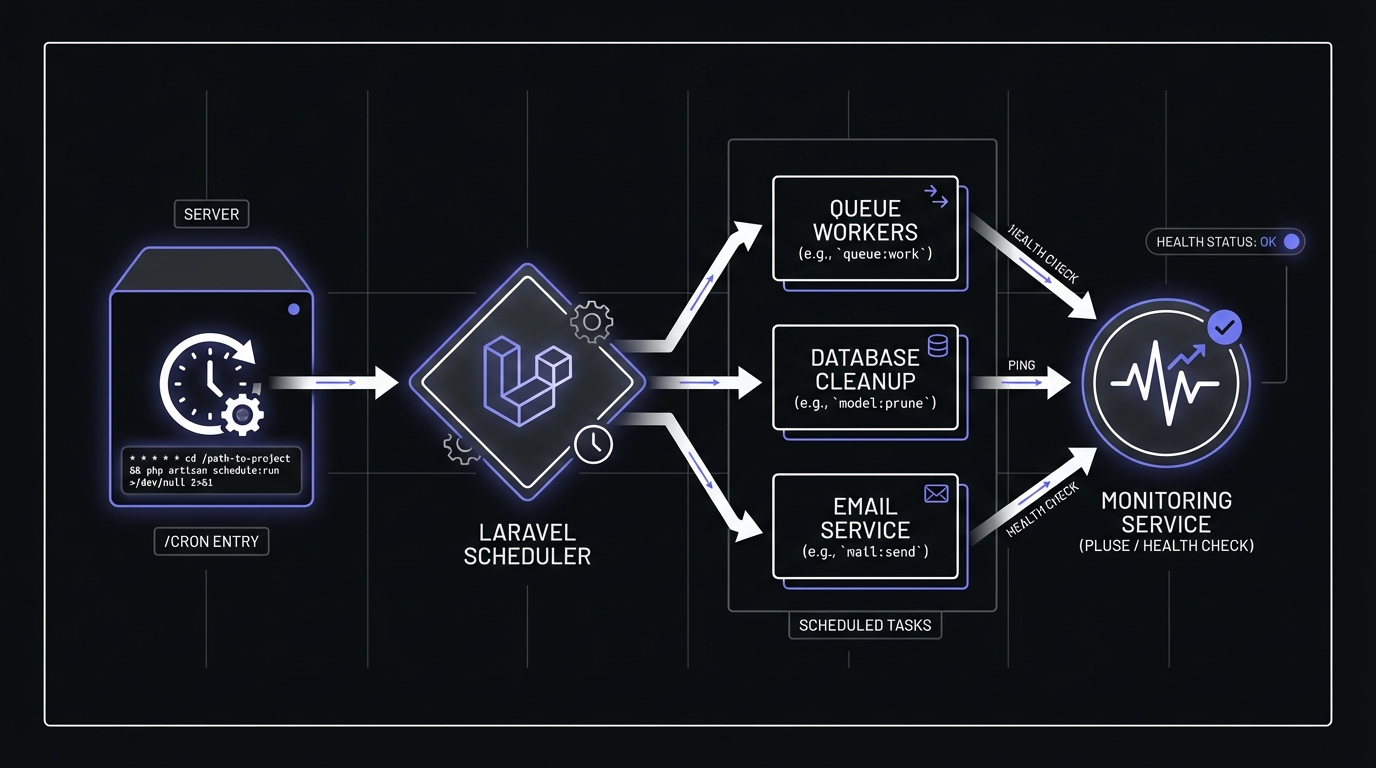
Laravel's scheduler centralizes task definitions in your application code. In Laravel 12, schedules are defined in routes/console.php (older versions use app/Console/Kernel.php). Instead of managing dozens of cron entries, you define your schedule in PHP:
// app/Console/Kernel.php
protected function schedule(Schedule $schedule)
{
    $schedule->command('billing:process')->daily();
    $schedule->command('reports:generate')->hourly();
    $schedule->command('cache:cleanup')->dailyAt('03:00');
}
Your server's crontab needs only one entry:
* * * * * cd /path-to-your-project && php artisan schedule:run >> /dev/null 2>&1Common scheduled tasks in Laravel applications include:
- Processing subscription billing
- Generating reports and analytics
- Sending scheduled notifications
- Cleaning up temporary files and expired sessions
- Syncing data with external services
- Pruning old database records
Use php artisan schedule:list to view all defined tasks and their next run times.
Why Laravel Tasks Fail Silently
Laravel's scheduler is resilient by design, which ironically makes failures harder to detect. Here's why your tasks might be failing without your knowledge:
The Scheduler Isn't Running
The most common failure mode: the cron entry calling schedule:run isn't set up correctly, or the cron daemon itself isn't running. Your beautifully defined schedule exists only in code, never executing.
Tasks Throw Exceptions, Scheduler Continues
When one task throws an exception, Laravel logs it and moves on to the next task. The scheduler keeps running, other jobs execute normally, and nobody gets alerted. You might check your logs days later to discover a critical job has been failing repeatedly.
Server Maintenance Causes Missed Jobs
Server reboots, deployment processes, or infrastructure issues can cause jobs to miss their scheduled windows. A nightly job that misses its 2 AM window doesn't retry at 2:01 AM; it waits until tomorrow.
Queue Worker Down
If your scheduled task dispatches jobs to a queue, the task itself succeeds even if the queue worker is down. The jobs pile up unprocessed, and your scheduler reports all is well.
Option 1: Ping-Based Monitoring (Simplest)
Laravel has built-in support for ping-based monitoring. This is the quickest way to add monitoring without changing your job logic:
$schedule->command('billing:process')
    ->daily()
    ->pingBefore('https://ping.example.com/abc123/start')
    ->thenPing('https://ping.example.com/abc123');
How it works:
- Before the task runs, Laravel sends a GET request to the
/startURL - After the task completes successfully, Laravel sends a GET request to the main URL
- Your monitoring service tracks both signals and alerts if expected pings don't arrive
Handling failures:
Add pingOnFailure() to send a signal when the task throws an exception:
$schedule->command('billing:process')
    ->daily()
    ->pingBefore('https://ping.example.com/abc123/start')
    ->thenPing('https://ping.example.com/abc123')
    ->pingOnFailure('https://ping.example.com/abc123/fail');
Now you get immediate notification when a task crashes, not just when it fails to run.

Option 2: HTTP Client Approach
For more control over what gets monitored within your task, use Laravel's HTTP client directly:
$schedule->call(function () {
    Http::get('https://ping.example.com/abc123/start');

    // Your job logic here
    $this->processOrders();
    $this->generateInvoices();
    $this->sendNotifications();

    Http::get('https://ping.example.com/abc123');
})->hourly();
This approach lets you wrap specific logic segments:
$schedule->call(function () {
    Http::get('https://ping.example.com/abc123/start');

    try {
        $processed = $this->processOrders();

        // Send success with metadata
        Http::get('https://ping.example.com/abc123', [
            'query' => ['processed' => $processed]
        ]);
    } catch (Exception $e) {
        Http::get('https://ping.example.com/abc123/fail', [
            'query' => ['error' => substr($e->getMessage(), 0, 100)]
        ]);
        throw $e;
    }
})->hourly();
Option 3: Job Wrapper for Queued Jobs
Queued jobs need special handling because they run asynchronously. The scheduled task dispatches the job and completes immediately, while the actual work happens later in a queue worker.
Create a middleware for monitoring:
// app/Jobs/Middleware/MonitoredJob.php
namespace App\Jobs\Middleware;

use Illuminate\Support\Facades\Http;

class MonitoredJob
{
    public function __construct(
        protected string $monitorUrl
    ) {}

    public function handle($job, $next)
    {
        Http::get("{$this->monitorUrl}/start");

        try {
            $next($job);
            Http::get($this->monitorUrl);
        } catch (\Throwable $e) {
            Http::get("{$this->monitorUrl}/fail");
            throw $e;
        }
    }
}
Use the middleware in your job:
// app/Jobs/ProcessDailyBilling.php
namespace App\Jobs;

use App\Jobs\Middleware\MonitoredJob;

class ProcessDailyBilling implements ShouldQueue
{
    public function middleware()
    {
        return [
            new MonitoredJob(config('services.monitors.daily_billing'))
        ];
    }

    public function handle()
    {
        // Your billing logic
    }
}
Setting Up Your First Laravel Monitor
Let's walk through adding monitoring to a critical job step by step.
Step 1: Create a monitor in your monitoring service
Log into Cron Crew and create a new monitor. Give it a descriptive name like "Production - Daily Billing" and set the expected schedule to match your Laravel task (e.g., daily at midnight).
Step 2: Copy the ping URL
You'll get a unique URL like https://ping.example.com/abc123. Copy this URL.
Step 3: Add monitoring to your Kernel.php
protected function schedule(Schedule $schedule)
{
    $schedule->command('billing:process')
        ->daily()
        ->pingBefore(config('services.monitors.billing') . '/start')
        ->thenPing(config('services.monitors.billing'))
        ->pingOnFailure(config('services.monitors.billing') . '/fail');
}
Step 4: Add the URL to your config
// config/services.php
'monitors' => [
    'billing' => env('MONITOR_BILLING_URL'),
],
# .env
MONITOR_BILLING_URL=https://ping.example.com/abc123Step 5: Test with schedule:test
Laravel 8+ includes a handy command to test individual scheduled tasks:
php artisan schedule:testSelect your billing task from the list. If everything is configured correctly, you'll see pings arrive in your monitoring dashboard.
Advanced Scheduling Patterns
Preventing Task Overlaps
If a task runs longer than expected, you don't want the next scheduled run to start while the first is still executing. Use withoutOverlapping():
$schedule->command('reports:generate')
    ->hourly()
    ->withoutOverlapping(30) // Lock expires after 30 minutes
    ->pingBefore(config('services.monitors.reports') . '/start')
    ->thenPing(config('services.monitors.reports'));
The lock uses your cache driver (Redis, Memcached, or database). If a task is still running when the next execution is scheduled, Laravel skips it.
Multi-Server Scheduling
Running the same Laravel app on multiple servers? Without coordination, each server executes every scheduled task, causing duplicate billing runs or report generations.
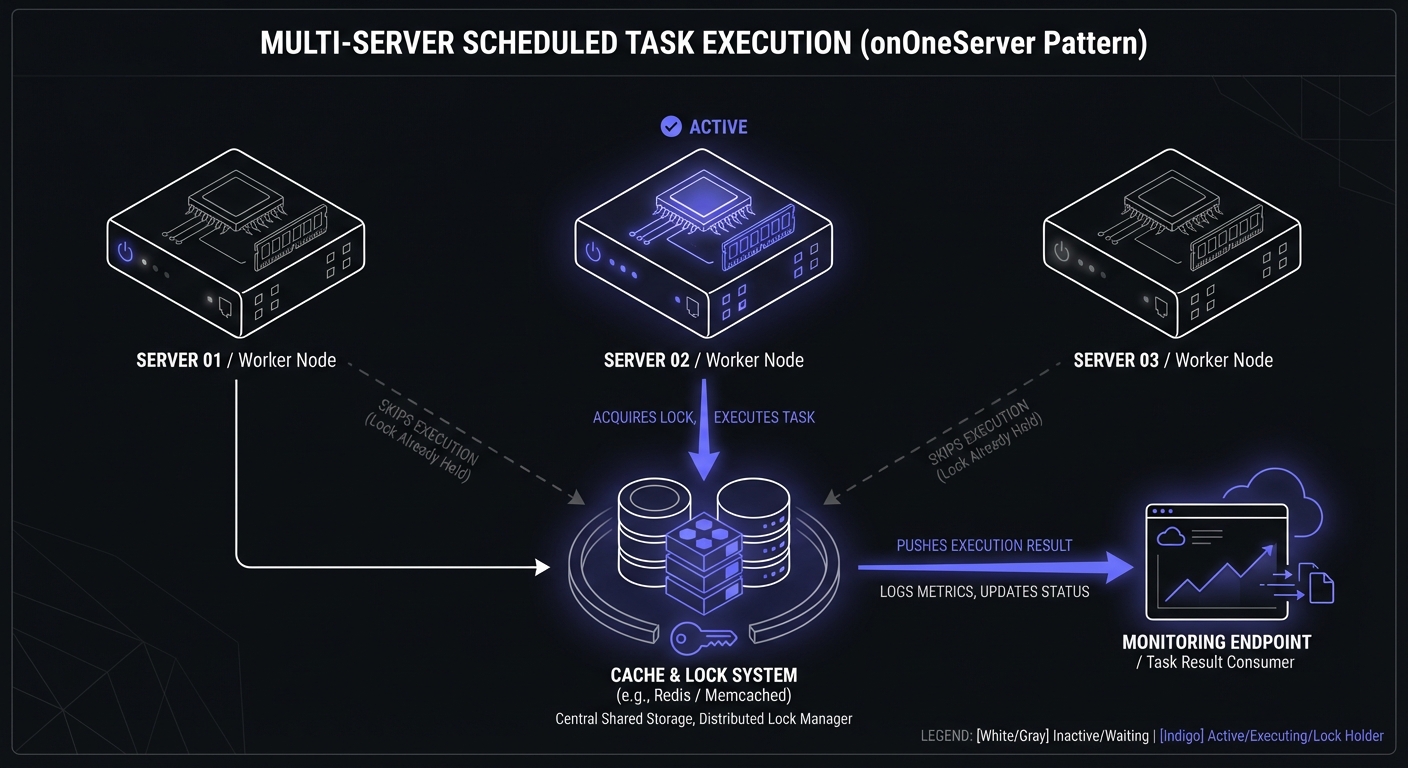
Use onOneServer() to ensure only one server executes each task:
$schedule->command('billing:process')
    ->daily()
    ->onOneServer()
    ->pingBefore(config('services.monitors.billing') . '/start')
    ->thenPing(config('services.monitors.billing'));
This requires a centralized cache driver (Redis or Memcached) accessible by all servers.
Laravel 12 Schedule Groups
Laravel 12 introduced schedule groups for tasks sharing the same configuration:
use Illuminate\Support\Facades\Schedule;

Schedule::daily()
    ->onOneServer()
    ->timezone('America/New_York')
    ->group(function () {
        Schedule::command('billing:process');
        Schedule::command('reports:generate');
        Schedule::command('analytics:aggregate');
    });
All tasks in the group inherit the daily frequency, single-server execution, and timezone setting.
Sub-Minute Scheduling
Laravel supports task execution more frequently than once per minute:
$schedule->command('queue:monitor')
    ->everyFiveSeconds()
    ->withoutOverlapping();

$schedule->command('cache:warm')
    ->everyThirtySeconds();
When sub-minute tasks are defined, schedule:run continues running until the minute ends. Use php artisan schedule:interrupt during deployments to stop sub-minute execution cleanly.
Best Practices for Laravel Monitoring
Monitor Critical Jobs Only
Not every task needs external monitoring. Focus on jobs that:
- Process payments or affect revenue
- Send customer communications
- Sync data with external systems
- Perform backups or maintenance
Low-risk jobs like clearing old logs can rely on Laravel's built-in logging.
Use Descriptive Monitor Names
When you have 20 monitors, "Job 1" and "Job 2" aren't helpful. Use names like:
- "Production - Nightly Billing Processing"
- "Production - Hourly Inventory Sync"
- "Staging - Daily Report Generation"
Set Grace Periods for Slow Jobs
If your report generation typically takes 5-30 minutes depending on data volume, set a grace period that accounts for the variation. A 45-minute grace period prevents false alerts when the job runs long but still completes successfully.
Separate Staging and Production Monitors
Use different monitor URLs for each environment:
// config/services.php
'monitors' => [
    'billing' => env('MONITOR_BILLING_URL'),
],
This way, staging job runs don't confuse your production monitoring, and you can set different alert thresholds per environment.
Common Laravel Monitoring Patterns
Different types of Laravel applications have different monitoring needs:
E-commerce applications:
- Order status sync with fulfillment systems
- Inventory level updates
- Abandoned cart email sequences
- Product feed generation for marketplaces
SaaS applications:
- Subscription billing and renewals
- Usage report generation
- Trial expiration processing
- Feature usage analytics aggregation
Content platforms:
- Newsletter and digest sends
- Search index updates
- Cache warming for popular content
- Media processing queues
Monitoring Service Options
Several services integrate with Laravel's ping methods. Here's a quick comparison of free tiers:
| Service | Free Monitors | Rate Limits | Notable Features |
|---|---|---|---|
| Healthchecks.io | 20 | None | Simple, generous free tier |
| Cron Crew | 15 | None | Unlimited team members |
| Sentry Crons | 1 | 6 check-ins/min | Integrated error tracking |
| Better Stack | 5 | None | Heartbeats + uptime monitoring |
| Cronitor | 5 | None | Detailed job metrics |
For Laravel-specific packages, Spatie's Laravel Schedule Monitor stores task execution history in your database and optionally syncs with Oh Dear for external alerting.
Troubleshooting
Ping Not Received
If your monitoring service isn't receiving pings:
- Check server cron: Run
crontab -lto verify the schedule:run entry exists - Check Laravel logs: Look in
storage/logs/laravel.logfor scheduler errors - Test manually: Run
php artisan schedule:runand watch for output - Verify network access: Ensure your server can reach external URLs
- Check schedule:list: Run
php artisan schedule:listto confirm tasks are registered
Alerts Firing But Job Ran Successfully
This usually means your grace period is too short:
- Check how long your job actually takes (add logging if needed)
- Increase the grace period in your monitoring service
- Consider if the job's duration is acceptable or needs optimization
SSL Certificate Issues
If pings fail with SSL errors:
// Temporary workaround (not recommended for production)
Http::withoutVerifying()->get($url);

// Better solution: fix your certificate chain
// or use a proper SSL certificate
Conclusion
Adding monitoring to Laravel scheduled tasks takes minutes but saves hours of debugging and prevents costly silent failures. Laravel's built-in pingBefore(), thenPing(), and pingOnFailure() methods make integration straightforward, and for more complex scenarios, the HTTP client approach gives you complete control.
Start with your most critical jobs: billing, customer notifications, and data synchronization. Once those are monitored, expand to cover other important tasks. The peace of mind knowing you'll be alerted when jobs fail is worth the small setup investment.
If you are working with other PHP frameworks, check out our guides on WordPress cron monitoring for WooCommerce stores or PHP cron job monitoring for vanilla PHP scripts. For help choosing a monitoring service, see our cron monitoring pricing comparison.
Ready to monitor your Laravel tasks? Cron Crew integrates seamlessly with Laravel's built-in ping methods. Create your first monitor in under a minute and never miss a failed job again.