Node.js Scheduled Job Monitoring Guide
Node.js apps rely on scheduled jobs for critical tasks. Whether you use node-cron or Bull, these tasks fail silently. This guide covers monitoring patterns for all.
Node.js Scheduled Job Monitoring Guide
Node.js applications frequently rely on scheduled jobs for critical background tasks: processing queues, syncing data, sending notifications, and cleaning up resources. Whether you use node-cron for simple in-process scheduling or Bull for distributed job processing, these tasks share a common problem: they fail silently.
This guide covers monitoring patterns for every major Node.js scheduling approach, with practical code examples you can implement in minutes. For a broader overview of monitoring concepts, see our complete guide to cron job monitoring.
Node.js Scheduling Options
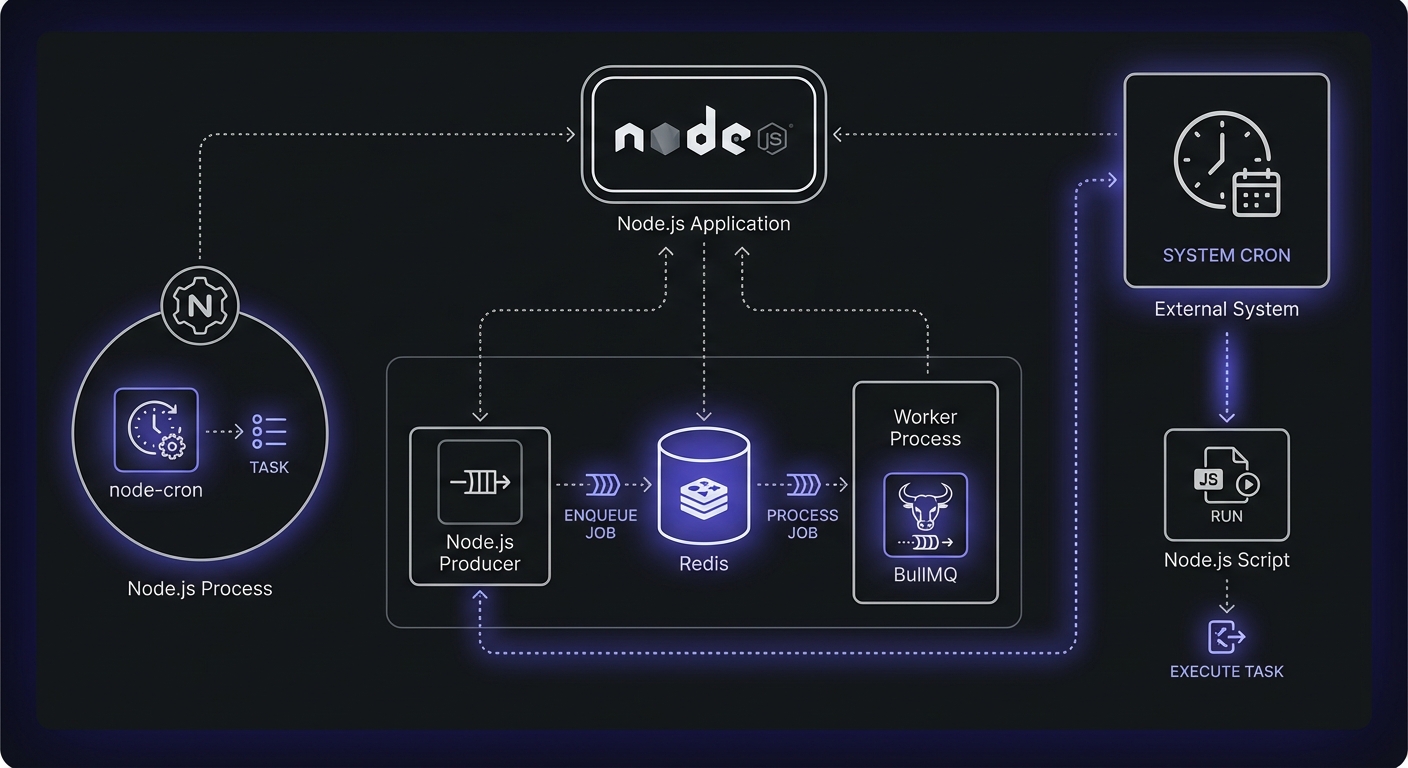
The Node.js ecosystem offers several approaches to scheduling, each with different tradeoffs.
Scheduler Comparison
| Library | Persistence | Retries | Dashboard | Weekly Downloads |
|---|---|---|---|---|
| node-cron | None | No | No | 1.2M+ |
| node-schedule | None | No | No | 800K+ |
| Bull/BullMQ | Redis | Yes | bull-board, Arena | 600K+ |
| Agenda | MongoDB | Yes | Agendash | 80K+ |
| Bree | Worker threads | No | No | 40K+ |
| System cron | Filesystem | No | No | N/A |
Choose based on your needs:
- Simple tasks, single server: node-cron or node-schedule
- Distributed systems, need retries: Bull/BullMQ
- Already using MongoDB: Agenda
- Maximum portability: System cron with Node scripts
node-cron (In-Process)
The most popular option for simple scheduling. Jobs run within your Node process using familiar cron syntax. No persistence means jobs are lost on restart.
const cron = require('node-cron');

cron.schedule('0 0 * * *', () => {
  console.log('Running daily job');
});
node-schedule (In-Process)
Similar to node-cron but with additional features like job cancellation, one-time scheduling, and Date object support.
Bull / BullMQ (Redis-Based Queues)
For distributed applications, Bull provides Redis-backed job queues with retry logic, rate limiting, and concurrency control. BullMQ is the actively maintained TypeScript rewrite with additional features.
Agenda (MongoDB-Based)
If you're already using MongoDB, Agenda stores job state in your database and provides a clean API for scheduling. Jobs persist across restarts.
System Cron with Node Scripts
The simplest approach: write a Node script and schedule it with system cron. No dependencies, maximum portability, but no built-in retry or monitoring.
Monitoring node-cron Jobs
Let's start with the most common pattern: node-cron jobs running in your application process.
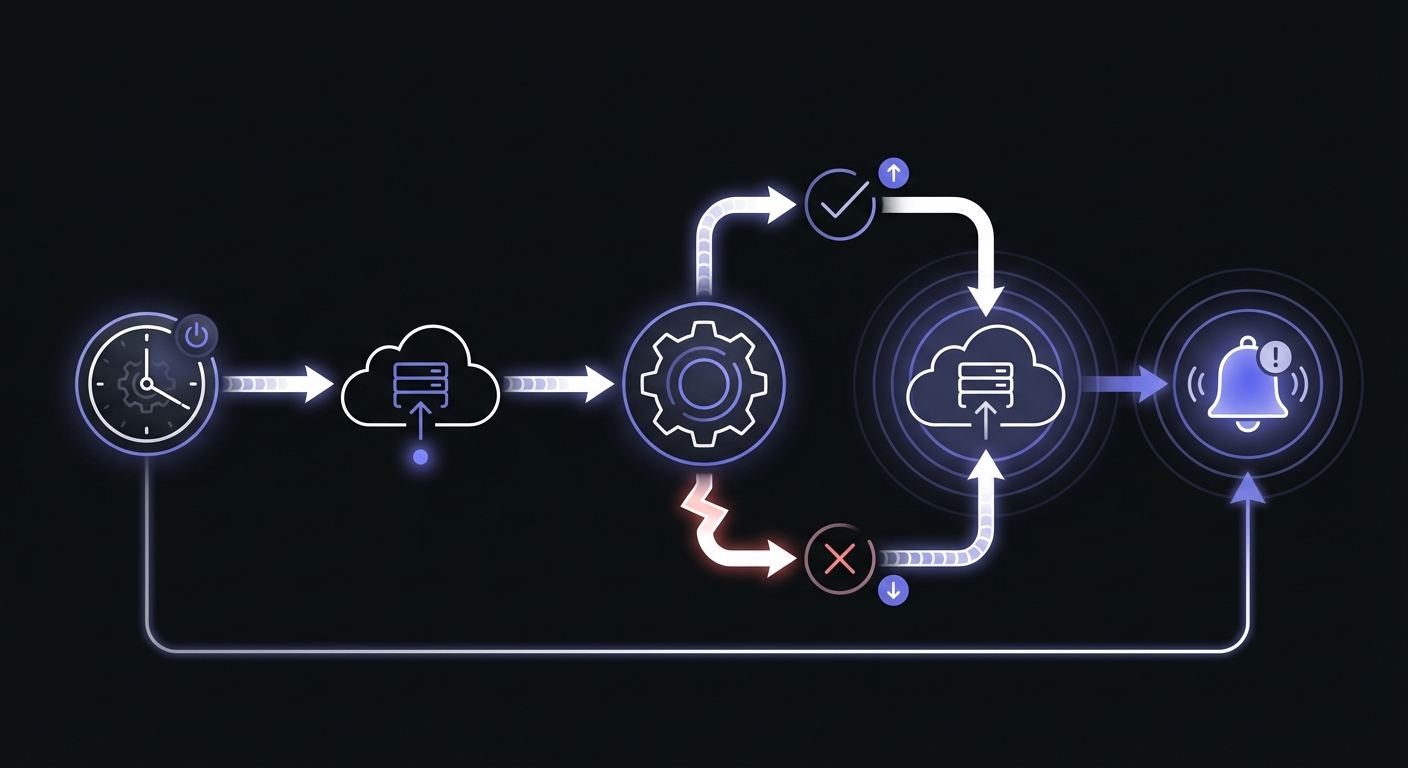
Basic monitoring with async/await:
const cron = require('node-cron');

const MONITOR_URL = process.env.CRON_MONITOR_URL;

async function ping(endpoint = '') {
  try {
    await fetch(`${MONITOR_URL}${endpoint}`, {
      signal: AbortSignal.timeout(10000)
    });
  } catch (error) {
    console.error(`Monitor ping failed: ${error.message}`);
  }
}

cron.schedule('0 0 * * *', async () => {
  await ping('/start');

  try {
    await processDaily();
    await ping();
  } catch (error) {
    await ping(`/fail?error=${encodeURIComponent(error.message.slice(0, 100))}`);
    throw error;
  }
});
Creating a reusable wrapper:
function withMonitoring(monitorUrl, fn) {
  return async (...args) => {
    // Signal start
    try {
      await fetch(`${monitorUrl}/start`, {
        signal: AbortSignal.timeout(10000)
      });
    } catch (e) {
      console.warn('Monitor start ping failed:', e.message);
    }

    try {
      const result = await fn(...args);

      // Signal success
      try {
        await fetch(monitorUrl, {
          signal: AbortSignal.timeout(10000)
        });
      } catch (e) {
        console.warn('Monitor success ping failed:', e.message);
      }

      return result;
    } catch (error) {
      // Signal failure
      try {
        const errorParam = encodeURIComponent(error.message.slice(0, 100));
        await fetch(`${monitorUrl}/fail?error=${errorParam}`, {
          signal: AbortSignal.timeout(10000)
        });
      } catch (e) {
        // Ignore monitoring errors
      }

      throw error;
    }
  };
}

// Usage
const monitoredDailyJob = withMonitoring(
  process.env.MONITOR_DAILY_JOB,
  async () => {
    // Your job logic here
    await processOrders();
    await generateReports();
  }
);

cron.schedule('0 0 * * *', monitoredDailyJob);
Monitoring Bull Queue Jobs
Bull adds complexity because jobs are processed asynchronously by workers. You need to monitor the actual job execution, not just the queue insertion.
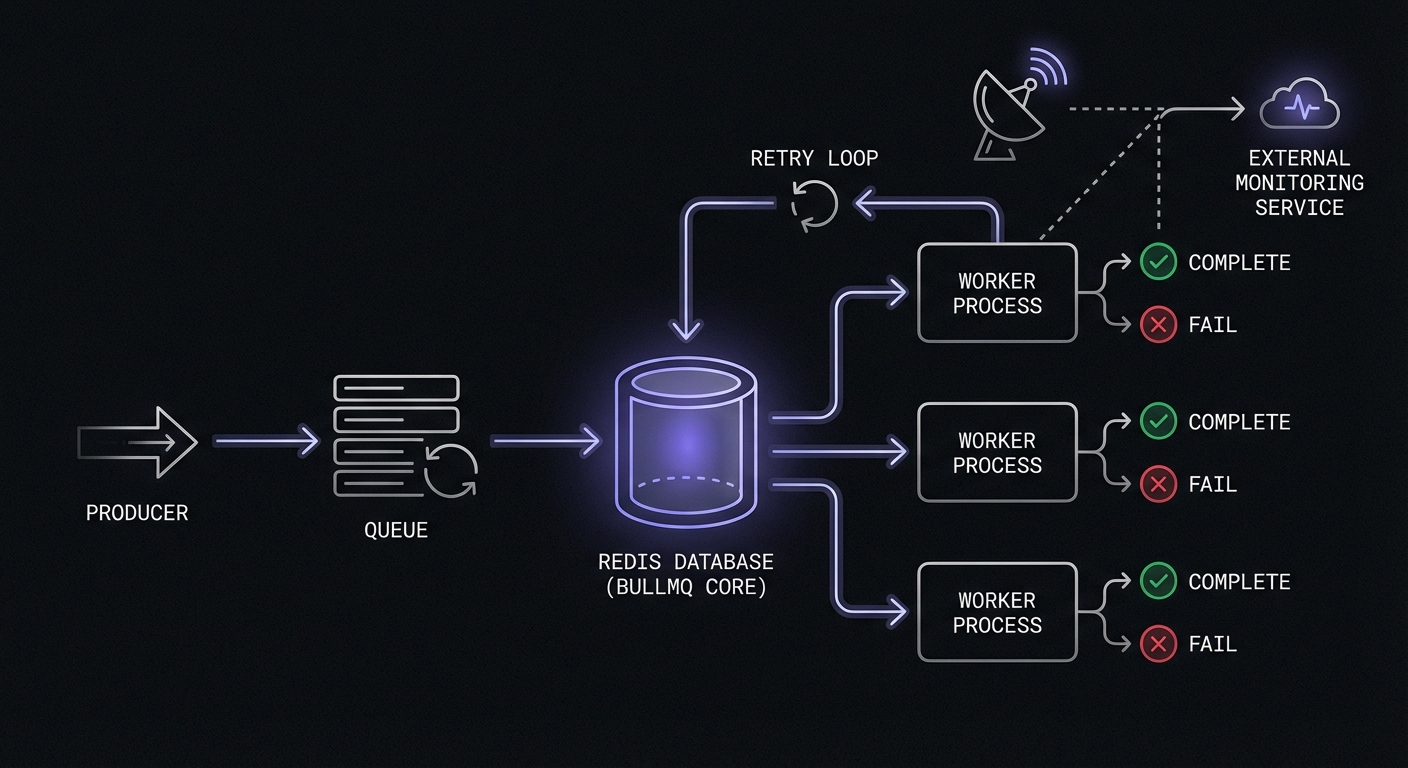
Monitored Bull job processor:
const Queue = require('bull');

const dailyQueue = new Queue('daily-jobs', {
  redis: process.env.REDIS_URL
});

const MONITORS = {
  'process-orders': process.env.MONITOR_PROCESS_ORDERS,
  'generate-reports': process.env.MONITOR_GENERATE_REPORTS,
};

async function ping(url, endpoint = '') {
  if (!url) return;

  try {
    await fetch(`${url}${endpoint}`, {
      signal: AbortSignal.timeout(10000)
    });
  } catch (error) {
    console.warn(`Monitor ping failed: ${error.message}`);
  }
}

dailyQueue.process('process-orders', async (job) => {
  const monitorUrl = MONITORS['process-orders'];

  await ping(monitorUrl, '/start');

  try {
    const result = await processOrders(job.data);
    await ping(monitorUrl);
    return result;
  } catch (error) {
    await ping(monitorUrl, `/fail?error=${encodeURIComponent(error.message.slice(0, 100))}`);
    throw error;
  }
});

dailyQueue.process('generate-reports', async (job) => {
  const monitorUrl = MONITORS['generate-reports'];

  await ping(monitorUrl, '/start');

  try {
    const result = await generateReports(job.data);
    await ping(monitorUrl);
    return result;
  } catch (error) {
    await ping(monitorUrl, `/fail?error=${encodeURIComponent(error.message.slice(0, 100))}`);
    throw error;
  }
});

// Schedule recurring jobs
dailyQueue.add('process-orders', {}, {
  repeat: { cron: '0 0 * * *' }
});

dailyQueue.add('generate-reports', {}, {
  repeat: { cron: '0 6 * * *' }
});
Using Bull events for monitoring:
Bull emits events you can hook into for centralized monitoring:
dailyQueue.on('completed', (job, result) => {
  const monitorUrl = MONITORS[job.name];
  if (monitorUrl) {
    ping(monitorUrl);
  }
});

dailyQueue.on('failed', (job, error) => {
  const monitorUrl = MONITORS[job.name];
  if (monitorUrl) {
    ping(monitorUrl, `/fail?error=${encodeURIComponent(error.message.slice(0, 100))}`);
  }
});
Bull Retry Strategies
Bull supports automatic retries with configurable backoff. Configure retries when adding jobs:
dailyQueue.add('process-orders', { orderId: 123 }, {
  attempts: 3,
  backoff: {
    type: 'exponential',
    delay: 2000 // 2s, 4s, 8s
  }
});
For scheduled jobs with retries:
dailyQueue.add('sync-inventory', {}, {
  repeat: { cron: '0 * * * *' },
  attempts: 5,
  backoff: {
    type: 'fixed',
    delay: 5000
  },
  removeOnComplete: 100, // Keep last 100 completed
  removeOnFail: 50       // Keep last 50 failed
});
Monitor only the final failure after all retries are exhausted:
dailyQueue.on('failed', (job, error) => {
  // job.attemptsMade tells you which attempt failed
  if (job.attemptsMade >= job.opts.attempts) {
    // All retries exhausted - alert monitoring
    ping(MONITORS[job.name], `/fail?error=${encodeURIComponent(error.message.slice(0, 100))}`);
  }
});
Queue Monitoring Dashboards
For visibility into queue health, Bull supports several dashboard options:
- bull-board: Web UI for managing queues and inspecting jobs
- Arena: Alternative dashboard with similar features
- Taskforce.sh: Commercial option with advanced analytics
Install bull-board for quick queue visibility:
const { createBullBoard } = require('@bull-board/api');
const { BullAdapter } = require('@bull-board/api/bullAdapter');
const { ExpressAdapter } = require('@bull-board/express');

const serverAdapter = new ExpressAdapter();
createBullBoard({
  queues: [new BullAdapter(dailyQueue)],
  serverAdapter
});

app.use('/admin/queues', serverAdapter.getRouter());
Monitoring Standalone Node Scripts
For scripts run via system cron, the pattern is similar but you need to handle process exit correctly.
Standalone script with monitoring (daily-job.js):
#!/usr/bin/env node

const MONITOR_URL = process.env.CRON_MONITOR_URL;

async function ping(endpoint = '') {
  if (!MONITOR_URL) return;

  try {
    await fetch(`${MONITOR_URL}${endpoint}`, {
      signal: AbortSignal.timeout(10000)
    });
  } catch (error) {
    console.error(`Monitor ping failed: ${error.message}`);
  }
}

async function main() {
  await ping('/start');

  // Your job logic here
  console.log('Processing daily tasks...');
  await processData();
  console.log('Done!');

  await ping();
}

main()
  .then(() => {
    process.exit(0);
  })
  .catch(async (error) => {
    console.error('Job failed:', error);
    await ping(`/fail?error=${encodeURIComponent(error.message.slice(0, 100))}`);
    process.exit(1);
  });
Crontab entry:
0 0 * * * CRON_MONITOR_URL=https://ping.example.com/abc123 /usr/bin/node /app/scripts/daily-job.jsCreating a Reusable Monitoring Module
For consistency across your application, create a dedicated monitoring module:
// lib/monitor.js

class JobMonitor {
  constructor(baseUrl, options = {}) {
    this.baseUrl = baseUrl;
    this.timeout = options.timeout || 10000;
    this.includeError = options.includeError !== false;
  }

  async ping(endpoint = '') {
    if (!this.baseUrl) return;

    try {
      await fetch(`${this.baseUrl}${endpoint}`, {
        signal: AbortSignal.timeout(this.timeout)
      });
    } catch (error) {
      console.warn(`Monitor ping failed: ${error.message}`);
    }
  }

  async start() {
    await this.ping('/start');
  }

  async success() {
    await this.ping();
  }

  async fail(error) {
    let endpoint = '/fail';
    if (this.includeError && error) {
      const msg = encodeURIComponent(String(error.message || error).slice(0, 100));
      endpoint += `?error=${msg}`;
    }
    await this.ping(endpoint);
  }

  wrap(fn) {
    return async (...args) => {
      await this.start();

      try {
        const result = await fn(...args);
        await this.success();
        return result;
      } catch (error) {
        await this.fail(error);
        throw error;
      }
    };
  }
}

// Factory function for easy creation
function createMonitor(urlOrEnvVar, options = {}) {
  const url = urlOrEnvVar.startsWith('http')
    ? urlOrEnvVar
    : process.env[urlOrEnvVar];

  return new JobMonitor(url, options);
}

module.exports = { JobMonitor, createMonitor };
TypeScript / ESM Version
For modern Node.js projects using TypeScript or ES modules:
// lib/monitor.ts
export class JobMonitor {
  private baseUrl: string | undefined;
  private timeout: number;
  private includeError: boolean;

  constructor(baseUrl: string | undefined, options: { timeout?: number; includeError?: boolean } = {}) {
    this.baseUrl = baseUrl;
    this.timeout = options.timeout ?? 10000;
    this.includeError = options.includeError ?? true;
  }

  async ping(endpoint = ''): Promise<void> {
    if (!this.baseUrl) return;

    try {
      await fetch(`${this.baseUrl}${endpoint}`, {
        signal: AbortSignal.timeout(this.timeout)
      });
    } catch (error) {
      console.warn(`Monitor ping failed: ${error instanceof Error ? error.message : error}`);
    }
  }

  start = () => this.ping('/start');
  success = () => this.ping();

  async fail(error?: Error | string): Promise<void> {
    let endpoint = '/fail';
    if (this.includeError && error) {
      const msg = encodeURIComponent(String(error instanceof Error ? error.message : error).slice(0, 100));
      endpoint += `?error=${msg}`;
    }
    await this.ping(endpoint);
  }

  wrap<T extends (...args: unknown[]) => Promise<unknown>>(fn: T): T {
    return (async (...args: Parameters<T>) => {
      await this.start();
      try {
        const result = await fn(...args);
        await this.success();
        return result;
      } catch (error) {
        await this.fail(error instanceof Error ? error : String(error));
        throw error;
      }
    }) as T;
  }
}

export const createMonitor = (urlOrEnvVar: string, options = {}) => {
  const url = urlOrEnvVar.startsWith('http') ? urlOrEnvVar : process.env[urlOrEnvVar];
  return new JobMonitor(url, options);
};
Usage:
const { createMonitor } = require('./lib/monitor');
const cron = require('node-cron');

// Create monitors for each job
const dailyReportMonitor = createMonitor('MONITOR_DAILY_REPORT');
const dataCleanupMonitor = createMonitor('MONITOR_DATA_CLEANUP');

// Use the wrap method for clean syntax
cron.schedule('0 0 * * *', dailyReportMonitor.wrap(async () => {
  await generateDailyReport();
}));

cron.schedule('0 3 * * *', dataCleanupMonitor.wrap(async () => {
  await cleanupOldData();
}));
Best Practices
Handle Fetch Failures Gracefully
Monitoring should never break your job. Always wrap monitoring calls:
// Bad - monitoring failure crashes the job
await fetch(`${url}/start`);
await doWork();

// Good - monitoring failure is logged but job continues
try {
  await fetch(`${url}/start`, { signal: AbortSignal.timeout(10000) });
} catch (e) {
  console.warn('Monitor ping failed');
}
await doWork();
Set Appropriate Timeouts
Network issues shouldn't hang your jobs:
// Too long - job hangs on network issues
await fetch(url);

// Better - fails fast with 10 second timeout
await fetch(url, { signal: AbortSignal.timeout(10000) });
Use Environment Variables
Keep monitoring URLs configurable across environments:
// Bad - hardcoded URLs
const MONITOR_URL = 'https://ping.example.com/abc123';

// Good - configurable per environment
const MONITOR_URL = process.env.MONITOR_DAILY_JOB;

// .env.production
MONITOR_DAILY_JOB=https://ping.example.com/production-abc123

// .env.staging
MONITOR_DAILY_JOB=https://ping.example.com/staging-abc123
Don't Block on Monitoring Calls
For time-sensitive jobs, consider non-blocking pings:
// Blocking - waits for ping to complete
await ping('/start');
await doTimeSensitiveWork();

// Non-blocking - fire and forget
ping('/start'); // No await
await doTimeSensitiveWork();
await ping(); // Wait for success ping
Common Node.js Job Patterns
Different applications have different monitoring needs. Here are common patterns:
Email Queue Processing
const emailMonitor = createMonitor('MONITOR_EMAIL_QUEUE');

cron.schedule('*/5 * * * *', emailMonitor.wrap(async () => {
  const emails = await EmailQueue.getPending();
  for (const email of emails) {
    await sendEmail(email);
    await EmailQueue.markSent(email.id);
  }
  console.log(`Processed ${emails.length} emails`);
}));
Database Cleanup
const cleanupMonitor = createMonitor('MONITOR_DB_CLEANUP');

cron.schedule('0 4 * * *', cleanupMonitor.wrap(async () => {
  const thirtyDaysAgo = new Date(Date.now() - 30 * 24 * 60 * 60 * 1000);

  const deleted = await db.sessions.deleteMany({
    lastActivity: { $lt: thirtyDaysAgo }
  });

  console.log(`Cleaned up ${deleted.deletedCount} expired sessions`);
}));
Report Generation
const reportMonitor = createMonitor('MONITOR_DAILY_REPORT');

cron.schedule('0 6 * * *', reportMonitor.wrap(async () => {
  const data = await Analytics.getDailyStats();
  const report = generateReport(data);
  await Report.save(report);
  await notifyStakeholders(report);
}));
API Data Syncing
const syncMonitor = createMonitor('MONITOR_API_SYNC');

cron.schedule('0 * * * *', syncMonitor.wrap(async () => {
  const externalData = await ExternalAPI.fetchLatest();
  const processed = await processAndStore(externalData);
  console.log(`Synced ${processed.length} records`);
}));
Handling Long-Running Jobs
For jobs that take a long time, consider intermediate heartbeat pings:
cron.schedule('0 0 * * 0', async () => {
  const monitor = createMonitor('MONITOR_WEEKLY_PROCESS');
  await monitor.start();

  try {
    const items = await getItemsToProcess(); // Could be thousands

    for (let i = 0; i < items.length; i++) {
      await processItem(items[i]);

      // Heartbeat every 100 items
      if (i > 0 && i % 100 === 0) {
        await monitor.ping(); // Resets the timeout
        console.log(`Processed ${i}/${items.length}`);
      }
    }

    await monitor.success();
  } catch (error) {
    await monitor.fail(error);
    throw error;
  }
});
Troubleshooting Common Failures
When cron jobs work locally but fail in production, check these common issues:
Environment Variables
System cron runs with a minimal environment. Variables set in .bashrc or .zshrc won't be available:
# Bad - relies on shell environment
0 0 * * * node /app/scripts/daily-job.js

# Good - explicitly set variables
0 0 * * * CRON_MONITOR_URL=https://ping.example.com/abc NODE_ENV=production node /app/scripts/daily-job.js

# Better - source your environment file
0 0 * * * . /app/.env && node /app/scripts/daily-job.js
Absolute Paths
Cron doesn't use your PATH. Always use absolute paths for both Node and your script:
# Bad - relies on PATH
0 0 * * * node daily-job.js

# Good - absolute paths
0 0 * * * /usr/bin/node /app/scripts/daily-job.js
Find your Node path with which node.
Working Directory
Scripts may assume they run from a specific directory. Either cd first or use __dirname:
// Bad - assumes current directory
const config = require('./config.json');

// Good - use __dirname for relative paths
const path = require('path');
const config = require(path.join(__dirname, 'config.json'));
File Permissions
Ensure your script is executable:
chmod +x /app/scripts/daily-job.jsNode Version Mismatch
If you use nvm, system cron won't have access to your nvm-managed Node:
# Use the absolute path to your nvm-managed Node
0 0 * * * /home/user/.nvm/versions/node/v20.10.0/bin/node /app/scripts/daily-job.js
Memory Limits
Long-running jobs may hit memory limits. Monitor and configure appropriately:
0 0 * * * node --max-old-space-size=4096 /app/scripts/memory-intensive-job.jsConclusion
Node.js offers many ways to schedule tasks, but monitoring follows the same pattern regardless of which approach you use: signal when you start, signal when you succeed, and signal when you fail. The reusable wrapper and module patterns shown here work across node-cron, Bull, standalone scripts, and any other scheduling method.
Start with your most critical jobs: payment processing, customer notifications, and data synchronization. Add monitoring using the patterns shown here, then expand coverage to other scheduled tasks. The few minutes spent implementing monitoring will save hours of debugging when jobs inevitably fail.
If you are deploying to Vercel, see our guide on monitoring Vercel cron jobs for serverless-specific patterns. For help choosing a monitoring service, check out our cron monitoring pricing comparison.
Ready to monitor your Node.js jobs? Cron Crew works with any Node.js scheduling approach. Create a monitor, set your environment variable, and add a few lines of code. You'll have visibility into your scheduled tasks within minutes.