Rails Background Job Monitoring with Sidekiq
Sidekiq handles everything from emails to payments. But when jobs fail, Sidekiq's resilience becomes a liability. Here's how to add proper monitoring.

Rails Background Job Monitoring with Sidekiq
Sidekiq is the go-to background job processor for Ruby on Rails applications. Combined with sidekiq-cron or sidekiq-scheduler, it handles everything from sending emails to processing payments. But when scheduled jobs fail, Sidekiq's resilience becomes a liability: failed jobs retry silently, and jobs that never run don't trigger alerts.
This guide shows you how to add monitoring to your Sidekiq scheduled jobs so you know immediately when something goes wrong. For foundational concepts, see our complete guide to cron job monitoring.
Version requirements: Sidekiq 8.0 requires Ruby 3.2+ and Rails 7.0+. It supports Redis 7.2+ as well as alternatives like Valkey and Dragonfly.
Sidekiq Scheduled Jobs Overview
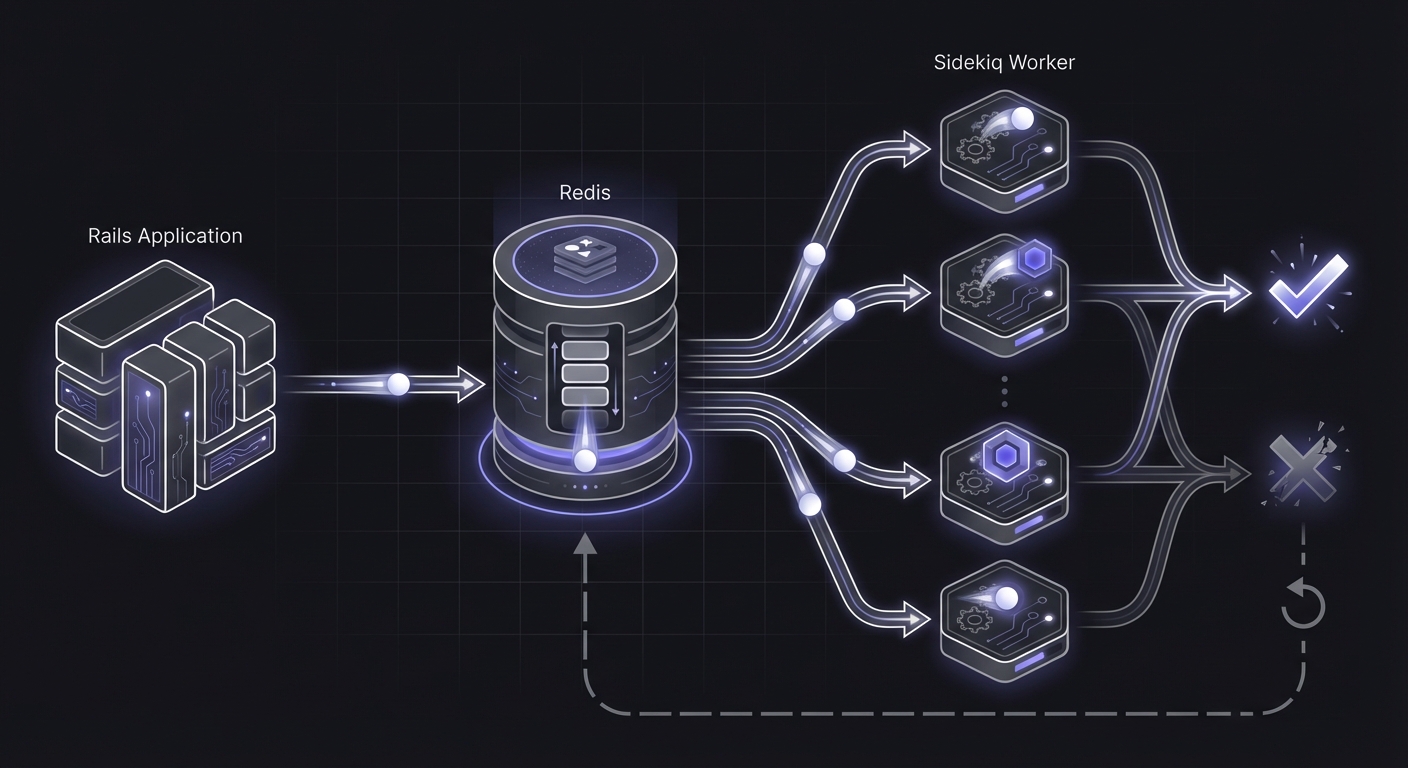
Sidekiq processes background jobs through Redis-backed queues. For scheduled recurring jobs, you typically use one of two gems:
sidekiq-cron:
# config/initializers/sidekiq.rb
Sidekiq::Cron::Job.create(
  name: 'Daily Report - every day at midnight',
  cron: '0 0 * * *',
  class: 'DailyReportJob'
)
sidekiq-scheduler:
# config/sidekiq_scheduler.yml
daily_report:
  cron: '0 0 * * *'
  class: DailyReportJob

hourly_sync:
  cron: '0 * * * *'
  class: HourlySyncJob
Both approaches trigger Sidekiq jobs at specified intervals. The jobs then execute in worker processes, separate from your web application.
sidekiq-cron also supports natural language scheduling via the Fugit library:
Sidekiq::Cron::Job.create(
  name: 'Weekly cleanup',
  cron: 'every Monday at 3am',
  class: 'WeeklyCleanupJob'
)
Why Sidekiq Jobs Fail Silently
Several failure modes can leave your scheduled jobs not running without any obvious indication.
Redis Connection Issues
If Sidekiq can't connect to Redis, jobs don't get enqueued. The scheduler might think it dispatched the job, but nothing actually happened.
Worker Process Not Running
Your scheduler might be running and enqueuing jobs, but if no workers are processing the queue, jobs pile up without executing. This commonly happens after deployments when workers don't restart properly.
Job Exhausts Retries
Sidekiq retries failed jobs with exponential backoff. A job might fail repeatedly over days before finally giving up. By default, there's no notification when retries are exhausted.
Schedule Configuration Errors
A typo in your cron expression or a missing job class definition means the job never runs. Sidekiq won't complain about scheduling a job that doesn't exist.
Option 1: Middleware Approach
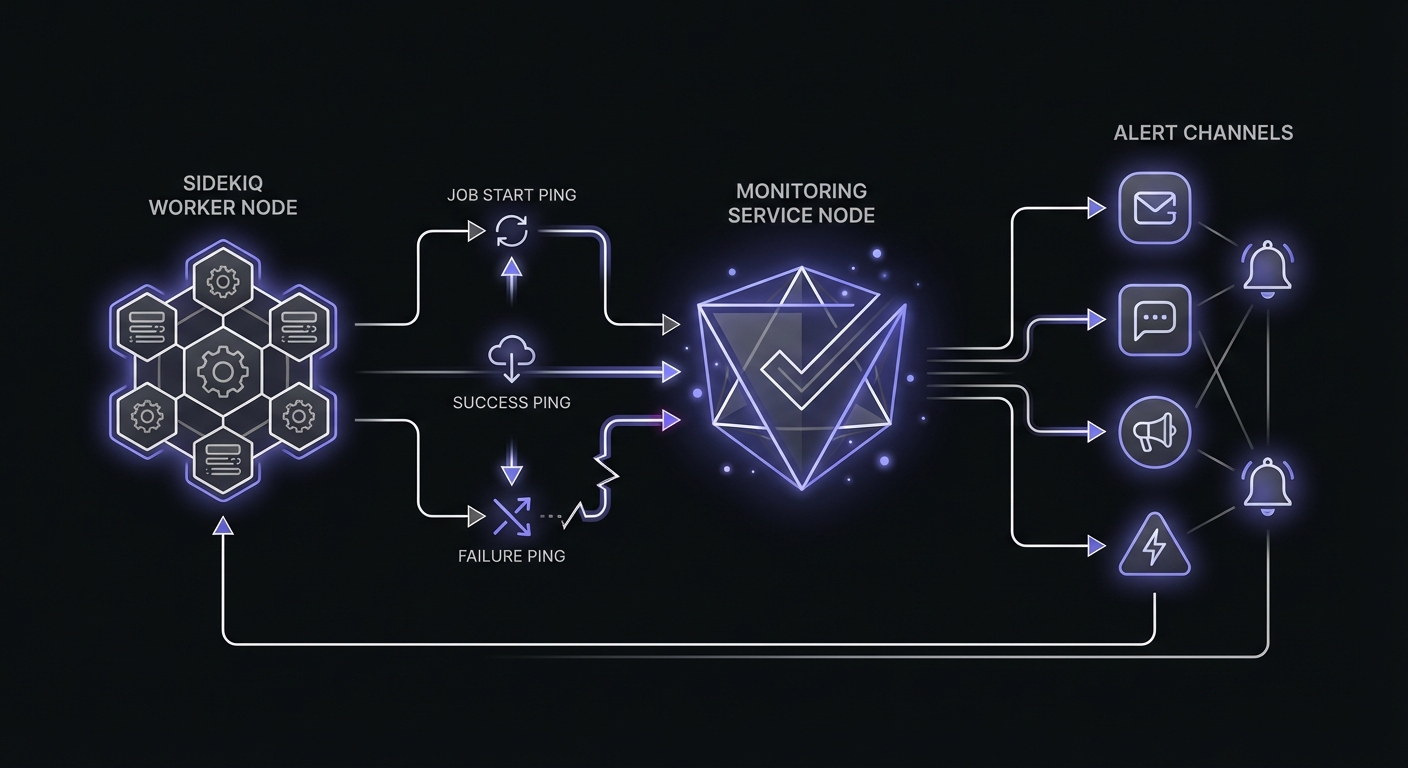
Sidekiq middleware wraps job execution, making it perfect for cross-cutting concerns like monitoring. This approach automatically monitors all jobs that include monitoring URLs.
Create the middleware:
# lib/sidekiq/cron_monitor_middleware.rb
module Sidekiq
  class CronMonitorMiddleware
    def call(worker, job, queue)
      monitor_url = job['cron_monitor_url'] || worker.class.try(:cron_monitor_url)

      if monitor_url
        ping("#{monitor_url}/start")
      end

      yield

      if monitor_url
        ping(monitor_url)
      end
    rescue => e
      if monitor_url
        ping("#{monitor_url}/fail", error: e.message[0..100])
      end
      raise
    end

    private

    def ping(url, params = {})
      uri = URI(url)
      uri.query = URI.encode_www_form(params) if params.any?

      Net::HTTP.get_response(uri)
    rescue => e
      Rails.logger.warn("Monitor ping failed: #{e.message}")
    end
  end
end
Register the middleware:
# config/initializers/sidekiq.rb
require 'sidekiq/cron_monitor_middleware'

Sidekiq.configure_server do |config|
  config.server_middleware do |chain|
    chain.add Sidekiq::CronMonitorMiddleware
  end
end
Use in your jobs:
class DailyReportJob
  include Sidekiq::Job

  def self.cron_monitor_url
    ENV['MONITOR_DAILY_REPORT']
  end

  def perform
    # Your job logic here
    ReportGenerator.new.generate_daily
    ReportMailer.daily_report.deliver_later
  end
end
The middleware automatically wraps job execution with monitoring signals.
Option 2: In-Job Monitoring
For finer control or when you only want to monitor specific jobs, add monitoring directly within the job.
Basic in-job monitoring:
class DailyBillingJob
  include Sidekiq::Job

  MONITOR_URL = ENV['MONITOR_DAILY_BILLING']

  def perform
    ping_start
    process_billing
    ping_success
  rescue => e
    ping_failure(e)
    raise
  end

  private

  def process_billing
    # Your billing logic
    User.billable.find_each do |user|
      BillingService.new(user).process
    end
  end

  def ping_start
    ping("#{MONITOR_URL}/start")
  end

  def ping_success
    ping(MONITOR_URL)
  end

  def ping_failure(error)
    ping("#{MONITOR_URL}/fail", error: error.message[0..100])
  end

  def ping(url, params = {})
    return unless MONITOR_URL

    uri = URI(url)
    uri.query = URI.encode_www_form(params) if params.any?

    Net::HTTP.start(uri.host, uri.port, use_ssl: uri.scheme == 'https', open_timeout: 5, read_timeout: 5) do |http|
      http.get(uri.request_uri)
    end
  rescue => e
    Rails.logger.warn("Monitor ping failed: #{e.message}")
  end
end
Option 3: Concern/Module Pattern
For consistent monitoring across multiple jobs without middleware, use a concern.
Create the concern:
# app/jobs/concerns/monitorable.rb
module Monitorable
  extend ActiveSupport::Concern

  class_methods do
    attr_accessor :monitor_url_env_var

    def monitored_by(env_var)
      self.monitor_url_env_var = env_var
    end
  end

  def with_monitoring
    url = monitor_url
    return yield unless url

    ping("#{url}/start")

    begin
      result = yield
      ping(url)
      result
    rescue => e
      ping("#{url}/fail", error: e.message[0..100])
      raise
    end
  end

  private

  def monitor_url
    return nil unless self.class.monitor_url_env_var
    ENV[self.class.monitor_url_env_var]
  end

  def ping(url, params = {})
    uri = URI(url)
    uri.query = URI.encode_www_form(params) if params.any?

    Net::HTTP.start(
      uri.host,
      uri.port,
      use_ssl: uri.scheme == 'https',
      open_timeout: 5,
      read_timeout: 5
    ) do |http|
      http.get(uri.request_uri)
    end
  rescue => e
    Rails.logger.warn("Monitor ping failed: #{e.message}")
  end
end
Use the concern:
class DailyReportJob
  include Sidekiq::Job
  include Monitorable

  monitored_by 'MONITOR_DAILY_REPORT'

  def perform
    with_monitoring do
      generate_report
      send_notifications
    end
  end

  private

  def generate_report
    # Report generation logic
  end

  def send_notifications
    # Notification logic
  end
end
Sidekiq-Cron Specific Monitoring
When using sidekiq-cron, you can leverage its built-in hooks for monitoring.
Configuration with monitoring:
# config/initializers/sidekiq_cron.rb
Sidekiq::Cron::Job.load_from_hash(
  'daily_report' => {
    'cron' => '0 0 * * *',
    'class' => 'DailyReportJob',
    'args' => { 'monitor_url' => ENV['MONITOR_DAILY_REPORT'] }
  },
  'hourly_sync' => {
    'cron' => '0 * * * *',
    'class' => 'HourlySyncJob',
    'args' => { 'monitor_url' => ENV['MONITOR_HOURLY_SYNC'] }
  }
)
Job that accepts monitor URL from arguments:
class DailyReportJob
  include Sidekiq::Job
  include Monitorable

  def perform(args = {})
    @monitor_url = args['monitor_url']

    with_monitoring do
      # Job logic here
    end
  end

  private

  def monitor_url
    @monitor_url
  end
end
Best Practices for Sidekiq Monitoring
Monitor Scheduled Jobs, Not All Jobs
You don't need to monitor every Sidekiq job. Focus on scheduled recurring jobs:
- Daily billing processing
- Scheduled report generation
- Periodic data synchronization
- Maintenance tasks (cleanup, archival)
One-off jobs triggered by user actions (like sending a welcome email) are better handled by error tracking tools like Sentry or Honeybadger.
Use Environment-Specific URLs
Different environments need different monitoring configurations:
# config/environments/production.rb
config.cron_monitors = {
  daily_billing: ENV['MONITOR_DAILY_BILLING'],
  daily_report: ENV['MONITOR_DAILY_REPORT'],
  hourly_sync: ENV['MONITOR_HOURLY_SYNC']
}

# config/environments/staging.rb
config.cron_monitors = {
  daily_billing: ENV['MONITOR_DAILY_BILLING_STAGING'],
  daily_report: ENV['MONITOR_DAILY_REPORT_STAGING'],
  hourly_sync: ENV['MONITOR_HOURLY_SYNC_STAGING']
}
Set Grace Periods for Variable-Length Jobs
Jobs that process variable amounts of data need appropriate grace periods. A job that usually takes 5 minutes but occasionally takes 30 minutes needs a grace period that accounts for the longer runs.
Consider Retry Behavior
Sidekiq's retry mechanism interacts with monitoring in important ways:
- First attempt fails: Your monitoring receives a failure ping
- Retry succeeds: Your monitoring receives a success ping (job recovered)
- All retries exhausted: Final failure, but the job "ran" multiple times
Sidekiq uses exponential backoff for retries with the formula (retry_count ** 4) + 15 + (rand(10) * (retry_count + 1)). Here's how retry delays scale:
| Retry | Delay | Cumulative |
|---|---|---|
| 1 | ~16 seconds | 16 seconds |
| 5 | ~4.5 minutes | ~10 minutes |
| 10 | ~2.3 hours | ~5 hours |
| 15 | ~15 hours | ~2 days |
| 20 | ~3 days | ~9 days |
| 25 | ~9 days | ~21 days |
After 25 retries (approximately 21 days), Sidekiq moves failed jobs to the Dead set.

For jobs with retries, you might want to only signal success on the final successful completion, not intermediate failures:
class ResilientJob
  include Sidekiq::Job
  include Monitorable

  sidekiq_options retry: 5

  def perform
    # Only ping start on first attempt
    ping_start if first_attempt?

    do_work

    # Always ping success when we complete
    ping_success
  rescue => e
    # Only ping failure when retries are exhausted
    if final_attempt?
      ping_failure(e)
    end
    raise
  end

  private

  def first_attempt?
    # Sidekiq sets retry_count on retry attempts
    !Thread.current[:sidekiq_context]&.dig('retry_count')
  end

  def final_attempt?
    retry_count = Thread.current[:sidekiq_context]&.dig('retry_count') || 0
    retry_count >= (sidekiq_options_hash['retry'] || 25) - 1
  end
end
Setting Up Sidekiq Web UI
Sidekiq includes a web dashboard for monitoring job queues and failures. Mount it in your routes:
# config/routes.rb
require 'sidekiq/web'
require 'sidekiq/cron/web' # if using sidekiq-cron

Rails.application.routes.draw do
  mount Sidekiq::Web => '/sidekiq'
end
Secure the dashboard in production using HTTP Basic Auth or Devise:
# config/routes.rb
require 'sidekiq/web'

Rails.application.routes.draw do
  Sidekiq::Web.use Rack::Auth::Basic do |username, password|
    ActiveSupport::SecurityUtils.secure_compare(
      ::Digest::SHA256.hexdigest(username),
      ::Digest::SHA256.hexdigest(ENV['SIDEKIQ_USERNAME'])
    ) &
    ActiveSupport::SecurityUtils.secure_compare(
      ::Digest::SHA256.hexdigest(password),
      ::Digest::SHA256.hexdigest(ENV['SIDEKIQ_PASSWORD'])
    )
  end

  mount Sidekiq::Web => '/sidekiq'
end
The dashboard shows processed/failed counts, queue sizes, latency, and scheduled jobs. Use it to manually retry failed jobs, clear the dead set, or verify scheduled jobs are registered.
Death Handlers for Exhausted Jobs
When jobs exhaust all retries, Sidekiq moves them to the Dead set. Configure global death handlers to alert your team:
# config/initializers/sidekiq.rb
Sidekiq.configure_server do |config|
  config.death_handlers << ->(job, exception) do
    # Send to your monitoring service
    uri = URI(ENV['MONITOR_DEAD_JOBS'])
    params = {
      job: job['class'],
      error: exception.message[0..100],
      jid: job['jid']
    }
    uri.query = URI.encode_www_form(params)
    Net::HTTP.get_response(uri)
  rescue => e
    Rails.logger.error("Death handler failed: #{e.message}")
  end
end
Death handlers fire once per permanently failed job, making them ideal for critical alerts that shouldn't be noise-filtered.
Integrating with Existing Tooling
Using Honeybadger
If you're already using Honeybadger for error tracking, you might consider their built-in check-in feature:
class DailyReportJob
  include Sidekiq::Job

  def perform
    # Honeybadger check-in on success
    generate_report
    Honeybadger.check_in('daily-report')
  end
end
However, dedicated cron monitoring tools typically offer more features:
- Start/finish timing for duration tracking
- Distinct failure signals with error messages
- Grace periods and scheduling flexibility
- Better visualization of job history
Standalone Cron Monitoring
For most teams, a dedicated cron monitoring service alongside your error tracker provides the best coverage:
- Error tracker (Sentry, Honeybadger): Catches exceptions, tracks stack traces
- Cron monitor (Cron Crew): Tracks job execution, alerts on missed jobs
The two complement each other. Your error tracker tells you what went wrong; your cron monitor tells you that something went wrong at all.
Queue Health Metrics
Beyond individual job monitoring, track these queue-level metrics to catch systemic issues:
Queue size: Jobs waiting to be processed. A growing queue indicates workers can't keep up with demand.
Queue latency: Time between job enqueue and processing start. High latency means jobs wait too long before execution.
Processed/failed rates: Track the ratio of successful to failed jobs. A failure rate above 5% warrants investigation.
Dead set size: Jobs that exhausted all retries. Monitor this to catch recurring failures.
Access these metrics programmatically via Sidekiq's API:
stats = Sidekiq::Stats.new

{
  processed: stats.processed,
  failed: stats.failed,
  scheduled_size: stats.scheduled_size,
  retry_size: stats.retry_size,
  dead_size: stats.dead_size,
  queues: stats.queues # hash of queue names to sizes
}
For queue-specific latency:
queue = Sidekiq::Queue.new('default')
queue.latency # seconds jobs have been waiting
Monitoring Checklist
Before going to production with Sidekiq scheduled jobs:
- Identify critical jobs: Which scheduled jobs affect revenue or customers?
- Create monitors: Set up a monitor for each critical job
- Configure schedules: Match your monitor schedules to your job schedules
- Set grace periods: Account for variable job duration
- Add monitoring code: Use middleware, in-job monitoring, or concerns
- Test thoroughly: Trigger jobs manually to verify pings arrive
- Configure alerts: Ensure the right people get notified when jobs fail
Conclusion
Sidekiq's reliability makes it easy to forget that scheduled jobs can still fail. Redis issues, worker outages, configuration errors, and exhausted retries can all leave your critical jobs not running. Adding monitoring takes minimal code but provides essential visibility.
Start with the middleware approach for broad coverage, then add in-job monitoring for specific jobs that need custom handling. Use the concern pattern for clean, consistent code across your job classes.
The few minutes spent implementing monitoring will save hours of debugging when you discover a job hasn't run for three days because of a silent configuration error.
If you work with other job queue systems, you may find our guide on Laravel task scheduling monitoring helpful, as Laravel's queue system shares similar patterns with Sidekiq. For a comparison of monitoring services, see our cron monitoring pricing guide.
Ready to monitor your Sidekiq jobs? Cron Crew works seamlessly with any Sidekiq setup. Create a monitor, add a few lines of code, and never miss a failed scheduled job again.