Monitoring Vercel Cron Jobs in Next.js
Vercel Cron Jobs bring scheduled tasks to serverless. But Vercel doesn't notify you when jobs fail. Here's how to add monitoring so you know immediately.

Monitoring Vercel Cron Jobs in Next.js
Vercel Cron Jobs bring scheduled task execution to the serverless world. With a simple configuration in your vercel.json file, you can run background jobs on a schedule without managing servers. But there's a catch: Vercel doesn't notify you when these jobs fail. A cron function that throws an error or times out fails silently, and you won't know until something downstream breaks.
This guide shows you how to add monitoring to your Vercel cron jobs so you're alerted the moment something goes wrong. For broader context, see our complete guide to cron job monitoring.
Vercel Cron Jobs Overview
Vercel Cron Jobs allow you to trigger serverless functions on a schedule. They're perfect for tasks like:
- Database cleanup and maintenance
- Cache invalidation
- Third-party API synchronization
- Scheduled email or notification sends
- Report generation
How Vercel Cron Works
You define cron jobs in your vercel.json file:
{
  "crons": [
    {
      "path": "/api/cron/daily-cleanup",
      "schedule": "0 0 * * *"
    },
    {
      "path": "/api/cron/hourly-sync",
      "schedule": "0 * * * *"
    }
  ]
}
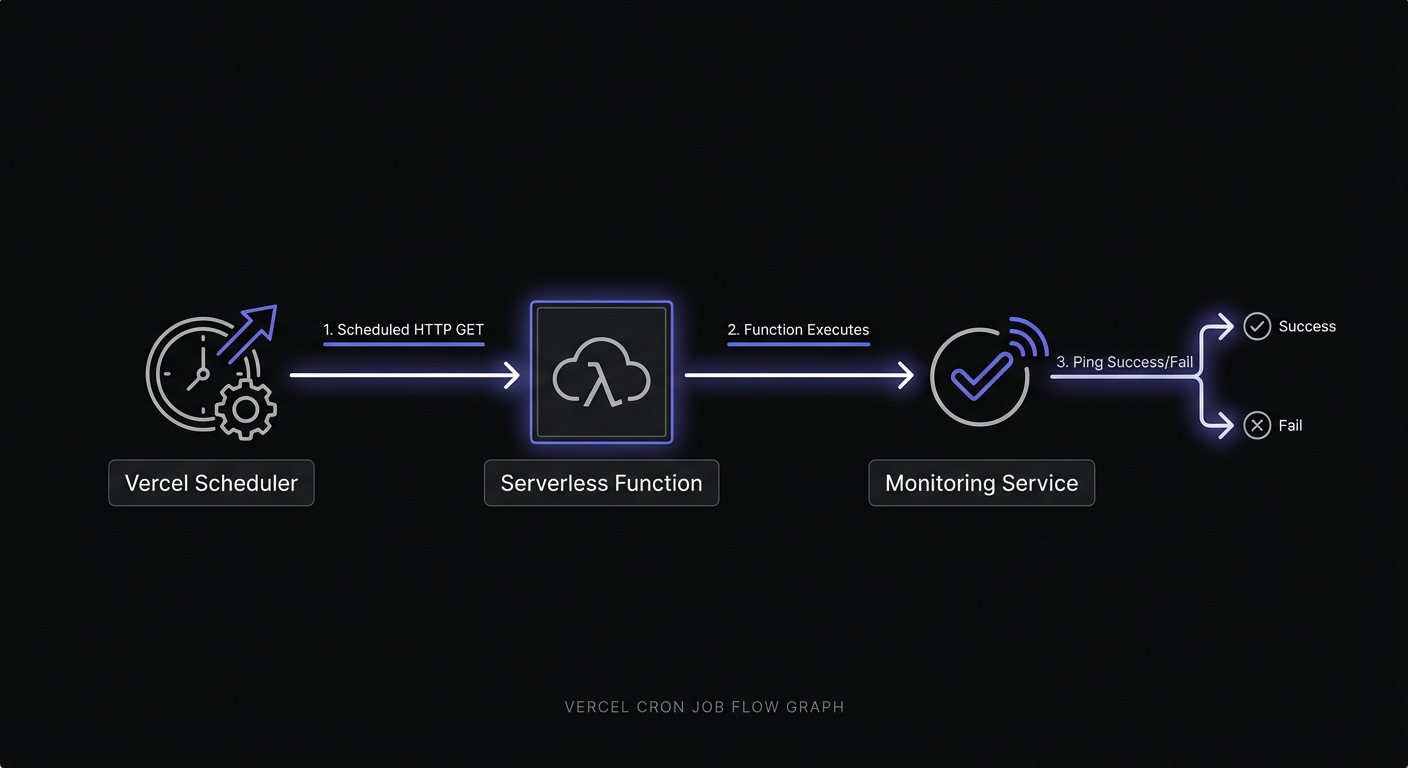
At the scheduled time, Vercel sends an HTTP request to your API route. The function executes, and that's it. No retry on failure, no notification, no logging beyond what you implement yourself.
Limitations and Pricing
Before relying on Vercel cron for critical tasks, understand the constraints:
| Plan | Cron Jobs | Duration | Scheduling Precision |
|---|---|---|---|
| Hobby | 100 | 10s default, 60s max | Hourly (not minute-level) |
| Pro | 100 | Up to 300s (5 min) | Per-minute |
| Enterprise | 100 | Up to 900s with Fluid Compute | Per-minute |
On Hobby plans, a job scheduled for 0 8 * * * might run anytime between 8:00 and 8:59 AM. Pro and Enterprise plans guarantee execution within the specified minute.
Cron jobs count against your serverless function invocations. For high-frequency jobs, this can add up.
Setting Up a Vercel Cron Job
Let's start with a basic cron job before adding monitoring.
vercel.json configuration:
{
  "crons": [
    {
      "path": "/api/cron/daily-cleanup",
      "schedule": "0 3 * * *"
    }
  ]
}
Basic API route (Pages Router):
// pages/api/cron/daily-cleanup.ts
import type { NextApiRequest, NextApiResponse } from 'next';

export default async function handler(
  req: NextApiRequest,
  res: NextApiResponse
) {
  // Verify the request is from Vercel Cron
  const authHeader = req.headers.authorization;
  if (authHeader !== `Bearer ${process.env.CRON_SECRET}`) {
    return res.status(401).json({ error: 'Unauthorized' });
  }

  try {
    // Your cleanup logic
    await cleanupExpiredSessions();
    await pruneOldRecords();

    res.status(200).json({ success: true });
  } catch (error) {
    console.error('Cleanup failed:', error);
    res.status(500).json({ error: 'Internal server error' });
  }
}

async function cleanupExpiredSessions() {
  // Session cleanup logic
}

async function pruneOldRecords() {
  // Record pruning logic
}
Environment variable:
Add CRON_SECRET to your Vercel project settings. Vercel automatically sends this as a Bearer token with cron requests, allowing you to verify the request origin.
Adding Monitoring to Vercel Cron
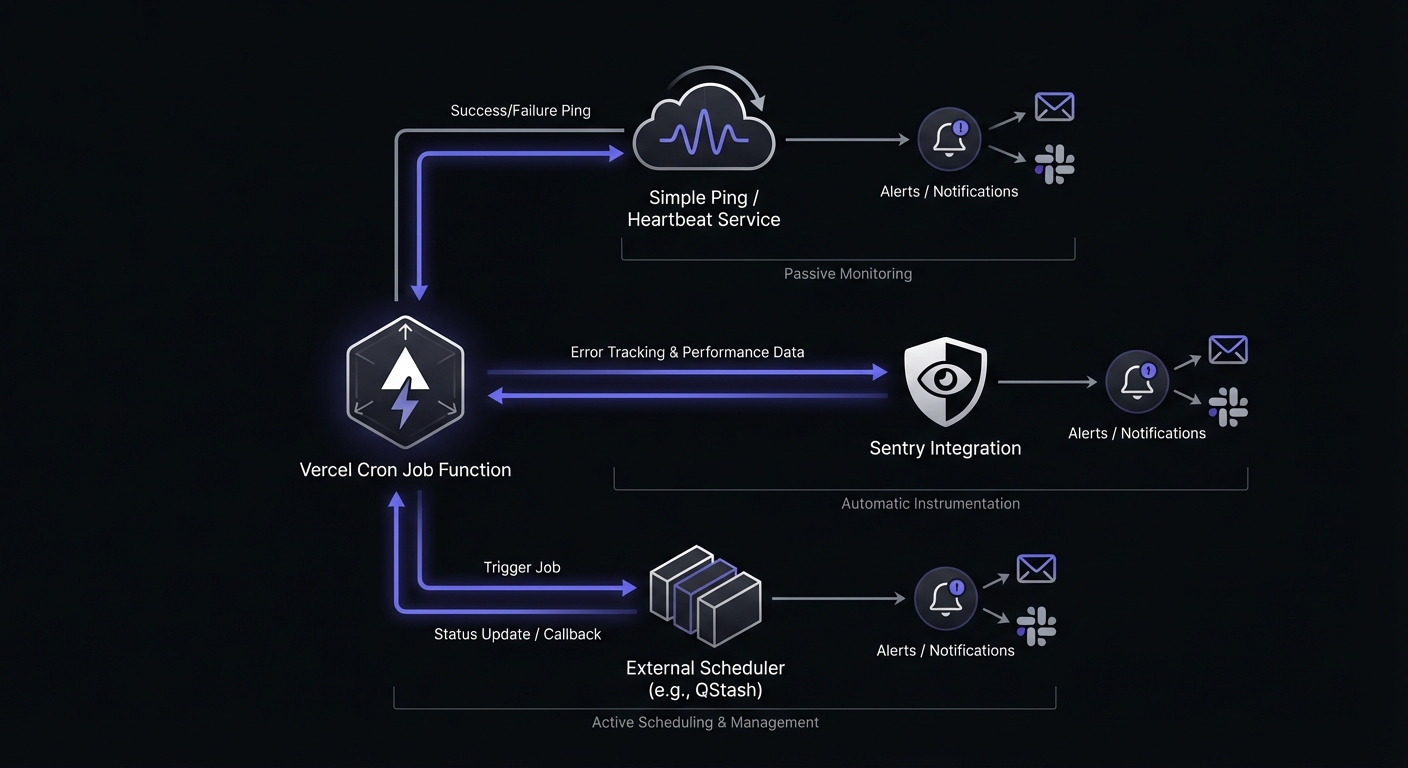
Now let's add monitoring to track job execution and get alerted on failures.
Monitored API route (Pages Router):
// pages/api/cron/daily-cleanup.ts
import type { NextApiRequest, NextApiResponse } from 'next';

const MONITOR_URL = process.env.CRON_MONITOR_CLEANUP;

async function ping(endpoint: string = '') {
  if (!MONITOR_URL) return;

  try {
    await fetch(`${MONITOR_URL}${endpoint}`, {
      signal: AbortSignal.timeout(10000),
    });
  } catch (error) {
    console.warn('Monitor ping failed:', error);
  }
}

export default async function handler(
  req: NextApiRequest,
  res: NextApiResponse
) {
  // Verify request origin
  const authHeader = req.headers.authorization;
  if (authHeader !== `Bearer ${process.env.CRON_SECRET}`) {
    return res.status(401).json({ error: 'Unauthorized' });
  }

  // Signal job start
  await ping('/start');

  try {
    await cleanupExpiredSessions();
    await pruneOldRecords();

    // Signal success
    await ping();

    res.status(200).json({ success: true });
  } catch (error) {
    const errorMessage = error instanceof Error ? error.message : 'Unknown error';

    // Signal failure
    await ping(`/fail?error=${encodeURIComponent(errorMessage.slice(0, 100))}`);

    console.error('Cleanup failed:', error);
    res.status(500).json({ error: errorMessage });
  }
}
App Router Approach (Next.js 13+)
For applications using the App Router, the pattern is similar but uses the new Route Handler syntax.
Monitored route handler:
// app/api/cron/daily-cleanup/route.ts
import { NextRequest } from 'next/server';

const MONITOR_URL = process.env.CRON_MONITOR_CLEANUP;

async function ping(endpoint: string = ''): Promise<void> {
  if (!MONITOR_URL) return;

  try {
    await fetch(`${MONITOR_URL}${endpoint}`, {
      signal: AbortSignal.timeout(10000),
    });
  } catch (error) {
    console.warn('Monitor ping failed:', error);
  }
}

export async function GET(request: NextRequest) {
  // Verify request origin
  const authHeader = request.headers.get('authorization');
  if (authHeader !== `Bearer ${process.env.CRON_SECRET}`) {
    return Response.json({ error: 'Unauthorized' }, { status: 401 });
  }

  // Signal job start
  await ping('/start');

  try {
    await cleanupExpiredSessions();
    await pruneOldRecords();

    // Signal success
    await ping();

    return Response.json({ success: true });
  } catch (error) {
    const errorMessage = error instanceof Error ? error.message : 'Unknown error';

    // Signal failure
    await ping(`/fail?error=${encodeURIComponent(errorMessage.slice(0, 100))}`);

    console.error('Cleanup failed:', error);
    return Response.json({ error: errorMessage }, { status: 500 });
  }
}

async function cleanupExpiredSessions(): Promise<void> {
  // Implementation
}

async function pruneOldRecords(): Promise<void> {
  // Implementation
}
Why Vercel Cron Needs Monitoring
Vercel's serverless architecture creates specific failure modes that make monitoring essential.
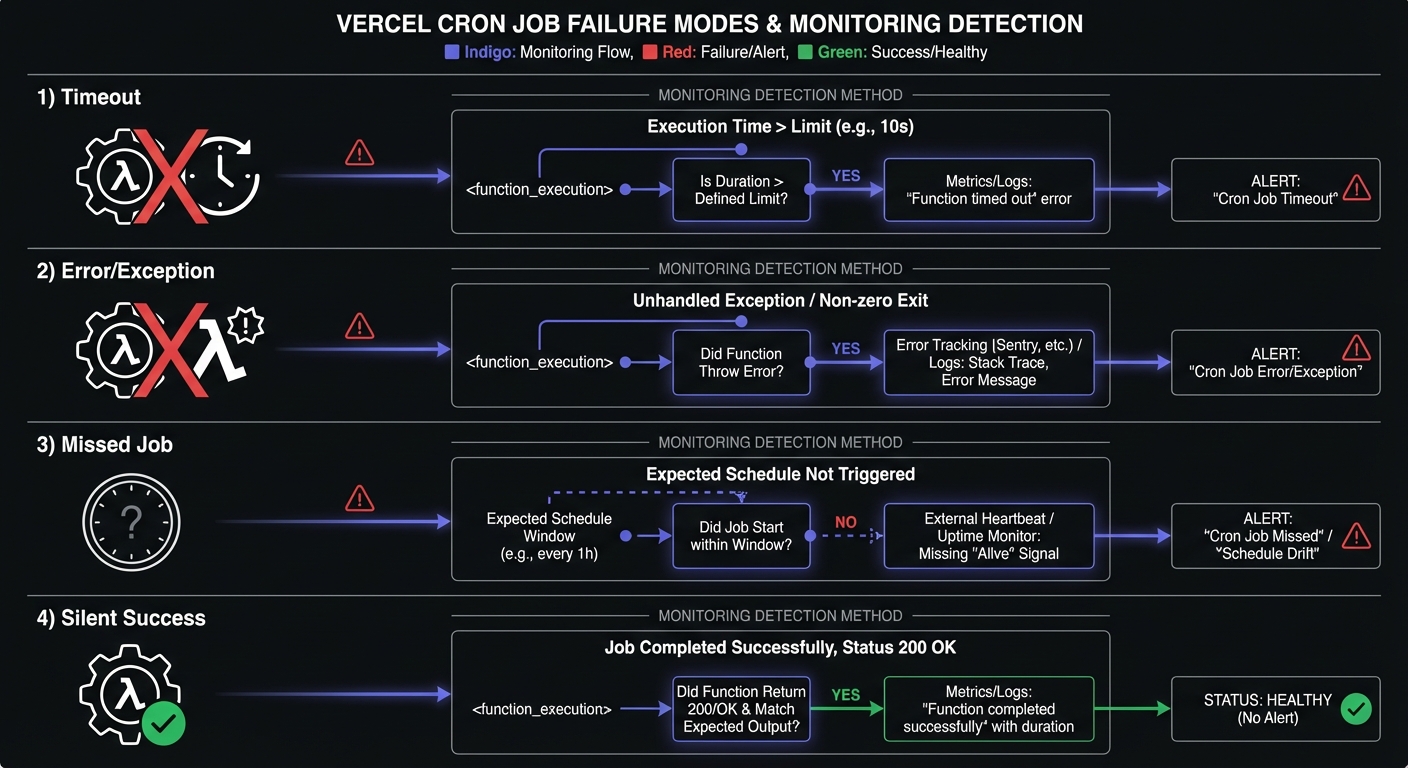
No Built-in Failure Notifications
When a cron job fails, Vercel logs the error but doesn't alert you. You have to actively check logs or wait for something downstream to break. By then, your job might have been failing for days.
Function Timeouts
Hobby plans have a 60-second limit. If your job takes longer, it's terminated mid-execution. The job "ran" but didn't complete its work. Without monitoring, you'd have no idea.
// This job might timeout silently
export async function GET(request: NextRequest) {
  await ping('/start');

  try {
    // Processing 10,000 records might take > 60 seconds
    for (const record of await getAllRecords()) {
      await processRecord(record);
    }

    await ping();
    return Response.json({ success: true });
  } catch (error) {
    // Timeout errors might not even reach this catch block
    await ping('/fail');
    return Response.json({ error: 'Failed' }, { status: 500 });
  }
}
Cold Start Issues
Serverless functions have cold starts. A cron job that runs infrequently might consistently experience slow startups, eating into your execution time budget.
Regional Execution Variability
Vercel runs cron jobs from a specific region, but network conditions vary. Database connections, API calls, and external services might behave differently than during development.
Environment Variable Setup
Proper environment configuration keeps your monitoring flexible across environments.
Vercel Dashboard Setup:
- Go to your project settings
- Navigate to Environment Variables
- Add your monitor URLs:
| Name | Value | Environment |
|---|---|---|
CRON_MONITOR_CLEANUP | https://ping.example.com/prod-cleanup-abc123 | Production |
CRON_MONITOR_SYNC | https://ping.example.com/prod-sync-def456 | Production |
CRON_MONITOR_CLEANUP | https://ping.example.com/preview-cleanup-xyz789 | Preview |
Different URLs for Preview vs Production:
Preview deployments should use different monitors (or no monitors at all) to avoid confusing your production monitoring.
const MONITOR_URL = process.env.VERCEL_ENV === 'production'
  ? process.env.CRON_MONITOR_CLEANUP
  : null; // Skip monitoring in preview
Common Vercel Cron Patterns
Here are common use cases with monitoring integrated.
Database Cleanup
// app/api/cron/cleanup-sessions/route.ts
import { db } from '@/lib/db';

const MONITOR_URL = process.env.CRON_MONITOR_SESSIONS;

export async function GET(request: NextRequest) {
  if (!verifyAuth(request)) {
    return Response.json({ error: 'Unauthorized' }, { status: 401 });
  }

  await ping(MONITOR_URL, '/start');

  try {
    const thirtyDaysAgo = new Date(Date.now() - 30 * 24 * 60 * 60 * 1000);

    const result = await db.session.deleteMany({
      where: {
        lastActivity: { lt: thirtyDaysAgo },
      },
    });

    await ping(MONITOR_URL);

    return Response.json({
      success: true,
      deleted: result.count,
    });
  } catch (error) {
    await ping(MONITOR_URL, '/fail', error);
    return Response.json({ error: 'Failed' }, { status: 500 });
  }
}
Cache Invalidation
// app/api/cron/invalidate-cache/route.ts
import { revalidateTag } from 'next/cache';

const MONITOR_URL = process.env.CRON_MONITOR_CACHE;

export async function GET(request: NextRequest) {
  if (!verifyAuth(request)) {
    return Response.json({ error: 'Unauthorized' }, { status: 401 });
  }

  await ping(MONITOR_URL, '/start');

  try {
    // Revalidate cached data
    revalidateTag('products');
    revalidateTag('categories');
    revalidateTag('pricing');

    await ping(MONITOR_URL);

    return Response.json({ success: true, revalidated: ['products', 'categories', 'pricing'] });
  } catch (error) {
    await ping(MONITOR_URL, '/fail', error);
    return Response.json({ error: 'Failed' }, { status: 500 });
  }
}
Third-Party API Sync
// app/api/cron/sync-inventory/route.ts
const MONITOR_URL = process.env.CRON_MONITOR_INVENTORY;

export async function GET(request: NextRequest) {
  if (!verifyAuth(request)) {
    return Response.json({ error: 'Unauthorized' }, { status: 401 });
  }

  await ping(MONITOR_URL, '/start');

  try {
    // Fetch from external API
    const response = await fetch('https://api.warehouse.com/inventory', {
      headers: { Authorization: `Bearer ${process.env.WAREHOUSE_API_KEY}` },
      signal: AbortSignal.timeout(30000),
    });

    if (!response.ok) {
      throw new Error(`Warehouse API returned ${response.status}`);
    }

    const inventory = await response.json();

    // Update local database
    await updateLocalInventory(inventory);

    await ping(MONITOR_URL);

    return Response.json({
      success: true,
      synced: inventory.length,
    });
  } catch (error) {
    await ping(MONITOR_URL, '/fail', error);
    return Response.json({ error: 'Failed' }, { status: 500 });
  }
}
Scheduled Notifications
// app/api/cron/send-digest/route.ts
import { sendEmail } from '@/lib/email';

const MONITOR_URL = process.env.CRON_MONITOR_DIGEST;

export async function GET(request: NextRequest) {
  if (!verifyAuth(request)) {
    return Response.json({ error: 'Unauthorized' }, { status: 401 });
  }

  await ping(MONITOR_URL, '/start');

  try {
    const subscribers = await getDigestSubscribers();
    const digest = await generateWeeklyDigest();

    let sent = 0;
    for (const subscriber of subscribers) {
      await sendEmail({
        to: subscriber.email,
        subject: 'Your Weekly Digest',
        body: digest,
      });
      sent++;
    }

    await ping(MONITOR_URL);

    return Response.json({ success: true, sent });
  } catch (error) {
    await ping(MONITOR_URL, '/fail', error);
    return Response.json({ error: 'Failed' }, { status: 500 });
  }
}
Handling Edge Cases
Function Timeout
For jobs that might timeout, implement progress tracking:
export async function GET(request: NextRequest) {
  if (!verifyAuth(request)) {
    return Response.json({ error: 'Unauthorized' }, { status: 401 });
  }

  await ping(MONITOR_URL, '/start');

  const startTime = Date.now();
  const TIMEOUT_BUFFER = 5000; // 5 seconds before Vercel timeout
  const MAX_EXECUTION = 55000; // 55 seconds for hobby plan

  try {
    const items = await getItemsToProcess();
    let processed = 0;

    for (const item of items) {
      // Check if we're running out of time
      if (Date.now() - startTime > MAX_EXECUTION - TIMEOUT_BUFFER) {
        // Save progress and exit gracefully
        await saveProgress(processed);
        await ping(MONITOR_URL); // Still signal success - partial completion

        return Response.json({
          success: true,
          processed,
          total: items.length,
          partial: true,
        });
      }

      await processItem(item);
      processed++;
    }

    await ping(MONITOR_URL);

    return Response.json({
      success: true,
      processed,
      total: items.length,
      partial: false,
    });
  } catch (error) {
    await ping(MONITOR_URL, '/fail', error);
    return Response.json({ error: 'Failed' }, { status: 500 });
  }
}
Rate Limiting
Handle rate-limited external APIs:
async function fetchWithRetry(url: string, maxRetries = 3): Promise<Response> {
  for (let i = 0; i < maxRetries; i++) {
    const response = await fetch(url);

    if (response.status === 429) {
      const retryAfter = response.headers.get('Retry-After');
      const delay = retryAfter ? parseInt(retryAfter) * 1000 : 1000 * (i + 1);

      if (delay < 10000) { // Only retry if delay is reasonable
        await new Promise(resolve => setTimeout(resolve, delay));
        continue;
      }
    }

    return response;
  }

  throw new Error('Max retries exceeded');
}
Idempotency for Retries
Make your cron jobs idempotent so running them twice doesn't cause problems:
export async function GET(request: NextRequest) {
  await ping(MONITOR_URL, '/start');

  try {
    // Use idempotency key based on date
    const today = new Date().toISOString().split('T')[0];
    const idempotencyKey = `daily-report-${today}`;

    // Check if already processed
    const existing = await db.report.findUnique({
      where: { idempotencyKey },
    });

    if (existing) {
      await ping(MONITOR_URL);
      return Response.json({
        success: true,
        message: 'Already processed today',
        reportId: existing.id,
      });
    }

    // Generate and store report
    const report = await generateDailyReport();
    await db.report.create({
      data: {
        idempotencyKey,
        ...report,
      },
    });

    await ping(MONITOR_URL);

    return Response.json({ success: true, reportId: report.id });
  } catch (error) {
    await ping(MONITOR_URL, '/fail', error);
    return Response.json({ error: 'Failed' }, { status: 500 });
  }
}
Creating a Reusable Monitoring Utility
To avoid repeating monitoring code across all your cron routes, create a utility:
// lib/cron-monitor.ts
type CronHandler = (request: NextRequest) => Promise<Response>;

interface MonitorOptions {
  monitorUrl?: string;
  requireAuth?: boolean;
}

export function withMonitoring(
  handler: CronHandler,
  options: MonitorOptions = {}
): CronHandler {
  const { monitorUrl, requireAuth = true } = options;

  return async (request: NextRequest) => {
    // Auth check
    if (requireAuth) {
      const authHeader = request.headers.get('authorization');
      if (authHeader !== `Bearer ${process.env.CRON_SECRET}`) {
        return Response.json({ error: 'Unauthorized' }, { status: 401 });
      }
    }

    // Signal start
    await ping(monitorUrl, '/start');

    try {
      const response = await handler(request);

      // Signal success if response is OK
      if (response.ok) {
        await ping(monitorUrl);
      } else {
        await ping(monitorUrl, '/fail');
      }

      return response;
    } catch (error) {
      const message = error instanceof Error ? error.message : 'Unknown error';
      await ping(monitorUrl, `/fail?error=${encodeURIComponent(message.slice(0, 100))}`);
      throw error;
    }
  };
}

async function ping(baseUrl: string | undefined, endpoint: string = ''): Promise<void> {
  if (!baseUrl) return;

  try {
    await fetch(`${baseUrl}${endpoint}`, {
      signal: AbortSignal.timeout(10000),
    });
  } catch {
    // Silently ignore monitoring failures
  }
}
Usage:
// app/api/cron/cleanup/route.ts
import { withMonitoring } from '@/lib/cron-monitor';

async function cleanupHandler(request: NextRequest) {
  await cleanupExpiredData();
  return Response.json({ success: true });
}

export const GET = withMonitoring(cleanupHandler, {
  monitorUrl: process.env.CRON_MONITOR_CLEANUP,
});
Sentry Automatic Integration
If you use Sentry for error tracking, you can enable automatic cron monitoring without code changes. Sentry detects your Vercel cron jobs from vercel.json and creates monitors automatically.
next.config.js:
const { withSentryConfig } = require('@sentry/nextjs');

module.exports = withSentryConfig({
  // Your Next.js config
}, {
  automaticVercelMonitors: true,
});
This creates check-ins automatically for each cron job defined in your vercel.json. When a job fails or times out, Sentry creates an issue and alerts you through your configured channels.
Limitations: Automatic instrumentation currently works only with the Pages Router. App Router route handlers require manual check-in calls using Sentry.captureCheckIn().
Handling Duplicate Events
Vercel's event-driven system can occasionally deliver the same cron event more than once. Your job might run twice for a single scheduled execution. Design your operations to be idempotent.
Safe operations (idempotent):
- "Set user status to active" - running twice has the same effect
- "Delete records older than 30 days" - second run finds nothing to delete
Risky operations (not idempotent):
- "Increment user credit by 10" - running twice doubles the credit
- "Send welcome email" - running twice sends duplicate emails
Use date-based idempotency keys to prevent duplicate processing:
const today = new Date().toISOString().split('T')[0];
const idempotencyKey = `billing-sync-${today}`;

const existing = await db.syncLog.findUnique({
  where: { idempotencyKey },
});

if (existing) {
  return Response.json({ message: 'Already processed today' });
}

// Process and store the idempotency key
await db.syncLog.create({ data: { idempotencyKey, completedAt: new Date() } });
Local Testing
Vercel doesn't invoke cron jobs during local development. Test your endpoints manually using curl with the bearer token:
# Test without auth (should return 401)
curl -I http://localhost:3000/api/cron/daily-cleanup

# Test with correct bearer token
curl -H "Authorization: Bearer your-cron-secret" \
  http://localhost:3000/api/cron/daily-cleanup
Add CRON_SECRET to your .env.local file for local testing. Use a different value than production to avoid confusion.
Conclusion
Vercel Cron Jobs are a powerful feature for serverless applications, but their silent failure mode makes monitoring essential. A job that times out, throws an error, or simply doesn't run won't notify you through Vercel's built-in tooling.
By adding simple ping-based monitoring to your cron routes, you gain immediate visibility into job execution. You'll know when jobs start, when they complete, and most importantly, when they fail.
Start with your most critical cron jobs: those that affect billing, customer data, or system health. Once those are monitored, expand coverage to maintenance tasks. The few lines of monitoring code will prevent the all-too-common scenario of discovering a cron job has been silently failing for days.
For more Node.js scheduling patterns outside of Vercel, see our Node.js cron monitoring guide which covers node-cron, Bull queues, and standalone scripts. If you are evaluating monitoring tools, check out our cron monitoring pricing comparison.
Ready to monitor your Vercel cron jobs? Cron Crew integrates with any Next.js application in minutes. Create a monitor, add your environment variable, and get alerted the moment your cron jobs fail.