Email Queue Monitoring for Small Businesses
Email is the backbone of customer communication. When queue processors stop, emails pile up and customers stop receiving critical messages. Here's how to monitor.

Email Queue Monitoring for Small Businesses
Email is the backbone of customer communication for most businesses. Password resets, order confirmations, invoices, notifications, and marketing campaigns all flow through email queues. When the queue processor stops running, emails pile up and customers stop receiving critical messages. This guide covers how to monitor your email queue processing jobs so messages always reach their destination.
Email Processing Cron Jobs
Most applications with email functionality run several scheduled jobs:
Transactional email queue processing: The core job that takes emails from the queue and sends them through your SMTP provider. This typically runs every minute or few minutes to ensure timely delivery.
Newsletter and campaign sends: Batch email jobs that send marketing messages to subscriber lists. These often run at specific times to optimize open rates.
Notification digests: Jobs that batch multiple notifications into a single email. Daily or weekly digest emails that summarize activity.
Email retry processing: A separate job that retries previously failed sends. Important for handling temporary SMTP issues without blocking the main queue.
Bounce and complaint handling: Processing feedback from email providers about bounces, spam complaints, and unsubscribes. Often triggered by webhooks but may have scheduled cleanup components.
Each of these jobs is critical to different aspects of your email operations.
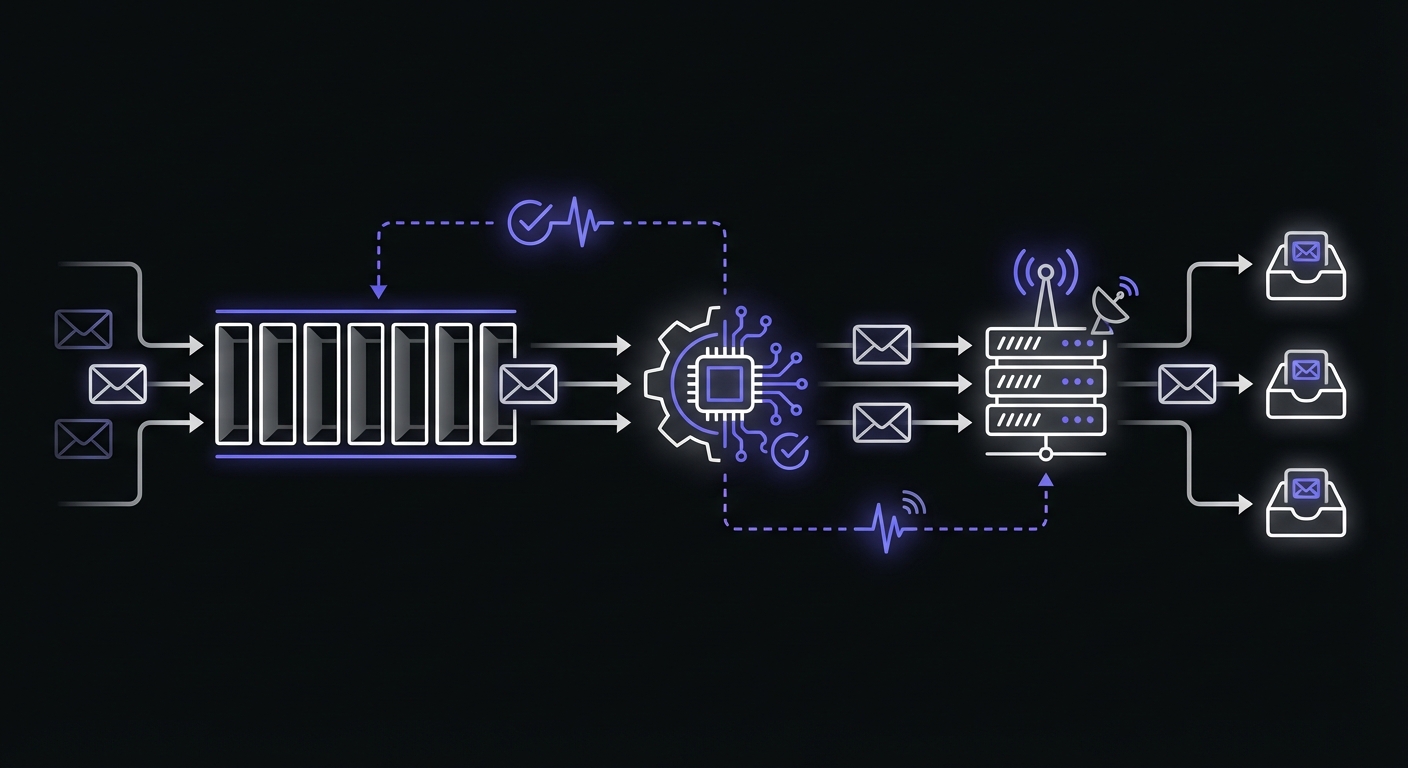
Why Email Queues Fail
Email queue processors fail for specific reasons:
SMTP provider issues: Your email provider (SendGrid, Mailgun, SES, etc.) has an outage, rate limits you, or rejects connections. Emails cannot send until the provider issue resolves.
Rate limiting: Sending too fast triggers rate limits from your provider or receiving mail servers. The queue backs up as send speed throttles.
Queue processor crashes: The worker process that sends emails crashes due to a bug, memory issue, or infrastructure problem. No process is running to work through the queue.
Memory exhaustion: Processing large attachments or high volumes can exhaust available memory, crashing the processor.
Database locks: The queue is stored in a database that becomes locked or unresponsive. The processor cannot fetch emails to send.
The worst part: emails do not complain when they are not delivered. The queue grows silently while customers wait for messages that never arrive. With over 347 billion emails sent globally each day, even a small percentage of failures represents millions of undelivered messages.
Impact of Email Queue Failures
The consequences depend on what types of emails are queued:
Password resets not delivered: A customer tries to reset their password and the email never arrives. They cannot access their account. They contact support, frustrated. Maybe they give up entirely.
Order confirmations delayed: Customers expect immediate confirmation after purchase. No email creates anxiety about whether the order went through. Support tickets and duplicate orders follow. E-commerce businesses face unique challenges here. See our e-commerce cron monitoring guide for a complete overview.
Notifications missed: Alert emails about important events never reach users. They miss critical information.
Customer complaints: Customers reaching out by email receive no response because your reply queue is stuck. They feel ignored.
The longer the queue processor is down, the worse the backlog. An hour of downtime might mean thousands of delayed emails for an active application.
Monitoring Email Queue Processors
Here is a practical example of a monitored email queue processor:
import os
import requests
from datetime import datetime

MONITOR_URL = os.environ.get('EMAIL_QUEUE_MONITOR_URL')

def process_email_queue():
    # Signal job start
    try:
        requests.get(f'{MONITOR_URL}/start', timeout=10)
    except Exception as e:
        print(f'Monitor start ping failed: {e}')

    try:
        # Get pending emails
        emails = get_pending_emails(limit=100)

        if not emails:
            print('No emails to process')
            requests.get(MONITOR_URL, timeout=10)
            return

        print(f'Processing {len(emails)} emails')

        success_count = 0
        fail_count = 0

        for email in emails:
            try:
                send_email(email)
                mark_sent(email.id)
                success_count += 1
            except Exception as e:
                print(f'Failed to send email {email.id}: {e}')
                mark_failed(email.id, str(e))
                fail_count += 1

        print(f'Processed: {success_count} sent, {fail_count} failed')

        # Signal job success
        requests.get(MONITOR_URL, timeout=10)

    except Exception as e:
        # Signal job failure
        try:
            requests.get(f'{MONITOR_URL}/fail', timeout=10)
        except:
            pass
        raise
This processor signals start and completion, handles individual email failures gracefully, and only fails the entire job if there is a systemic issue.
What to Monitor
Effective email monitoring covers multiple dimensions:
Queue processor running: The primary monitor. Is the job executing on schedule?
Queue depth: A separate check for how many emails are waiting. Growing queue depth indicates the processor cannot keep up, even if it is running.
def check_queue_depth():
    pending = count_pending_emails()
    if pending > 1000:
        alert_high_queue_depth(pending)
Send success rate: Track what percentage of emails successfully send versus fail. A sudden drop in success rate indicates provider issues.
Bounce rate spikes: A spike in bounces might indicate a list quality problem or deliverability issue that needs attention. Keep spam complaint rates below 0.1% to protect sender reputation.
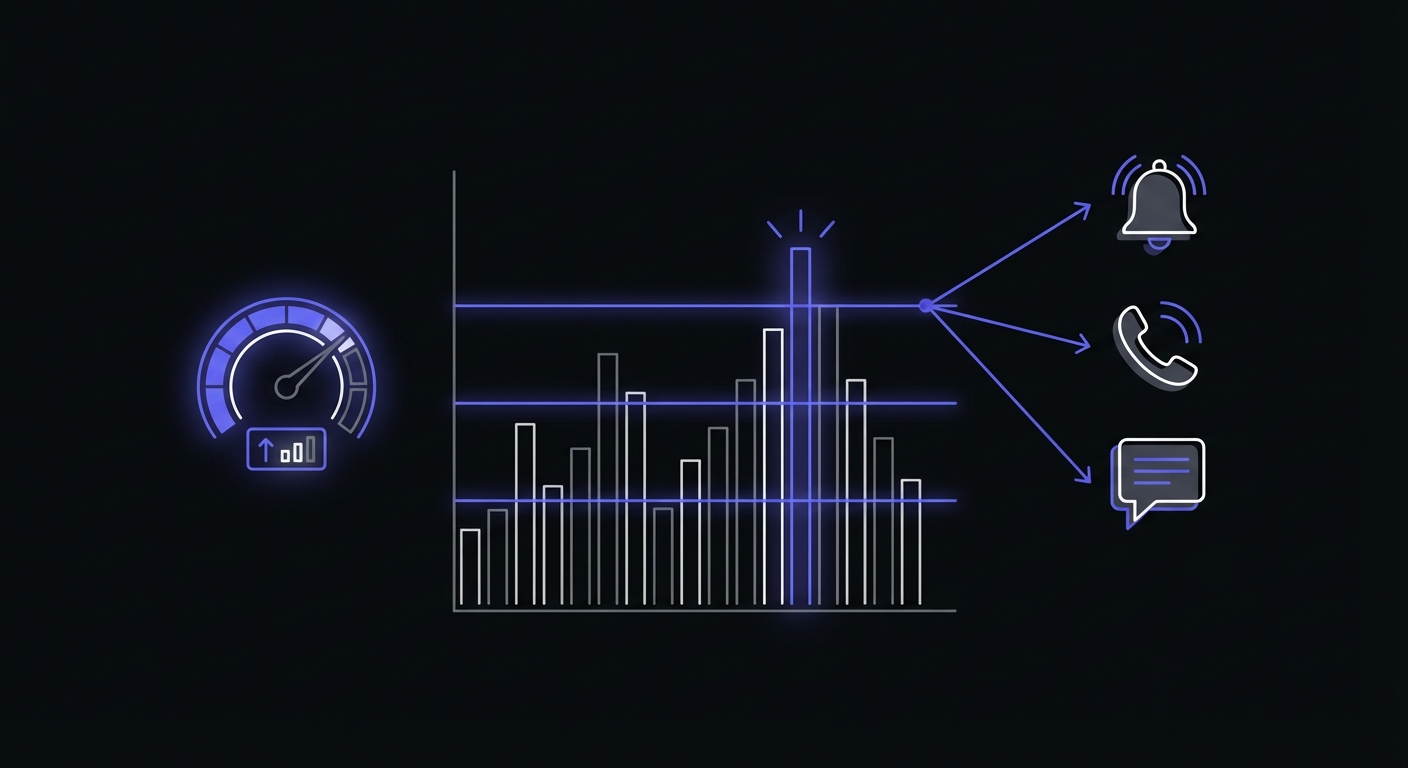
Queue Depth Thresholds
Set specific thresholds based on your normal queue behavior:
| Queue Depth | Alert Level | Action |
|---|---|---|
| 100+ messages | Warning | Investigate if sustained |
| 500+ messages | Critical | Check processor health |
| 1000+ messages | Emergency | Immediate intervention |
For cloud queues like Amazon SQS, monitor the ApproximateAgeOfOldestMessage metric. If the oldest message exceeds your processing cycle time (e.g., 5+ minutes for a minutely processor), the queue is backing up.
Duration Tracking Importance
Email queue duration provides insight into queue health:
| Duration Pattern | Indication |
|---|---|
| Consistent short runs | Healthy, queue staying empty |
| Gradually longer runs | Queue backing up, may need optimization |
| Very short runs | Few emails sending, potential issue |
| Very long runs | Large backlog being worked through |
Track how long each processing run takes. A processor that used to complete in 30 seconds but now runs for 10 minutes is working through a growing backlog.
Alert Strategy
Configure alerts based on who needs to respond:
Technical team for processor failures: The queue processor crashed or the job is not running. This needs immediate technical attention.
Marketing team for campaign issues: A scheduled campaign failed to send. Marketing needs to know and may need to reschedule. SaaS companies should coordinate email alerting with their broader monitoring strategy. See our SaaS cron monitoring guide for the complete picture.
Escalate for password reset issues: If password reset emails are not sending, customers cannot access their accounts. This is high priority.
Example alert configuration:
| Scenario | Alert Channel | Recipient |
|---|---|---|
| Processor failure | Slack + Email | Engineering |
| High queue depth | Slack | Engineering |
| Campaign send failure | Marketing | |
| Password reset delay | SMS | On-call |
Common Email Queue Patterns
Different applications structure email queues differently:
Process every N minutes: The simplest pattern. Run the processor on a schedule (every 1-5 minutes) to clear the queue.
* * * * * /usr/bin/php /var/www/app/artisan queue:work --stop-when-emptyBatch processing: Process emails in batches with pauses between batches to respect rate limits.
def process_batch():
    while True:
        emails = get_pending_emails(limit=50)
        if not emails:
            break
        for email in emails:
            send_email(email)
        time.sleep(1)  # Rate limit pause
Priority queues: Separate queues for different email types. Password resets in a high-priority queue, marketing emails in a lower-priority queue.
Rate-limited sending: Explicit rate limiting to stay within provider limits.
from ratelimit import limits, sleep_and_retry

@sleep_and_retry
@limits(calls=100, period=60)  # 100 emails per minute
def send_email(email):
    provider.send(email)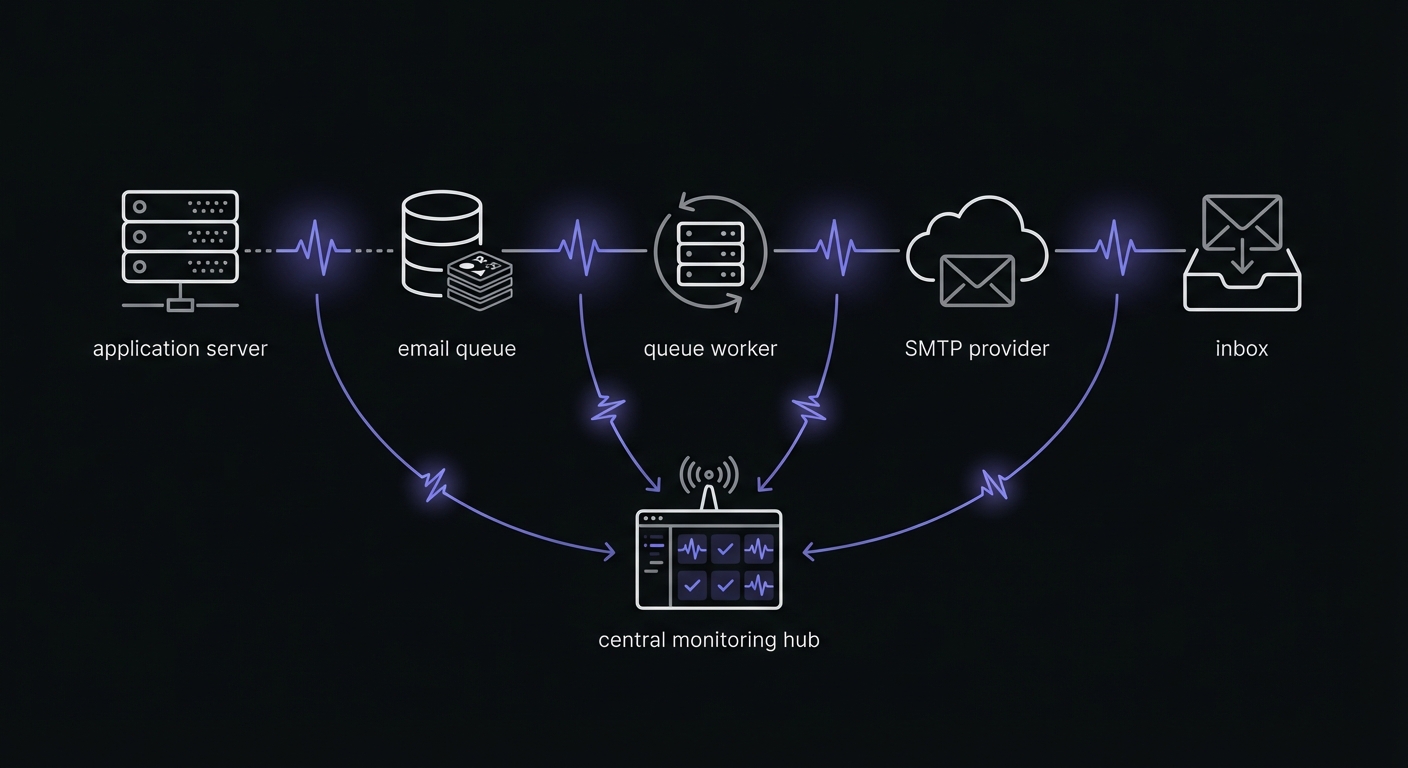
Framework-Specific Queue Tools
Different frameworks provide built-in queue monitoring:
Laravel Horizon: Real-time dashboard for Redis-backed queues. Tracks job throughput, runtime, failures, and queue wait times. Auto-balances workers across queues.
BullMQ (Node.js): Background job processing for Redis with built-in monitoring via Taskforce.sh. Supports job progress tracking, retries, and rate limiting.
Sidekiq (Ruby): Web dashboard showing queue sizes, processed jobs, and failure rates. Enterprise version adds real-time metrics and historical data.
Celery (Python): Use Flower for real-time monitoring of Celery workers and tasks. Tracks task states, completion times, and worker status.
Setting Up Your Monitoring
For comprehensive email queue monitoring:
-
Primary processor monitor: Runs on the same schedule as your queue processor. Alert if the job does not complete within expected time.
-
Queue depth check: A separate scheduled check that alerts if pending emails exceed a threshold.
-
Duration tracking: Enable duration tracking to spot performance degradation.
-
Alert routing: Configure appropriate channels for different failure types.
Example monitor configuration:
| Monitor | Schedule | Grace Period | Alerts |
|---|---|---|---|
| Queue processor | Every 5 min | 10 min | Slack, Email |
| Queue depth check | Every 15 min | 20 min | Slack |
| Campaign processor | Daily at 9 AM | 30 min | Email (Marketing) |
Deliverability Benchmarks
Track these metrics to ensure emails reach inboxes:
| Metric | Target | Warning Threshold |
|---|---|---|
| Delivery rate | 98%+ | Below 95% |
| Bounce rate | <2% | Above 5% |
| Spam complaint rate | <0.1% | Above 0.3% |
| Inbox placement | 85%+ (marketing), 95%+ (transactional) | Below target |
Email providers classify bounces into categories: invalid address, technical failure, content issues, reputation problems, volume limits, and mailbox unavailable. Monitor which categories increase to diagnose issues quickly.
Email Provider Rate Limits
Know your provider limits to avoid throttling:
| Provider | Free Tier | Paid Starting | Rate Limits |
|---|---|---|---|
| SendGrid | 100/day | $19.95/mo | Varies by plan |
| Mailgun | 100/day (trial) | $15/mo | 300/min default |
| Amazon SES | 200/day (sandbox) | $0.10/1K | 14/sec default |
| Postmark | 100/mo | $15/mo | No hard limit |
Configure your queue processor batch size and sleep intervals to stay within these limits.
Troubleshooting Common Issues
When alerts fire, here is what to check:
Processor not running:
- Is the cron job enabled?
- Did the process crash? Check logs.
- Is there a deployment issue?
High queue depth:
- Is the processor running but slow?
- Check SMTP provider status
- Look for rate limiting
- Review
ApproximateAgeOfOldestMessageif using cloud queues
High failure rate:
- Check SMTP provider status
- Review error messages and bounce classifications
- Look for specific email addresses causing issues
- Verify SPF, DKIM, and DMARC authentication
Long duration:
- Large backlog accumulating
- Provider responding slowly
- Consider scaling workers or increasing batch size
Conclusion
Email queues are invisible infrastructure that customers depend on without knowing it. A password reset, an order confirmation, a notification, all flow through your email queue. When it stops, customer experience suffers immediately.
Monitor your email queue processor to catch failures quickly. Track queue depth to detect backups before they become critical. Set up alerts that reach the right people with the right urgency.
The few minutes spent setting up monitoring saves hours of debugging customer complaints about missing emails. More importantly, it protects your customer relationships by ensuring critical messages always get through. For help choosing the right monitoring tool, see our best cron monitoring tools comparison and cron monitoring guide for small businesses.
Cron Crew provides the monitoring tools email queue operators need. Set up monitors for your queue processors, track duration and queue depth, and receive alerts when something goes wrong. Start monitoring your email queue today.