Cron Crew vs Oh Dear: Laravel Teams Guide
Oh Dear has carved out a strong position in the Laravel ecosystem with deep integration. For Laravel teams, it's compelling. For everyone else, the calculus differs.
Cron Crew vs Oh Dear: Laravel Teams Guide
Oh Dear has carved out a strong position in the Laravel and PHP ecosystem. Built by Freek Van der Herten, a respected figure in the Laravel community, Oh Dear offers website monitoring with deep Laravel integration including automatic scheduler synchronization. For Laravel teams, it is a compelling option. For everyone else, the calculus is different.
This comparison examines when Oh Dear's Laravel-focused approach makes sense and when a more general cron monitoring tool better fits your needs. For a broader market overview, see our guide to the best cron monitoring tools.
Quick Comparison
| Feature | Cron Crew | Oh Dear |
|---|---|---|
| Free tier | 15 monitors | None |
| Entry price | $15/mo (50 monitors) | 15 EUR/mo (~$16) for 5 sites |
| Laravel integration | Basic | Deep (scheduler auto-sync) |
| Data location | US | EU (Belgium) |
| Pricing model | Per-monitor | Per-site (5 cron monitors per site) |
| Focus | Cron monitoring | Website monitoring + cron |
Oh Dear Overview

Oh Dear was founded in 2018 in Belgium by Freek Van der Herten and Mattias Geniar. Freek is well-known in the Laravel community for his open source packages, blog posts, and video courses.
What Oh Dear offers:
- Uptime monitoring: Website availability with global checks
- Cron monitoring: Scheduled task monitoring (called "scheduled tasks" in Oh Dear)
- Certificate monitoring: SSL certificate expiration alerts
- Broken link checker: Crawler that finds broken links
- Mixed content detection: Identifies insecure content on HTTPS pages
Oh Dear's strengths:
- Laravel integration: Automatic sync with Laravel's task scheduler. Define your schedule in Laravel, Oh Dear creates monitors automatically.
- Community connection: Freek's Laravel community presence lends credibility.
- EU data residency: Data stored in Belgium for EU compliance.
- Per-site simplicity: Pay per site, not per individual check.
Considerations:
- No free tier (trial only)
- Per-site pricing limits flexibility
- 5 cron monitors per site on basic plan
The Laravel Auto-Sync Feature
Oh Dear's standout feature for Laravel teams is scheduler synchronization:
// In your Laravel kernel
protected function schedule(Schedule $schedule)
{
    $schedule->command('billing:process')
        ->daily()
        ->thenPingOhDear('billing-process');
}
With the Oh Dear package installed, your Laravel scheduler automatically syncs with Oh Dear. Add a new scheduled task, and Oh Dear creates a monitor for it. Change the schedule, and the monitor updates.
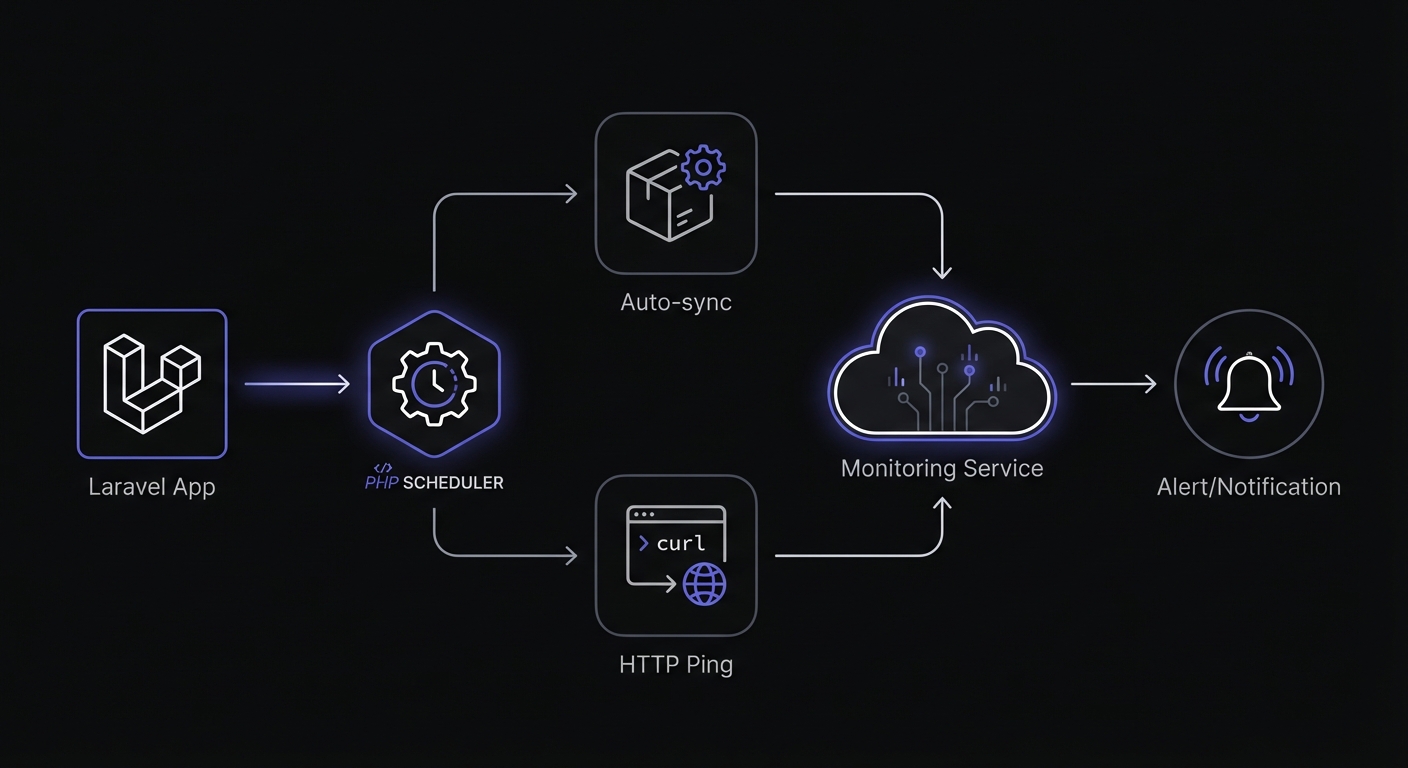
The spatie/laravel-schedule-monitor package handles the integration. Configuration options include:
- Grace time: Buffer before alerting (default 5 minutes)
- Log retention: How long to keep execution history (default 30 days)
- Metadata tracking: Memory usage, runtime duration, exit codes
The sync command (php artisan schedule-monitor:sync) should run on each deployment to keep Oh Dear updated with your schedule changes.
This is genuinely useful for Laravel teams with many scheduled tasks who want to avoid manual monitor maintenance.
Cron Crew Overview
Cron Crew is a framework-agnostic cron monitoring service that works with any technology stack.
Key characteristics:
- Generous free tier: 15 monitors for free
- Per-monitor pricing: Pay based on how many jobs you monitor
- Framework agnostic: Works identically with any language or framework
- Simple HTTP pings: No SDK or package required
Laravel usage:
// In your Laravel kernel
protected function schedule(Schedule $schedule)
{
    $schedule->command('billing:process')
        ->daily()
        ->thenPing('https://your-product.example/ping/billing-process');
}
Laravel's thenPing() method works with any URL, including Cron Crew.
Feature Comparison
Where Oh Dear Wins
Laravel scheduler auto-sync: The automatic synchronization between Laravel's scheduler and Oh Dear is convenient. No manual monitor creation, no keeping things in sync.
EU data residency: For EU-based companies with data residency requirements, Oh Dear's Belgian hosting may be necessary.
Per-site simplicity: If you have few sites with multiple checks each, per-site pricing is predictable.
Broader website monitoring: Broken link checking, mixed content detection, and certificate monitoring in addition to cron monitoring.
Laravel community connection: Freek's reputation and the company's Laravel focus mean Laravel-specific issues are prioritized.
Where Cron Crew Wins
Free tier: Oh Dear has no free tier, only a trial. Cron Crew offers 15 free monitors permanently.
Per-monitor flexibility: Oh Dear limits you to 5 cron monitors per site on the basic plan. Cron Crew lets you monitor 50 jobs for $15/month regardless of how many "sites" they belong to.
Framework agnostic: If you run mixed stacks (Laravel plus Python data jobs, bash scripts, etc.), Cron Crew treats them all equally.
Simpler pricing for many monitors: If you have 40 cron jobs across 3 sites, Oh Dear's per-site model may not fit well. Cron Crew's per-monitor model is more predictable.
The Per-Site vs Per-Monitor Tradeoff
Oh Dear charges per site with a limited number of cron monitors included:
- 5 sites / 25 scheduled task checks: 15 EUR/mo
- 10 sites / 50 scheduled task checks: 30 EUR/mo
- And so on
Cron Crew charges per monitor:
- 50 monitors: $15/mo
- 100 monitors: $29/mo
When per-site works: You have a few sites with a few scheduled tasks each.
When per-site struggles: You have one application with 30+ scheduled tasks, or many small monitoring needs across different systems.
Pricing Comparison
Oh Dear Pricing
- 5 sites: 15 EUR/mo (~$16)
- 10 sites: 30 EUR/mo (~$32)
- 25 sites: 60 EUR/mo (~$65)
- 50 sites: 110 EUR/mo (~$120)
Each site includes 5 scheduled task monitors (cron monitors).
Cron Crew Pricing
- Free: 15 monitors
- Starter ($15/mo): 50 monitors
- Pro ($29/mo): 100 monitors
Value Scenarios
Scenario A: Laravel SaaS with 20 scheduled tasks
Oh Dear: Need 4 sites worth of checks (20 / 5 = 4), which means the 5-site plan. Cost: ~$16/mo
Cron Crew: 20 monitors fits in the Starter plan. Cost: $15/mo
Similar cost, but Cron Crew offers more headroom.
Scenario B: Multiple microservices with total 60 scheduled tasks
Oh Dear: Need 12 sites worth of checks, which requires the 25-site plan. Cost: ~$65/mo
Cron Crew: 60 monitors fits in Pro plan. Cost: $29/mo
Cron Crew is significantly cheaper for this scenario. For a complete breakdown of pricing across all providers, check our cron monitoring pricing comparison.
Scenario C: Single Laravel app with 3 scheduled tasks
Oh Dear: 5-site plan covers this. Cost: ~$16/mo
Cron Crew: Free tier covers this. Cost: $0
Cron Crew's free tier handles many small projects.
Quick Reference: Market Pricing
| Service | Free Tier | Entry Price | 50 Monitors | 100 Monitors |
|---|---|---|---|---|
| Cron Crew | 15 monitors | $15/mo | $15/mo | $29/mo |
| Oh Dear | None | €15/mo (5 sites) | ~€30/mo | ~€60/mo |
| Cronitor | 5 monitors | $7/mo | $100/mo | $200/mo |
| Healthchecks.io | 20 monitors | $20/mo | $20/mo | $80/mo |
Oh Dear's per-site model makes direct monitor-count comparison tricky. Each site includes 5 cron monitors, so 50 monitors requires the 10-site plan.
Best Fit: Oh Dear
Oh Dear is the better choice when:
You are a Laravel-focused team: The scheduler auto-sync feature is genuinely valuable if you have many scheduled tasks and want automatic synchronization.
EU data residency is required: Belgian data hosting may be necessary for your compliance requirements.
You need the full monitoring suite: Broken link checking, certificate monitoring, and mixed content detection add value beyond cron monitoring.
Per-site pricing fits your usage: A few sites with a few tasks each maps well to Oh Dear's model.
Laravel agency with multiple client sites: The per-site model works well for agencies managing multiple Laravel applications.
Alert Channels and Integrations
Both tools offer multiple notification options, but the specifics differ.

Oh Dear notification channels:
- Email, SMS
- Slack, Discord, Microsoft Teams, Telegram, Google Chat
- PagerDuty, Opsgenie
- Webhooks, Pushover
Cron Crew notification channels:
- Slack
- Webhooks
Oh Dear offers more built-in integrations. Cron Crew covers the core channels most teams need, with webhooks enabling custom integrations.
Advanced Monitoring Features
Oh Dear provides additional monitoring capabilities beyond basic heartbeat checks:
Lifecycle endpoints: Beyond the standard completion ping, Oh Dear supports /starting and /finished endpoints for tracking job duration, plus /failed for active failure reporting.
Metadata capture: The Laravel package reports memory usage, execution time, and exit codes to Oh Dear.
POST request support: Use POST instead of GET to bypass CDN caching layers that might interfere with ping delivery.
Dual-location verification: Before alerting, Oh Dear confirms issues from a secondary location to prevent false positives.
Cron Crew focuses on reliable heartbeat monitoring with configurable grace periods and failure detection.
Best Fit: Cron Crew
Cron Crew is the better choice when:
You need a free tier: Oh Dear offers only a trial. Cron Crew offers 15 free monitors permanently.
You have many scheduled tasks: Per-monitor pricing scales better when you have many jobs.
You are not Laravel-only: Mixed stacks (Python, Node, bash, plus Laravel) work equally well with Cron Crew.
You are in the US or region-flexible: If EU data residency is not required, this constraint does not apply.
You have more monitors than Oh Dear's per-site limits allow: The 5-monitors-per-site limit can be restrictive.
Laravel Teams: An Honest Take
Oh Dear's Laravel integration is excellent. The scheduler auto-sync is the kind of thoughtful feature that comes from deep ecosystem understanding. If you are running a Laravel shop and the per-site pricing fits your needs, Oh Dear is a solid choice.
But consider:
Manual setup is not that hard: Adding thenPing() calls to your scheduled tasks takes minutes. The auto-sync convenience may not justify the pricing model constraints.
Mixed stacks are common: Many Laravel applications include non-Laravel components: Python for data processing, bash scripts for ops tasks, external services. Cron Crew handles these uniformly.
Free tier matters: Testing your monitoring setup, personal projects, and small applications benefit from Cron Crew's free tier.
Non-Laravel PHP Teams
If you are using PHP without Laravel (Symfony, vanilla PHP, WordPress), Oh Dear's Laravel-specific features provide less value. The broader website monitoring features (broken links, certificates) may still appeal, but the scheduler auto-sync does not apply.
For non-Laravel PHP teams, Cron Crew's framework-agnostic approach is more practical.
Migration and Integration
Using Cron Crew with Laravel
Laravel's built-in scheduler supports pinging any URL:
protected function schedule(Schedule $schedule)
{
    $schedule->command('reports:generate')
        ->dailyAt('06:00')
        ->thenPing('https://your-product.example/ping/daily-reports');

    $schedule->command('billing:process')
        ->hourly()
        ->thenPing('https://your-product.example/ping/billing-process');
}
Setup takes minutes:
- Create monitors in Cron Crew
- Add
thenPing()calls to your scheduled tasks - Deploy
You lose automatic sync but gain free tier access, per-monitor pricing, and framework independence.
Conclusion
Oh Dear is a thoughtful product built by developers who understand Laravel deeply. The scheduler auto-sync feature is genuinely useful, and the EU data residency appeals to European companies.
For Laravel-focused teams with per-site pricing that fits their usage and a need for EU data residency, Oh Dear is a strong choice.
For teams wanting a free tier, per-monitor pricing flexibility, or running mixed technology stacks, Cron Crew is the more practical option. The Laravel integration via thenPing() works smoothly, and you get more monitors for your money.
Try Cron Crew's free tier to monitor your most critical scheduled tasks and see if it meets your needs.
Need help deciding? Our guide on how to choose cron monitoring walks through the key factors to consider.