What is Cron Job Monitoring?
If you've discovered days later that your 'automatic' task stopped working without anyone noticing, you understand why cron monitoring exists. Here's how it works.
What is Cron Job Monitoring?
If you have ever set up a scheduled task to run automatically on a server, you have likely used cron. And if you have ever discovered days later that your "automatic" task stopped working without anyone noticing, you understand why cron monitoring exists.
This guide will explain what cron job monitoring is, how it works, and why it matters, all in plain language accessible to developers who are just getting started with DevOps and server management. For a deeper dive into monitoring strategies, see our complete guide to cron job monitoring.
What is a Cron Job?
Before we talk about monitoring, let us make sure we understand what we are monitoring.
A cron job is a scheduled task that runs automatically at specified times. The name comes from "cron," the time-based job scheduler in Unix-like operating systems. Think of it as an alarm clock for your server that says "run this script at 2 AM every night" or "send this report every Monday morning."
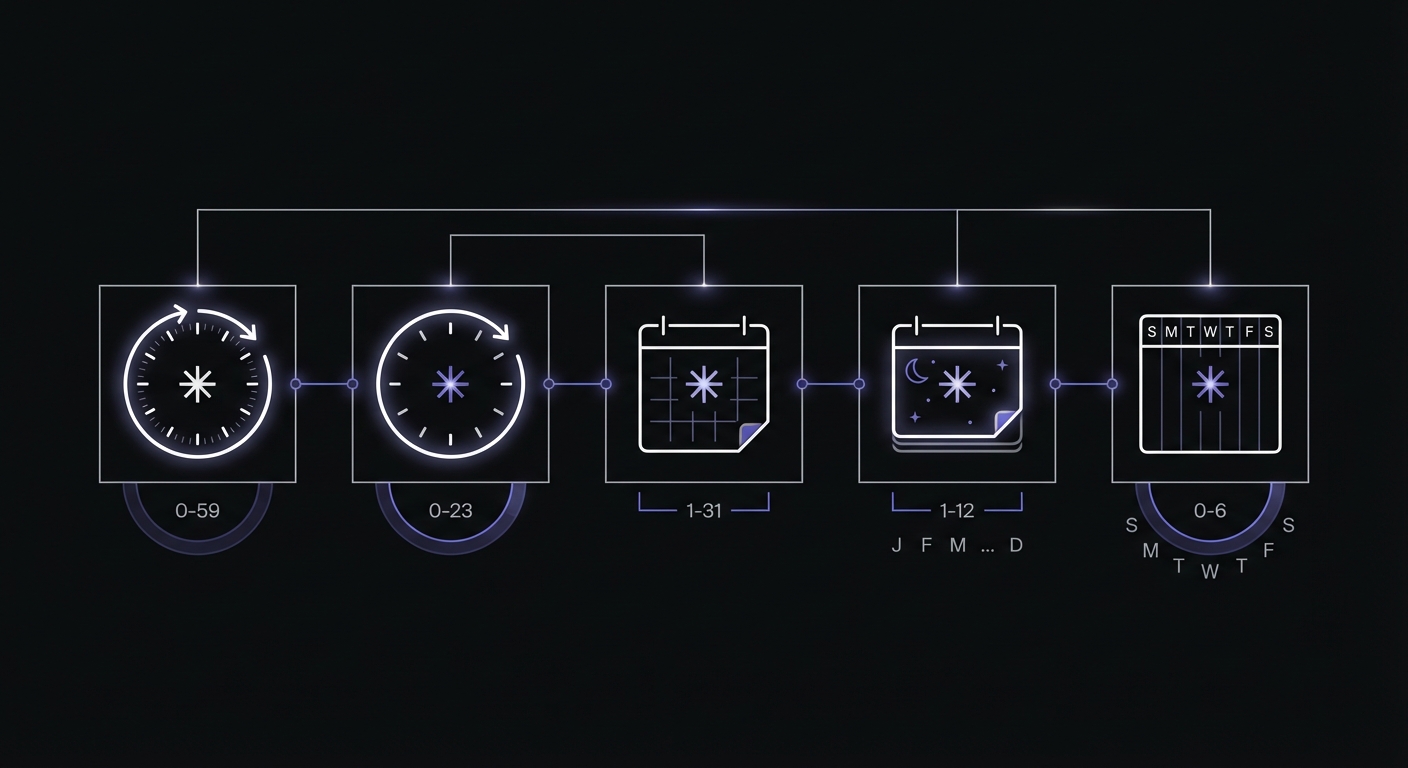
Cron uses a five-field syntax to define when jobs run: minute (0-59), hour (0-23), day of month (1-31), month (1-12), and day of week (0-7). An asterisk (*) means "every" value for that field.
Quick Reference: Cron Syntax Shortcuts
Instead of memorizing the five-field format, you can use special strings for common schedules:
| Shortcut | Equivalent | Meaning |
|---|---|---|
@hourly | 0 * * * * | Run at the start of every hour |
@daily | 0 0 * * * | Run at midnight every day |
@weekly | 0 0 * * 0 | Run at midnight every Sunday |
@monthly | 0 0 1 * * | Run at midnight on the 1st of each month |
@reboot | N/A | Run once when the system starts |
Common Examples of Cron Jobs
Cron jobs handle many of the behind-the-scenes tasks that keep applications running smoothly:
- Database backups: Automatically back up your database every night at 3 AM
- Report generation: Create and email weekly sales reports every Monday
- Data synchronization: Sync data between systems every hour
- Cleanup tasks: Delete old log files or temporary data weekly
- Email sending: Process queued emails every few minutes
- Cache warming: Rebuild caches before peak traffic hours
The Silent Worker
Here is the key thing to understand about cron jobs: they run silently in the background. There is no user interface. No one is watching when they execute. When they work, they just work. When they fail, they often fail silently.
This is the fundamental problem that cron monitoring solves.
The Problem with Cron Jobs
Cron jobs are set-and-forget by design. You configure them once, and they run on their schedule without intervention. This is a feature, but it is also a risk.
They Run in the Background
When your cron job runs at 3 AM, who is watching? No one. The job executes, succeeds or fails, and life goes on. If it succeeds, great. If it fails, the failure sits there waiting for someone to notice.
No One is Watching When They Fail
Unlike a web server that immediately shows errors to users when something breaks, a failed cron job is invisible. The server does not alert you. The cron system itself does not have a notification mechanism for failures. It just... stops working.
Silent Failures Go Unnoticed
Consider this scenario: your nightly backup job fails on Monday. No one notices. It fails again on Tuesday, Wednesday, Thursday. On Friday, your database crashes and you reach for your backups, only to discover you have none from the past week.
This is not a hypothetical situation. It happens to teams all the time. We cover more failure scenarios in our article on common cron job failures and how to prevent them.
"I Thought the Backup Was Running"
How many disaster stories start with this sentence? The assumption that automated tasks are working is dangerous. Without active verification that jobs are completing successfully, you are operating on hope rather than knowledge.
What is Cron Monitoring?
Cron monitoring is the practice of actively watching your scheduled jobs and alerting you when they do not run as expected. Instead of assuming your jobs are working, you verify it continuously.
Getting Notified When Jobs Fail
The core purpose of cron monitoring is simple: tell you when something goes wrong. If your backup job does not run, you get an alert. If your report generator crashes, you find out immediately rather than when someone asks where their report is.
Peace of Mind Automation
With proper monitoring in place, you can trust your automated systems. When your phone does not buzz with an alert, you know your jobs are running. When it does buzz, you know exactly what needs attention.
The Dead Man's Switch Concept
Cron monitoring often works on a "dead man's switch" principle. The name comes from a safety device that requires regular input to prevent an alarm. In cron monitoring:
- You tell the monitoring system "expect a signal every 24 hours"
- Your job sends a signal each time it runs successfully
- If the signal does not arrive, the monitoring system alerts you
The job has to actively prove it is alive. Silence is treated as failure.
How Cron Monitoring Works
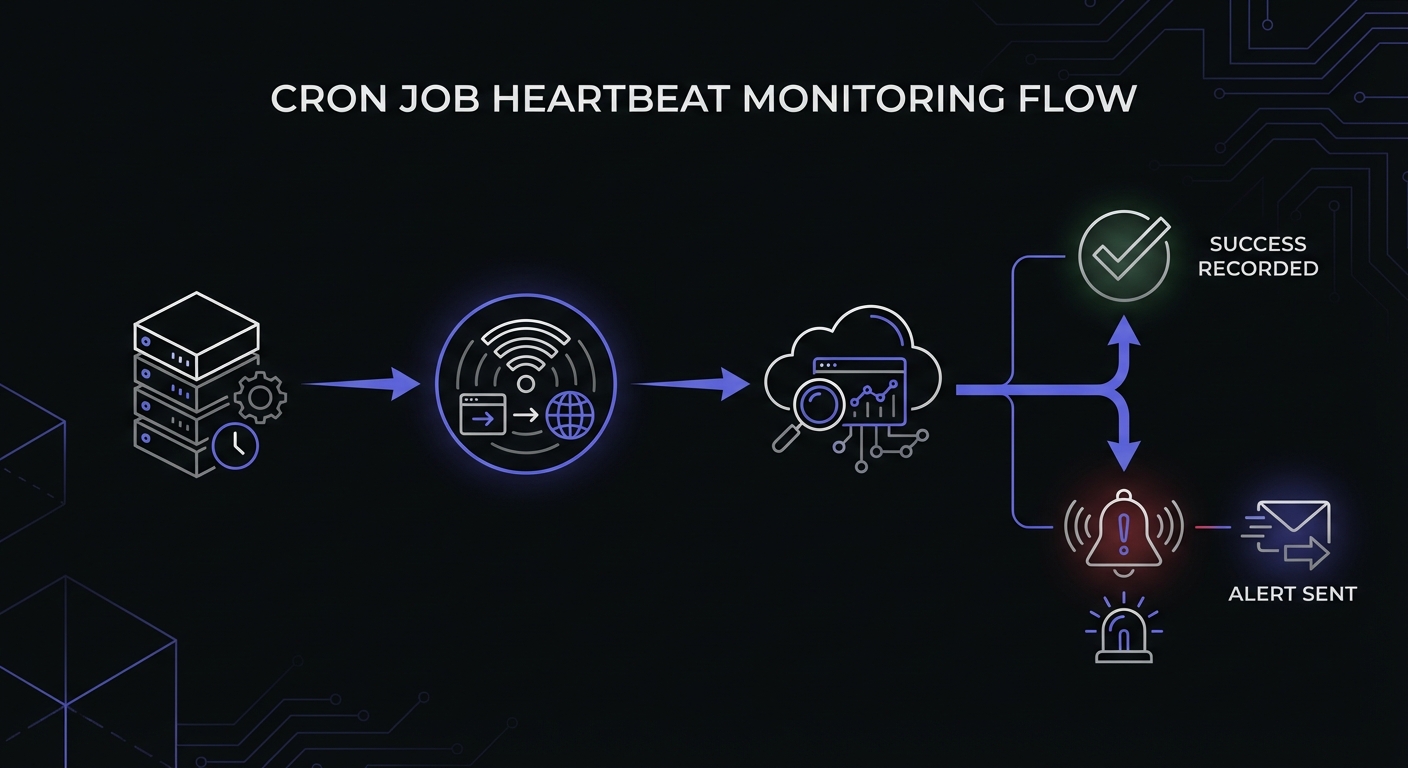
The most common approach to cron monitoring is the heartbeat model. Here is how it works in practice.
The Heartbeat Model
Think of it like a heartbeat check. A healthy heart beats regularly. If it stops beating, that is a problem. Similarly, a healthy cron job "beats" (sends a signal) every time it runs. If the beat stops, something is wrong.
Your Job Checks In When It Runs
When you set up cron monitoring, you get a unique URL for each job you want to monitor. At the end of your cron job script, you add a line that makes an HTTP request to that URL. This is the "check-in" or "ping" that tells the monitoring system "I just ran successfully."
If the Check-In Does Not Arrive, You Get an Alert
The monitoring system knows your job's schedule. If midnight passes and your nightly job has not checked in by 12:15 AM, the system sends you an alert via email, Slack, SMS, or whatever channels you have configured.
How It Looks in Practice
Your Cron Job                    Monitoring Service
     |                                  |
     |  [Job runs at midnight]          |
     |                                  |
     |  ------- HTTP ping -------->     |
     |                                  |
     |                           [Records check-in]
     |                                  |
     |                           [Resets timer for next expected run]
If the ping never arrives:
Your Cron Job                    Monitoring Service
     |                                  |
     |  [Job fails to run]              |
     |                                  |
     |  [No ping sent]                  |
     |                                  |
     |                           [Timer expires]
     |                                  |
     |                           [Sends alert to you]
Simple Example
Let us see what this looks like in actual code.
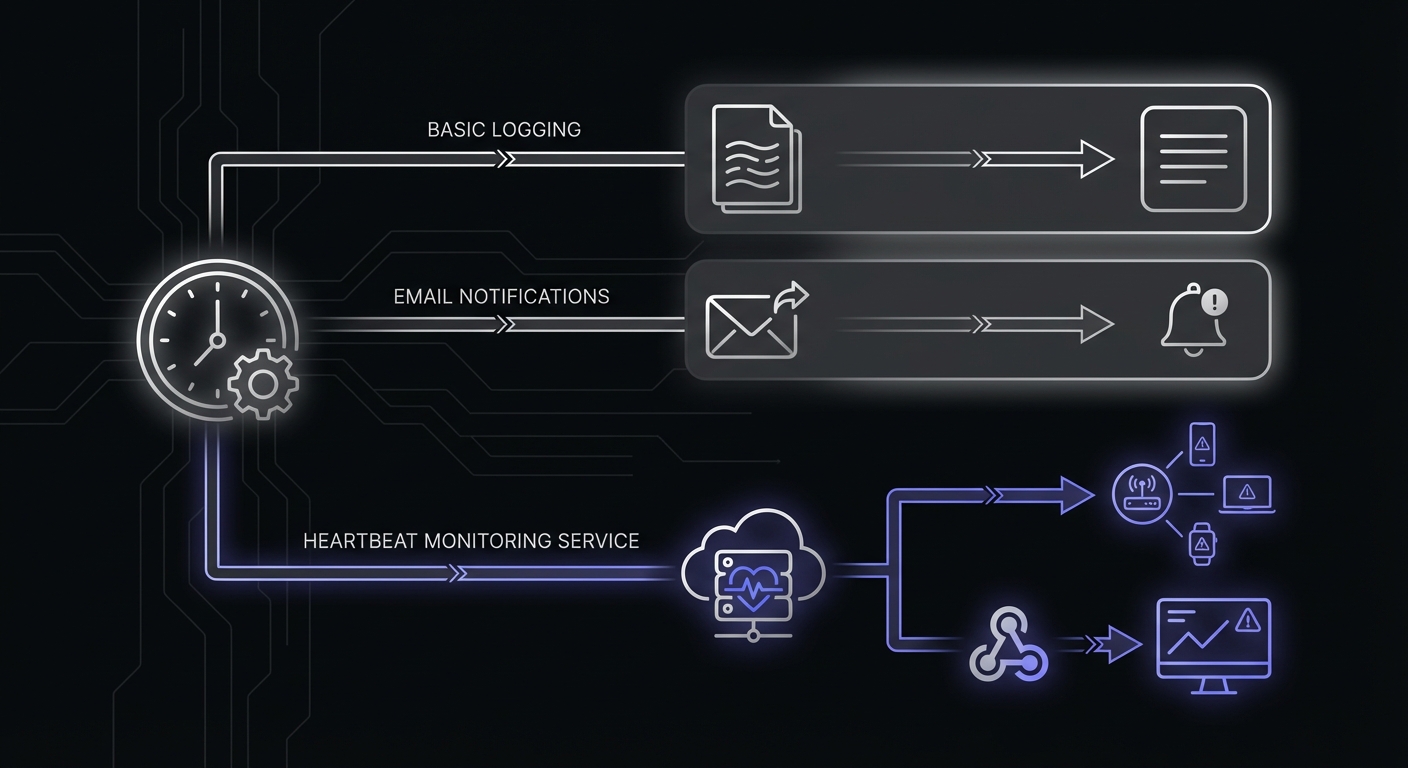
Without Monitoring
Here is a typical cron job entry that runs a backup script at midnight:
0 0 * * * /home/user/scripts/backup.shThis job runs silently. If the script fails, crashes, or the server misses the scheduled time, you will not know.
With Monitoring
Here is the same job with monitoring added:
0 0 * * * /home/user/scripts/backup.sh && curl -s https://ping.example.com/abc123The && operator means the curl command only runs if the backup script succeeds. If the backup completes successfully, it pings the monitoring URL. If the backup fails, no ping is sent, and you get an alert.
Even Better: Check Both Start and Finish
Some monitoring services let you track when a job starts and when it finishes:
0 0 * * * curl -s https://ping.example.com/abc123/start && /home/user/scripts/backup.sh && curl -s https://ping.example.com/abc123This tells you not just whether the job succeeded, but how long it took to run.
What Can Be Monitored?
While the name mentions "cron," heartbeat monitoring works for any recurring process.
Cron Jobs
The obvious use case. Any task scheduled via crontab on Linux/Unix systems.
Background Workers
Queue processors, job runners, and other background services that should be constantly processing work.
Scheduled Tasks on Windows
Windows Task Scheduler jobs can be monitored the same way by adding a PowerShell command to ping the monitoring URL.
Kubernetes CronJobs
Container orchestration platforms like Kubernetes have their own cron job scheduling. These can and should be monitored.
Any Recurring Process
Anything that should run on a regular schedule can be monitored using the heartbeat model. If it runs, it pings. If it does not ping, you get alerted.
Where to Find Cron Logs
Before setting up monitoring, know where to look when things go wrong. Cron logs its activity to different locations depending on your operating system:
| Operating System | Log Location | Command to View |
|---|---|---|
| Ubuntu/Debian | /var/log/syslog | grep CRON /var/log/syslog |
| CentOS/RHEL | /var/log/cron | cat /var/log/cron |
| macOS | /var/log/system.log | grep cron /var/log/system.log |
To capture your job's output for debugging, redirect stdout and stderr to a log file:
0 0 * * * /home/user/scripts/backup.sh >> /var/log/backup.log 2>&1The 2>&1 redirects error output to the same file as standard output, so you see everything in one place.
Why You Need Cron Monitoring
Still wondering if monitoring is worth the setup effort? If you are unsure whether cron monitoring makes sense for your situation, take our quick assessment: do I need cron monitoring? Consider these benefits.
Catch Failures Before Customers Do
The worst way to learn about a failed cron job is from a customer complaint. "Why didn't I get my invoice?" is a bad way to discover your billing job stopped working last week. Monitoring lets you find and fix problems before they impact users.
Sleep Better at Night
There is real psychological value in knowing your systems are being watched. When you have monitoring in place, you can actually disconnect after work hours knowing that problems will find you if they are serious.
Reduce Manual Checking
Without monitoring, conscientious developers often fall into a pattern of manually checking logs every morning. This is tedious, error-prone, and wastes time that could be spent on more valuable work.
Professional Practice
Production systems should have monitoring. It is a mark of mature engineering practice. When you join a team that monitors their cron jobs, you know they take reliability seriously.
Getting Started with Cron Monitoring
Ready to add monitoring to your cron jobs? Here is how to get started.
Most Services Have Free Tiers
You do not need to pay anything to try cron monitoring. Most services offer free tiers that cover small setups:
| Service | Free Monitors | Notes |
|---|---|---|
| UptimeRobot | 50 | Also includes uptime monitoring |
| Healthchecks.io | 20 | Open source option available |
| Cron Crew | 15 | Unlimited team members |
| Better Stack | 10 | Includes incident management |
| Cronitor | 5 | Full-featured free tier |
It Takes About Five Minutes
Setting up your first monitor is quick:
- Sign up for a monitoring service
- Create a monitor and specify its schedule
- Copy the ping URL
- Add a curl command to your cron job
- Done
Start with Your Most Critical Job
You do not need to monitor everything on day one. Identify the job that would cause the most pain if it failed silently: your backup, your billing processor, your critical data sync. Start there and expand over time.
Troubleshooting Quick Reference
When cron jobs fail, check these common issues first:
Permission errors: Cron runs with limited permissions. Ensure your script is executable (chmod +x script.sh) and the cron user has access to required files and directories.
Environment variables: Cron does not load your shell profile. If your script relies on environment variables like PATH, define them explicitly at the top of your crontab:
PATH=/usr/local/bin:/usr/bin:/bin
0 0 * * * /home/user/scripts/backup.sh
Absolute paths: Always use full paths in cron jobs. /home/user/scripts/backup.sh works; ./backup.sh does not.
Grace periods: Set grace periods slightly longer than your job's typical duration. A backup that usually takes 10 minutes should have a 15-20 minute grace period to avoid false alerts on slow days.
Glossary of Terms
As you explore cron monitoring, you will encounter some common terminology.
Heartbeat
A signal sent by your job to indicate it ran successfully. Also called a "ping" or "check-in."
Check-In / Ping
The HTTP request your job makes to the monitoring service. "The job checked in" means it sent its heartbeat successfully.
Grace Period
The window of time after an expected run before an alert is triggered. If your job is expected at midnight but sometimes runs at 12:05 AM, a 10-minute grace period prevents false alerts.
Dead Man's Switch
A monitoring model where silence triggers an alert. The job must actively signal that it is alive; failure to signal is assumed to indicate failure.
Monitor
A configured check in the monitoring system, usually corresponding to one cron job or scheduled task.
Conclusion
Cron jobs are essential for running automated tasks, but their silent nature makes them risky without proper oversight. A job that fails at 3 AM on a Saturday can go unnoticed for days, leading to data loss, unhappy customers, and stressful recovery efforts.
Cron monitoring solves this by actively verifying that your jobs run as expected and alerting you immediately when they do not. The heartbeat model is simple: your job pings a URL when it succeeds, and the monitoring service alerts you if the ping does not arrive.
Setting up monitoring takes just a few minutes and most services offer free tiers that cover small setups. Start with your most critical job and expand from there.
Ready to monitor your first cron job? Sign up for Cron Crew's free tier and follow our five-minute setup guide to get your first job monitored today. When you are ready to compare options, check out our guide on how to choose cron monitoring and our comparison of the best cron monitoring tools.