Common Cron Job Failures and How to Prevent Them
Cron jobs fail. It's not a matter of if, but when. The difference between a minor issue and a major outage is how quickly you detect it. Here's how to prevent failures.

Common Cron Job Failures and How to Prevent Them
Cron jobs fail. It is not a matter of if, but when. The difference between a minor inconvenience and a major outage often comes down to how quickly you detect the failure and how well you have prepared for it.
In this guide, we will walk through the most common reasons cron jobs fail and, more importantly, how to prevent each type of failure. Whether you are debugging a current issue or hardening your scheduled tasks against future problems, this guide will help. For the warning signs that your jobs may already be failing without your knowledge, see our article on 5 signs your cron jobs are failing silently.

Why Cron Jobs Fail Silently
Before diving into specific failure modes, it is worth understanding why cron job failures are particularly insidious.
No Built-In Notification System
Unlike a web server that returns error pages or a service that logs to a central system, cron has no built-in way to tell you when something goes wrong. The cron daemon runs your job and moves on. If the job fails, cron does not know or care.
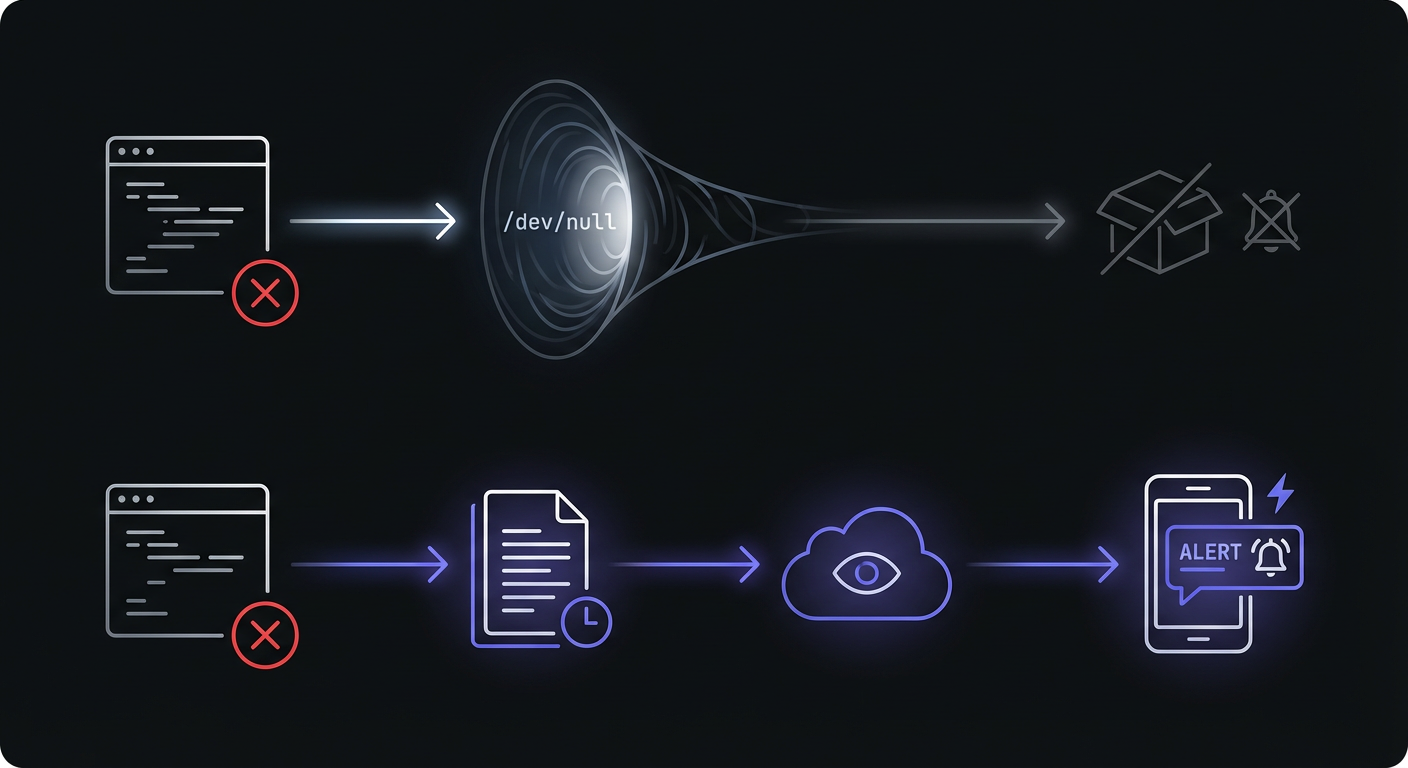
Errors Often Go to /dev/null
Many cron jobs are configured to suppress output entirely by redirecting to /dev/null:
0 0 * * * /scripts/job.sh > /dev/null 2>&1This keeps your mailbox from filling up with successful run notifications, but it also means errors vanish into the void.
No One is Watching at 3 AM
Cron jobs often run during off-hours when no one is actively monitoring systems. A job that fails at 3 AM on Saturday will not be noticed until someone happens to check or a downstream effect becomes visible.
The Assumption They "Just Work"
Once a cron job is set up and working, teams tend to forget about it. The assumption that it will continue working forever is dangerous. Servers change, dependencies update, disks fill up, and suddenly your "reliable" backup job has been failing for two weeks. To understand the full scope of monitoring, see our complete guide to cron job monitoring.
Failure 1: Script Errors
The most straightforward failure mode: your script has a bug or encounters an error condition.
Common Causes
Unhandled exceptions: A null value where you expected data, a missing file, an API that returns an unexpected response.
Missing dependencies: A library was uninstalled, a binary moved, or a Python package was not installed in the cron environment.
Path issues: The script works when you run it manually but fails from cron because paths are different.
Permission denied: The cron user does not have access to a file, directory, or resource the script needs.
Example
#!/bin/bash
# This script fails silently if backup.sql cannot be written

pg_dump mydb > /backups/backup.sql
If /backups does not exist or is not writable, this job fails with no notification.
Prevention
Add error handling: Make your scripts fail loudly.
#!/bin/bash
set -e  # Exit on any error
set -o pipefail  # Catch errors in pipes

pg_dump mydb > /backups/backup.sql || { echo "Backup failed"; exit 1; }
Log everything: Redirect output to a log file, not /dev/null.
0 0 * * * /scripts/backup.sh >> /var/log/backup.log 2>&1Add monitoring: Use a monitoring service to alert you when the job does not complete successfully.
0 0 * * * /scripts/backup.sh && curl -s https://ping.example.com/abc123Failure 2: Resource Exhaustion
Your script worked fine until the server ran out of resources.
Common Causes
Disk full: Log files grew unbounded, temporary files accumulated, or backups filled the disk.
Memory exhaustion: The job processes more data than expected and runs out of RAM, getting killed by the OOM killer.
CPU overload: The job takes longer than expected and overlaps with other intensive processes.
Network timeout: An API call or database connection times out due to network issues.
Example
A backup job that worked for months suddenly fails because the disk filled up:
pg_dump mydb > /backups/backup.sql
# Fails with "No space left on device"
Prevention
Set resource limits: Use ulimit or cgroups to prevent runaway resource usage.
Implement cleanup jobs: Regularly delete old logs, temporary files, and outdated backups.
# Delete backups older than 30 days
0 1 * * * find /backups -mtime +30 -delete
Monitor disk space: Set up alerts when disk usage exceeds 80%.
Use timeouts: Prevent jobs from running indefinitely.
0 0 * * * timeout 1h /scripts/backup.shAdd monitoring: Even with all these precautions, resource issues can surprise you. Monitoring catches what you did not anticipate.
Failure 3: Environment Issues
The script works perfectly when you run it from your terminal but fails when cron runs it.
Common Causes
Wrong PATH: Cron runs with a minimal PATH, often just /usr/bin:/bin. Commands that work in your shell might not be found.
Missing environment variables: Your shell profile sets environment variables that cron does not have.
Different user context: Cron might run as a different user with different permissions and environment.
Locale and timezone problems: Date formatting, character encoding, or time calculations behave differently.
Example
#!/bin/bash
# Works in terminal, fails in cron
node /scripts/process.js
This fails because node is installed via nvm and is not in cron's PATH.
Prevention
Use absolute paths: Always specify full paths to executables.
#!/bin/bash
/usr/local/bin/node /scripts/process.js
Set up the environment explicitly: Define required variables at the top of your script.
#!/bin/bash
export PATH="/usr/local/bin:/usr/bin:/bin"
export NODE_ENV="production"
export DATABASE_URL="postgres://..."
Source your profile if needed: Though this can be fragile.
#!/bin/bash
source /home/user/.bashrc
# Rest of script
Test in the cron environment: Run your script exactly as cron will run it to verify it works. Simulate the minimal cron environment with:
env -i /bin/sh -c '/path/to/your/script.sh'Watch for percent signs: In crontab entries (not scripts), the % character is interpreted as a newline. This causes silent failures when commands contain unescaped percent signs:
# This fails silently - % is interpreted as newline
0 0 * * * tar -czf backup-$(date +%Y%m%d).tar.gz /data

# Escape percent signs in crontab entries
0 0 * * * tar -czf backup-$(date +\%Y\%m\%d).tar.gz /data
Failure 4: Scheduling Conflicts
Jobs that overlap or interfere with each other cause subtle and frustrating failures.
Common Causes
Job runs longer than interval: An hourly job takes 90 minutes, so the next instance starts before the first finishes.
Multiple instances overlap: Two instances of the same job run simultaneously and corrupt shared state.
Race conditions: Two jobs access the same resource and interfere with each other.
Lock contention: A job waits for a lock held by another process and times out.
Example
An hourly data sync normally takes 20 minutes, but one day the source system is slow and the job takes 70 minutes. The next instance starts and both jobs try to write to the same database table.
Prevention
Use lock files: Prevent multiple instances from running simultaneously.
#!/bin/bash
LOCKFILE="/tmp/backup.lock"

if [ -f "$LOCKFILE" ]; then
    echo "Another instance is running"
    exit 1
fi

trap "rm -f $LOCKFILE" EXIT
touch "$LOCKFILE"

# Rest of script
Better: Use flock: The flock command handles lock files properly.
0 * * * * flock -n /tmp/hourly-job.lock /scripts/hourly-job.shThe -n flag makes flock fail immediately if the lock is held, rather than waiting.
Track duration: Monitor how long jobs take. If a job starts taking longer, you will know before it causes overlap issues.
Stagger schedules: Do not run all jobs at the same time.
# Instead of everything at midnight
0 0 * * * /scripts/backup.sh
5 0 * * * /scripts/cleanup.sh
10 0 * * * /scripts/report.sh
Failure 5: External Dependencies
Your script depends on something outside your control, and that something is not available.
Common Causes
API unavailable: The third-party API you call is down or slow.
Database down: Your database server is unreachable, restarting, or overloaded.
Network issues: DNS fails, a route is broken, or a firewall blocks traffic.
Third-party rate limits: You hit the API rate limit and requests start failing.
Example
#!/bin/bash
# Sync data from external API
curl -s https://api.example.com/data > /data/latest.json
# If api.example.com is down, this silently creates an empty file
Prevention
Implement retry logic: Transient failures often resolve themselves.
#!/bin/bash
MAX_RETRIES=3
RETRY_DELAY=30

for i in $(seq 1 $MAX_RETRIES); do
    if curl -sf https://api.example.com/data > /data/latest.json; then
        exit 0
    fi
    echo "Attempt $i failed, retrying in $RETRY_DELAY seconds..."
    sleep $RETRY_DELAY
done

echo "All retries failed"
exit 1
Check responses: Do not assume a successful HTTP request means valid data.
response=$(curl -sf https://api.example.com/data)
if [ -z "$response" ]; then
    echo "Empty response from API"
    exit 1
fi
echo "$response" > /data/latest.json
Use circuit breakers: If a dependency is consistently failing, back off rather than hammering it.
Add monitoring: External failures are unpredictable. Monitoring alerts you regardless of the cause.
Failure 6: Configuration Drift
The cron job was set up correctly, but something changed and now it does not run at all.
Common Causes
Crontab overwritten: Someone edited the crontab and accidentally removed entries.
Server rebuilt without cron: A new server was provisioned but the cron jobs were not migrated.
Container without scheduler: The application moved to a container that does not have cron installed.
Migration missed cron setup: During a platform migration, cron jobs were forgotten.
Example
A backup job worked for years. The company migrated to new infrastructure. Six months later, someone realizes backups have not been running since the migration.
Prevention
Infrastructure as code: Define cron jobs in your configuration management (Ansible, Puppet, Chef) or Terraform. Cron jobs become versioned and reproducible.
# Ansible example
- name: Set up backup cron job
  cron:
    name: "Daily backup"
    minute: "0"
    hour: "2"
    job: "/scripts/backup.sh"
Document your cron jobs: Maintain a list of what jobs exist and why they matter.
Use monitoring: This is the ultimate safety net. If the job does not run (for any reason, including the cron entry being missing), monitoring will alert you.
0 2 * * * /scripts/backup.sh && curl -s https://ping.example.com/abc123Even if the cron entry is deleted, the monitoring service will alert you when the expected ping does not arrive.
Failure 7: Timezone and DST Issues
Jobs that depend on time calculations can fail during daylight saving time transitions or when servers run in unexpected timezones.
Common Causes
DST transition gaps: A job scheduled for 2:30 AM might not run when clocks spring forward, or run twice when clocks fall back.
Server timezone mismatch: The server runs in UTC but the job assumes local time, or vice versa.
Container timezone: Containers often default to UTC regardless of host timezone.
Cron daemon timezone: Some systems allow per-job timezone overrides; others do not.
Example
A report scheduled for 2:30 AM local time never runs on the day clocks spring forward:
# This job does not run on DST spring-forward day
30 2 * * * /scripts/daily-report.sh
Prevention
Avoid scheduling during DST transition hours: Do not schedule jobs between 1 AM and 3 AM if DST matters.
Use UTC for server time: Run your servers in UTC to avoid DST issues entirely.
Set timezone explicitly: Some cron implementations support the CRON_TZ variable:
CRON_TZ=America/New_York
30 2 * * * /scripts/daily-report.sh
Document timezone assumptions: Make it clear what timezone your jobs expect.
Building Resilient Cron Jobs
Taking the lessons from all these failure modes, here is how to build cron jobs that are resilient by design.

Add Monitoring First
This is the most important practice. Monitoring catches failures you did not anticipate, whether from script errors, resource issues, external dependencies, or configuration drift.
0 0 * * * /scripts/job.sh && curl -s https://ping.example.com/abc123Implement Proper Error Handling
Make scripts fail explicitly rather than silently.
#!/bin/bash
set -e
set -o pipefail
trap 'echo "Error on line $LINENO"' ERR
Log Everything
Redirect output to log files and implement log rotation.
0 0 * * * /scripts/job.sh >> /var/log/job.log 2>&1Use Lock Files for Long Jobs
Prevent overlapping runs with flock.
0 * * * * flock -n /tmp/job.lock /scripts/hourly-job.shSet Timeouts
Prevent jobs from running indefinitely.
0 0 * * * timeout 2h /scripts/long-job.shBuild Idempotency
Design jobs so they can safely run multiple times without causing problems. If a job fails halfway through and runs again, it should not duplicate data or corrupt state.
Troubleshooting Quick Reference
When a cron job fails, use this table to quickly identify the likely cause:
| Symptom | Likely Cause | First Check |
|---|---|---|
| Job never runs | Cron service stopped, bad syntax, wrong crontab | systemctl status cron |
| Works manually, fails in cron | Environment/PATH issues | Check $PATH, use absolute paths |
| "Permission denied" in logs | File permissions, user context | ls -la on script and directories |
| "No space left on device" | Disk full | df -h, clean old files |
| Job runs but no output | Redirect to /dev/null, missing dependencies | Remove >/dev/null, check command exists |
| Multiple instances running | Missing lock file | Add flock -n |
| Job takes much longer than usual | Resource contention, data growth | Check concurrent jobs, dataset size |
| Job stopped working after server change | Configuration drift | Verify crontab entry exists |
| Runs at wrong time | Timezone mismatch | Check server timezone, use UTC |
| Intermittent failures | External dependency, rate limits | Add retry logic, check API status |
Common Exit Codes
Understanding exit codes helps diagnose failures:
| Exit Code | Meaning | Common Cause |
|---|---|---|
| 0 | Success | Job completed normally |
| 1 | General error | Script error, command failed |
| 2 | Misuse of command | Invalid arguments, syntax error |
| 126 | Permission denied | Script not executable |
| 127 | Command not found | Wrong PATH, missing binary |
| 128+N | Killed by signal N | 137 = OOM killed (128+9), 143 = terminated |
| 124 | Timeout | Job exceeded timeout limit |
The Monitoring Safety Net
Even with all the best practices above, cron jobs will still fail in ways you did not anticipate. That is the nature of software. Monitoring provides the safety net that catches everything else.
Catches Failures You Did Not Anticipate
You cannot predict every failure mode. Monitoring alerts you regardless of the cause.
Alerts Before Customers Notice
When your reporting job fails, monitoring tells you before someone asks "where is my report?"
Duration Tracking Spots Slow Jobs
If a job that usually takes 5 minutes suddenly takes 45 minutes, something has changed. Duration monitoring helps you spot problems before they become critical.
Start and Finish Signals for Debugging
Tracking when jobs start and finish helps you understand what happened when something goes wrong.
Conclusion
Cron job failures are inevitable. The question is whether you find out about them immediately or days later when the damage has compounded.
The seven common failure types we covered are script errors, resource exhaustion, environment issues, scheduling conflicts, external dependencies, configuration drift, and timezone/DST issues. Each has specific prevention strategies, but they all share one solution: monitoring.
Adding monitoring to your cron jobs takes just a few minutes and provides the safety net that catches failures regardless of their cause. Combined with proper error handling, logging, lock files, timeouts, and idempotent design, you can build scheduled tasks that are resilient and trustworthy.
Ready to add monitoring to your cron jobs? Cron Crew offers a free tier to get started. Follow our guide to set up cron monitoring in 5 minutes and stop wondering whether your jobs are running. For a complete checklist of reliability practices, see our cron job best practices guide.