Do I Need Cron Monitoring? A Quick Assessment
You have scheduled jobs running in production. You've heard about cron monitoring. But do you actually need it? This guide helps you quickly assess your needs.

Do I Need Cron Monitoring? A Quick Assessment
You have scheduled jobs running in production. You have heard about cron monitoring. But do you actually need it, or is it overkill for your situation?
This guide will help you quickly assess whether cron monitoring makes sense for you. We will walk through a few questions, discuss when monitoring is essential versus optional, and help you weigh the costs against the benefits. If you are new to the concept, start with our article on what is cron job monitoring.
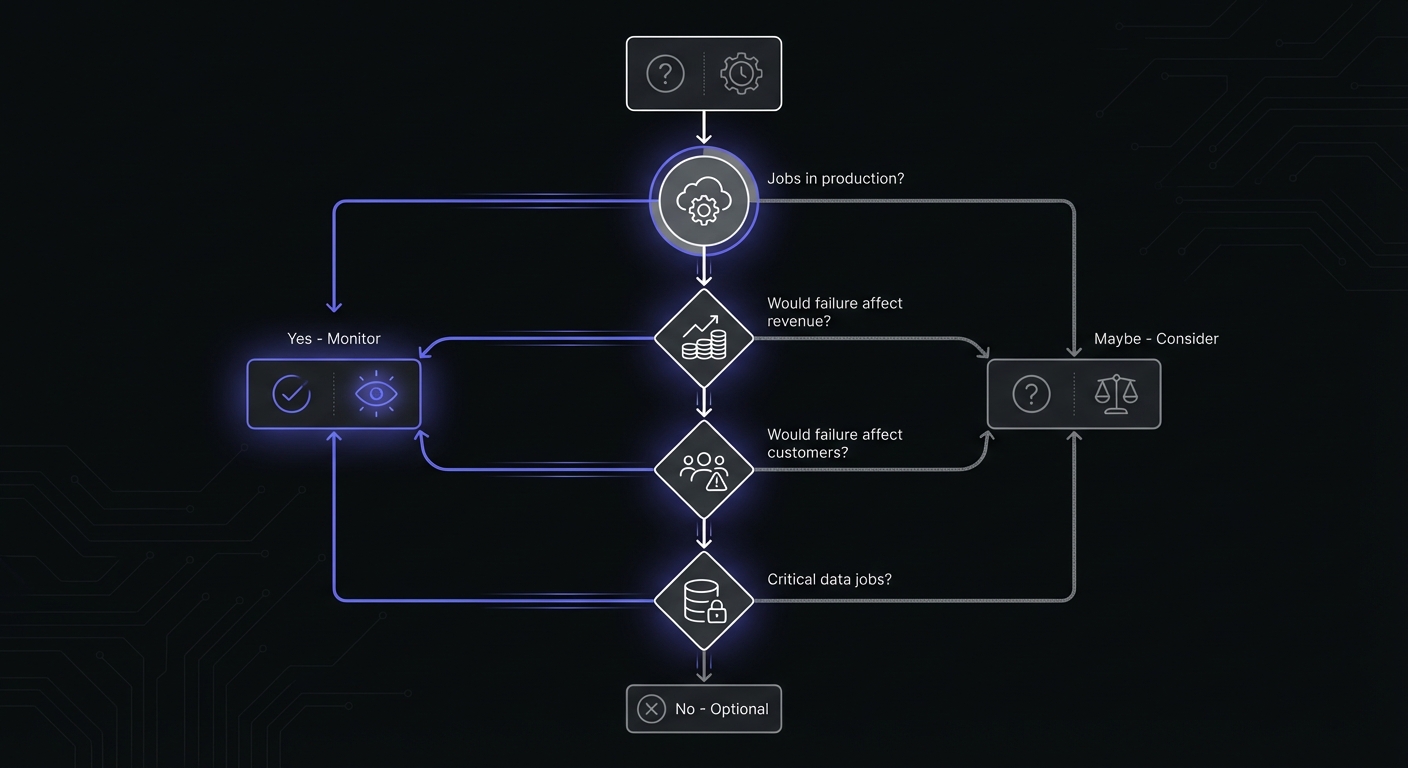
Quick Assessment: 5 Questions
Answer these questions honestly to get a sense of whether you need cron monitoring.
1. Do you have scheduled jobs running in production?
If you have cron jobs, scheduled tasks, background workers, or any process that runs on a regular schedule in a production environment, you have something that could fail silently.
2. Would you know if a job failed overnight?
If your backup job failed at 3 AM last night, would you know about it right now? Or would you only find out when you needed the backup, when someone asked about missing data, or when you happened to check the logs?
3. Have you ever discovered a broken cron job days (or weeks) later?
Think back. Has there been a time when you realized a scheduled task had stopped working and no one noticed? If this has happened before, it will happen again.
4. Would a failed job impact customers or revenue?
Consider your scheduled jobs. If they stopped running, what would happen? Customers not receiving emails? Reports not generated? Payments not processed? Data not synced?
5. Are you manually checking if jobs ran?
Do you have a morning ritual of checking logs, reviewing dashboards, or running queries to verify that overnight jobs completed? This manual checking is a sign that you do not trust your automation but also are not monitoring it properly.
If you answered "yes" to two or more of these questions, you probably need cron monitoring.
The Numbers Behind Silent Failures
Industry data paints a clear picture of why cron monitoring matters.
According to developer surveys, 73% of developers have experienced silent cron job failures that went undetected for days or weeks. The cost is substantial: undetected failures in scheduled tasks cost businesses an average of $5,600 per hour in downtime and recovery efforts.
Teams that implement proper monitoring see measurable improvements:
| Metric | Without Monitoring | With Monitoring |
|---|---|---|
| Time to detect failure | Hours to weeks | Minutes |
| Downtime costs | Full impact | 75-90% reduction |
| Incident response costs | Full effort | 60-80% reduction |
| System reliability | Variable | Up to 99.9% |
One mid-size e-commerce company detected 12 silent failures within their first month of monitoring. These would have gone unnoticed, affecting inventory sync and customer orders.
Understanding Failure Types
Not all cron failures look the same. Knowing the different types helps you assess your monitoring needs.
Silent failures: The job exits with an error but produces no notification. This is the most dangerous type because you have no indication anything went wrong.
Partial failures: The job runs but does not complete all its work. A backup that finishes but skips corrupted files, or a sync that processes 90% of records before timing out.
Performance degradation: The job completes successfully but takes longer than expected. A 5-minute job that gradually grows to 30 minutes signals underlying problems.
Resource overruns: The job hangs, consumes excessive memory, or runs indefinitely. These can affect other processes on the same server.
Each failure type requires different detection strategies. Simple heartbeat monitoring catches silent failures and jobs that never run. Duration tracking catches performance degradation. Exit code monitoring catches explicit errors.
You Definitely Need Monitoring If...
Some situations make cron monitoring essentially mandatory.
Jobs Affect Revenue
If scheduled jobs handle billing, payment processing, subscription renewals, or any revenue-related automation, a silent failure directly costs you money. You need to know immediately when these jobs fail.
Jobs Affect Customers
Email notifications, report delivery, data exports, account provisioning: if customers depend on your scheduled tasks, failures mean unhappy customers. The longer a failure goes undetected, the more customers are affected.
Data Integrity Depends on Jobs
Backups, database maintenance, data synchronization, cache refreshes: these jobs protect your data. A backup job that silently fails for two weeks leaves you vulnerable. A sync job that stops working means your systems drift out of alignment.
You Have Been Burned by Silent Failures Before
If you have already experienced the pain of discovering a cron job had been failing for days or weeks, you know how much damage silent failures can cause. Learning from that experience means adding monitoring to prevent it from happening again. Explore the warning signs in our guide to 5 signs your cron jobs are failing silently.
No One is Watching Overnight
Most cron jobs run during off-hours when the team is asleep. Without monitoring, failures that occur at 2 AM Saturday will not be noticed until Monday morning at the earliest, and often much later.
You Might Not Need Monitoring If...
There are legitimate situations where cron monitoring might be unnecessary.
Only Running Jobs in Development
If your scheduled tasks only run in development or staging environments, the stakes are lower. A failed job in development is annoying but not damaging. That said, monitoring in development can help you catch issues before they reach production.
Jobs Are Truly Non-Critical
Some scheduled tasks are genuinely optional. Analytics aggregation that can be re-run manually, cache warming that just improves performance slightly, cleanup tasks that can be skipped without consequence: these might not warrant monitoring.
Be honest with yourself though. Many tasks that seem non-critical turn out to matter more than expected when they fail.
You Have Comprehensive Logging with Log Alerts
If you already have a robust logging system that captures cron job output and alerts on errors, you might have de facto monitoring in place. However, this approach has gaps: it only catches jobs that run and fail, not jobs that fail to run at all.
Single Cron Job That You Check Manually Daily
If you have exactly one scheduled task and you check on it every single day as part of your routine, you might get away without automated monitoring. This approach does not scale and relies on human discipline, but for very simple setups it can work.
Risk Assessment Quick Reference
Use this table to prioritize which jobs need monitoring first:
| Job Type | Risk Level | Priority | Recommended Grace Period |
|---|---|---|---|
| Database backups | Critical | Monitor immediately | 10-30 minutes |
| Payment processing | Critical | Monitor immediately | 5-15 minutes |
| Customer notifications | High | Monitor soon | 15-30 minutes |
| Data sync/ETL | High | Monitor soon | Based on job duration + 50% |
| Report generation | Medium | Consider monitoring | 30-60 minutes |
| Cache warming | Low | Optional | 1-2 hours |
| Log cleanup | Low | Optional | Several hours |
| Analytics aggregation | Low | Optional | Flexible |
Grace period is how long the monitoring service waits after the expected run time before alerting. Fast jobs need shorter grace periods. Jobs that vary in duration need longer grace periods.
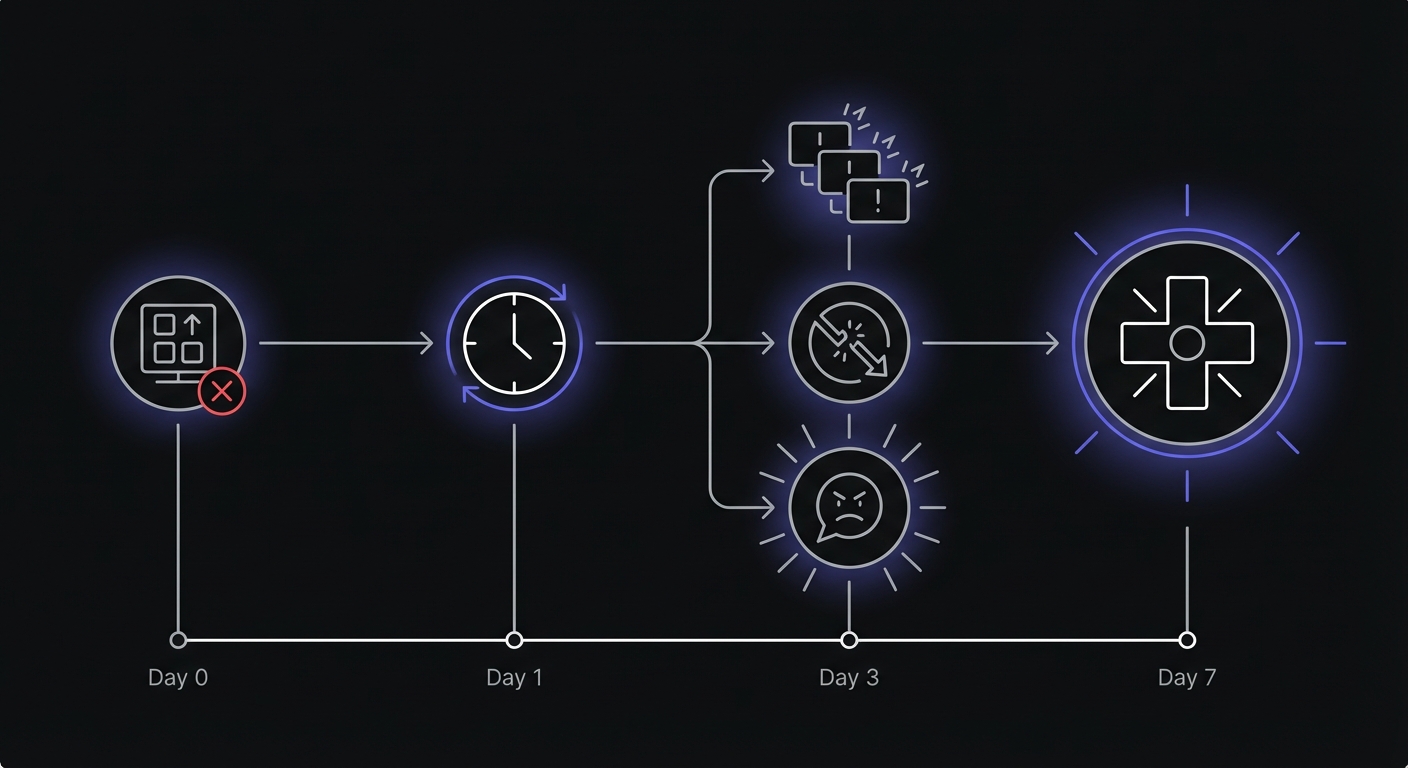
The Cost of Not Monitoring
Let us think about what happens when cron jobs fail silently.
Time to Detect Failures
Without monitoring, how long until you notice a failed job?
- Best case: You happen to check within a few hours
- Typical case: Days pass before someone notices
- Worst case: Weeks or months, discovered only when the downstream impact becomes critical
Every hour of undetected failure is an hour where the problem compounds.
Customer Impact During That Time
A notification job that fails for three days means three days of customers not receiving important emails. A billing job that fails for a week means a week of invoices not sent and payments not processed.
Manual Recovery Effort
When you finally discover a failure, you often need to manually recover. Backups need to be re-run. Data needs to be re-synced. Customers need to be notified. The longer the failure went undetected, the more recovery work is required.
Reputation Damage
Customers notice when things do not work. "Why didn't I get my confirmation email?" and "My report is missing" erode trust. Repeated issues damage your reputation and can drive customers away.
Stress and Worry
Without monitoring, you never quite know if things are working. There is a low-level anxiety that comes from uncertainty. Is the backup running? Did the sync complete? You check logs "just to be sure" and never feel fully confident.
Real-World Examples
These scenarios happen more often than you might think:
The month-long backup failure: A database backup job failed silently for over a month. The failure was discovered only when the primary database was corrupted and the team needed to restore. Recovery required rebuilding from partial snapshots and weeks of work.
The missed billing cycle: A subscription billing job stopped running due to a server migration. Three weeks of invoices were never sent. The company discovered the problem when customers complained about duplicate charges after the job was fixed and ran catch-up billing.
The drift disaster: A data sync between two systems failed for two weeks. When discovered, the systems had drifted so far apart that reconciliation required manual review of thousands of records.
The Cost of Monitoring
Now let us look at what monitoring actually costs.
Most Free Tiers Cover Small Setups
If you have a handful of scheduled jobs, free tiers from monitoring services are often sufficient:
| Service | Free Monitors | Free Features |
|---|---|---|
| Cron Crew | 15 | Unlimited team members, Slack/email alerts |
| Healthchecks.io | 20 | 100 log entries per job, 3 team members |
| Cronitor | 5 | Basic alerting, 7-day retention |
| UptimeRobot | 50 | Heartbeat checks, basic notifications |
| Better Stack | Limited | Part of broader monitoring stack |
You may not need to pay anything.
Paid Plans Are Affordable
For setups that exceed free tiers, paid plans typically range from $15 to $30 per month. Compare this to the cost of a single incident caused by an undetected failure.
Setup Takes About 5-10 Minutes
Adding monitoring to a cron job is straightforward:
- Create a monitor in the service
- Copy the ping URL
- Add a curl command to your cron job
For a typical job, this takes less than five minutes.
Peace of Mind
The intangible benefit of monitoring is confidence. When your phone is not buzzing with alerts, you know things are working. When it does buzz, you know exactly what needs attention. No more wondering, no more manual checking, no more surprise discoveries.
Start Small
If you are unsure about whether monitoring is worth it, start with a minimal commitment.
Monitor Your Most Critical Job First
Identify the one scheduled task that would cause the most pain if it failed silently. Your database backup, your payment processor, your critical data sync. Add monitoring to just that one job.
Use a Free Tier to Try It
Sign up for a free account with a monitoring service. No credit card required. Try it for a few weeks and see how it feels.
Add More Jobs as You See Value
Once you have one job monitored, you will quickly see the value. The confidence that comes from knowing your backup ran successfully is compelling. You will naturally want to extend that confidence to other jobs.
Do Not Over-Engineer
You do not need to monitor every single scheduled task on day one. Start with the critical ones and expand over time. Some low-stakes jobs might never need monitoring, and that is fine.
Next Steps
Ready to try cron monitoring? Here is a simple path forward.
Identify Your Critical Jobs
Make a quick list of your scheduled tasks and rank them by importance. Which ones would cause real problems if they failed silently? Those are your candidates for monitoring.
Sign Up for a Free Tier
Choose a monitoring service and create a free account. Cron Crew offers 15 free monitors with no credit card required.
Add Monitoring to One Job
Pick your most critical job and add monitoring. It takes about five minutes:
# Before
0 2 * * * /scripts/backup.sh

# After
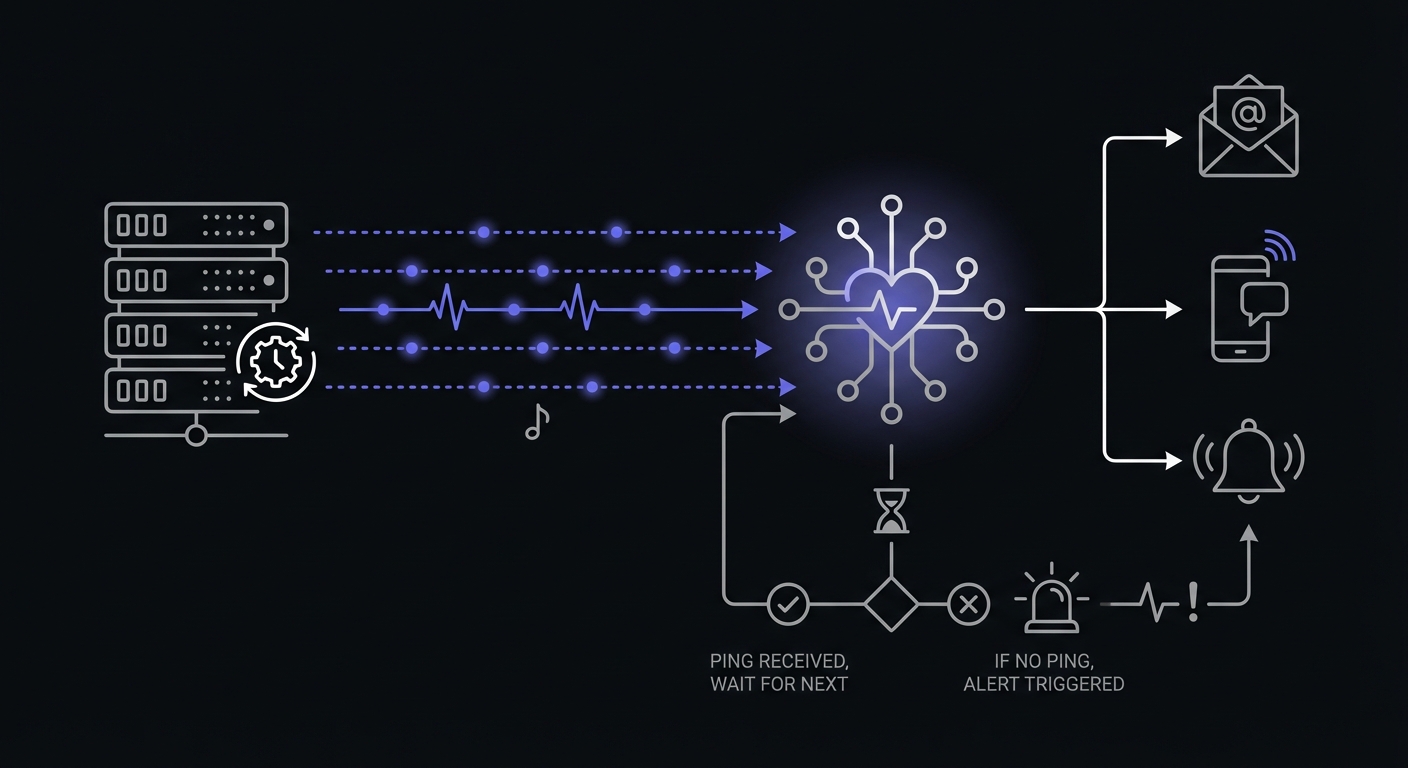
0 2 * * * /scripts/backup.sh && curl -s https://ping.example.com/abc123
The && ensures the ping only fires if your script exits successfully. If the script fails, no ping is sent, and the monitoring service alerts you.
See How It Feels
Run with monitoring for a week or two. Notice how your confidence changes. When the dashboard shows green, you know your job ran. When you get an alert, you know something needs attention.
Expand From There
Once you experience the peace of mind that comes with monitoring, you will want to extend it to your other scheduled tasks. Add them incrementally based on their criticality.
Conclusion
Do you need cron monitoring? If you have scheduled jobs in production that affect customers, revenue, or data integrity, the answer is almost certainly yes. The cost of undetected failures far exceeds the cost of monitoring, both in direct impact and in the stress of uncertainty.
If your situation is simpler with just development jobs, truly non-critical tasks, or comprehensive logging already in place, you might be able to get by without dedicated monitoring. But even then, the peace of mind that comes with proper monitoring is worth considering.
The best approach is to start small. Add monitoring to your most critical job using a free tier. See how it changes your confidence in your automation. Then expand from there based on what you learn.
Ready to try it? Cron Crew offers a free tier with 15 monitors. Follow our guide to set up cron monitoring in 5 minutes and see the difference it makes. For guidance on selecting the right tool for your needs, read our article on how to choose cron monitoring or compare options in our cron monitoring pricing guide.