5 Signs Your Cron Jobs Are Failing Silently
Cron jobs are the silent workhorses of your infrastructure. When they fail, they're invisible. Here are five warning signs your jobs might already be failing.
5 Signs Your Cron Jobs Are Failing Silently
Cron jobs are the silent workhorses of your infrastructure. They run backups, send reports, sync data, and process queues without anyone watching. When they work, they are invisible. When they fail, they are also invisible.
That invisibility is the problem. A cron job can fail at 3 AM and no one will know until the damage is done. This guide will help you recognize the warning signs that your scheduled tasks might already be failing without your knowledge.
Introduction: The Silent Killer
Cron job failures do not announce themselves. There is no popup, no notification, no flashing red light. Your job simply does not run, and the cron daemon moves on with its day. The failure sits there, waiting to be discovered.
Sometimes you discover it in hours. Sometimes days. Sometimes weeks. And sometimes you only find out when a customer asks why their report is missing, or when you reach for a backup and it is not there.
If you are not actively monitoring your cron jobs, you could have failures right now that you do not know about. For a detailed look at what causes these failures, see our guide on common cron job failures and how to prevent them. Here are five signs to watch for.
Sign 1: "I Thought That Was Working"
You get a question from a colleague or customer. Maybe it is "Why didn't I get my weekly report?" or "When was the last time we synced with the vendor?" You go to check, confident that everything is fine.
And then you discover the job has not run in days. Or weeks.
The Scenario
The nightly inventory sync was set up two years ago. Everyone assumed it was running because no one ever said it was not. Then a quarterly audit reveals inventory counts are weeks out of date.
How did this happen? The job was working fine until a server migration three months ago. The cron entry was not migrated. No one noticed because no one was watching.
Why This Happens
Cron jobs are set-and-forget by design. Once configured, they run on their schedule without intervention or feedback. The assumption that they continue working is natural but dangerous.
Without active verification that jobs are completing, you are relying on hope. And hope is not a monitoring strategy. For a comprehensive understanding of how monitoring works, read our complete guide to cron job monitoring.
The Fix
Add monitoring that alerts on missed runs. When your nightly sync does not happen, you should know within minutes, not months.
# Before: silent failure
0 2 * * * /scripts/sync.sh

# After: monitored
0 2 * * * /scripts/sync.sh && curl -s https://ping.example.com/abc123
With monitoring in place, if the job does not run, you get an alert. No more "I thought that was working" discoveries.
Sign 2: Data Is Stale
You pull up a report and the data looks old. Or someone mentions that the dashboard numbers have not changed in a while. Or the API returns results that seem out of date.
The Scenario
The sales dashboard shows the same numbers it showed yesterday. And the day before. You dig into it and discover the hourly data refresh job has been failing for four days. The error? The source database moved to a new server and the connection string was never updated.
Why This Happens
Data freshness issues are often the first visible symptom of a failed cron job. But by the time you notice the data is stale, the failure has already been happening for some time.
The gap between when a job fails and when someone notices stale data can be hours, days, or longer depending on how actively the data is used.
The Fix
Monitor your data refresh jobs directly rather than relying on downstream observations.
# Sync job with monitoring
*/30 * * * * /scripts/refresh-data.sh && curl -s https://ping.example.com/xyz789
When the refresh job fails, you learn about it immediately, not when someone complains that their numbers look wrong.
Sign 3: Manual Recovery Is Becoming Routine
You have a recurring task on your calendar: "Check if nightly job ran." Or you find yourself running the backup script manually every few days because it "sometimes gets stuck." Or there is a wiki page titled "How to recover when the sync fails."
The Scenario
Every Monday morning, someone on the team checks the weekend job logs to verify everything ran. When something did not run, they kick it off manually. This has been the process for months. It is accepted as "just how things work."
Why This Happens
When cron jobs are unreliable but critical, teams develop workarounds. Manual checking and manual recovery become normalized. The underlying issues are never fixed because the workaround "works."
But this manual process wastes developer time, introduces human error, and does not scale. It also means failures are only caught when someone remembers to check.
The Fix
Automated monitoring replaces manual checking. Instead of a calendar reminder to verify jobs ran, you get alerts when they do not.
# Weekend job with monitoring
0 4 * * 0 /scripts/weekly-maintenance.sh && curl -s https://ping.example.com/weekly123
If the weekend maintenance does not run, you get an alert Sunday morning. No need for Monday morning log spelunking.
Sign 4: Customers Notice Before You Do
The worst way to learn about a failed cron job is from a customer complaint. "Where is my invoice?" "I didn't get the shipping notification." "The export I requested yesterday never arrived."
The Scenario
A customer emails support asking why they did not receive their monthly statement. Support checks and sees the statement job ran, but then discovers it threw an error and exited without sending emails. This has been happening for the past three billing cycles. Dozens of customers did not receive statements.
Why This Happens
Customer-facing jobs often fail in ways that are not immediately visible internally. The job might technically run but encounter an error that prevents it from completing its task. Or the job might not run at all. Either way, you do not find out until customers tell you.
The Fix
Proactive monitoring means you learn about failures before customers do.
# Monthly statement job
0 9 1 * * /scripts/send-statements.sh && curl -s https://ping.example.com/statements
When the statement job does not complete successfully, you get an alert. You can investigate and fix the issue before the support tickets start arriving.
For extra protection, only send the monitoring ping if the job actually succeeded at its core task:
#!/bin/bash
# send-statements.sh

# Generate and send statements
if send_all_statements; then
    # Only ping if statements were actually sent
    curl -s https://ping.example.com/statements
else
    exit 1
fi
Sign 5: You Are Checking Logs Manually
You have a routine of grepping through log files. Maybe it is checking /var/log/cron every morning. Maybe it is opening a log viewer and searching for "error" or "failed." Maybe it is a custom script that parses logs and emails you a summary.
The Scenario
Every morning at 9 AM, the developer on rotation runs a script that checks the overnight logs for errors. If there are errors, they investigate. If not, they move on. This takes 15-30 minutes per day and sometimes errors are missed because they do not match the grep patterns.
Why This Happens
Log checking is a natural response to cron job uncertainty. You know jobs can fail silently, so you check logs to verify they did not. It feels responsible and proactive.
But manual log checking has significant problems:
- It only happens when someone remembers to do it
- It takes valuable developer time every day
- It is error-prone: patterns can miss new failure modes
- It provides no protection outside business hours
The Fix
Replace manual log checking with automated monitoring.
0 0 * * * /scripts/nightly-job.sh && curl -s https://ping.example.com/nightlyNow you do not need to check logs to verify the job ran. If it does not run, monitoring tells you. You get your morning time back, and you have coverage 24/7, not just when someone checks.
If you still want visibility into job activity, monitoring dashboards show run history without requiring you to grep through logs.

The Real Cost of Silent Failures
Silent cron failures are not just inconvenient. They have measurable business impact. One documented case study revealed an 89-day backup failure window that went undetected. The consequences: 14,223 missed transactions across 2,847 customer records, approximately $31,400 in billing discrepancies, and a 47-hour recovery effort once discovered.
The pattern is consistent: the longer a silent failure goes undetected, the more expensive the recovery. A backup job that fails for one day requires restoring one day of data. A backup job that fails for 89 days requires forensic reconstruction of three months of business operations.
Why Cron Jobs Fail Silently
Understanding the root causes helps you prevent silent failures before they start.
Environment Differences
The most common cause of silent failures: cron runs in a minimal environment, not your interactive shell. When you test a script manually, it works. When cron runs it, it fails silently.
# Your shell has a full PATH
echo $PATH
# /usr/local/bin:/usr/bin:/bin:/usr/sbin:/sbin:...

# Cron's PATH is minimal
# /usr/bin:/bin
Scripts that call python, node, or php without absolute paths fail because cron cannot find them. Add explicit PATH at the top of your crontab:
PATH=/usr/local/sbin:/usr/local/bin:/usr/sbin:/usr/bin:/sbin:/binOr use absolute paths in your commands:
0 2 * * * /usr/bin/python3 /scripts/backup.pyPermission Issues
A script that works when you run it manually may fail under cron because cron runs as a different user or with different permissions. Common culprits include files owned by root, directories without execute permission, and SSH keys not available to the cron user.
Shell Differences
Cron uses /bin/sh by default, not /bin/bash. Advanced bash features like arrays, [[ ]] tests, and process substitution silently fail.
# Fails in cron (bash feature)
if [[ $result == "success" ]]; then

# Works in cron (POSIX sh)
if [ "$result" = "success" ]; then
The Underlying Problem
All five signs point to the same underlying issue: cron has no notification system.
Silence Does Not Mean Success
When a cron job completes, cron does not tell you. When it fails, cron does not tell you. When it does not run at all, cron does not tell you. Silence is the only feedback you get, regardless of the outcome.
Output Goes Nowhere Useful
By default, cron emails job output to the local user, which usually means an unmonitored mailbox or /dev/null. Errors and success messages disappear into the void.
No Feedback Loop
Without active monitoring, there is no feedback loop between job execution and human awareness. Jobs run (or do not), and life continues regardless.
The Solution: Monitoring
The solution to all five signs is the same: add monitoring to your cron jobs.
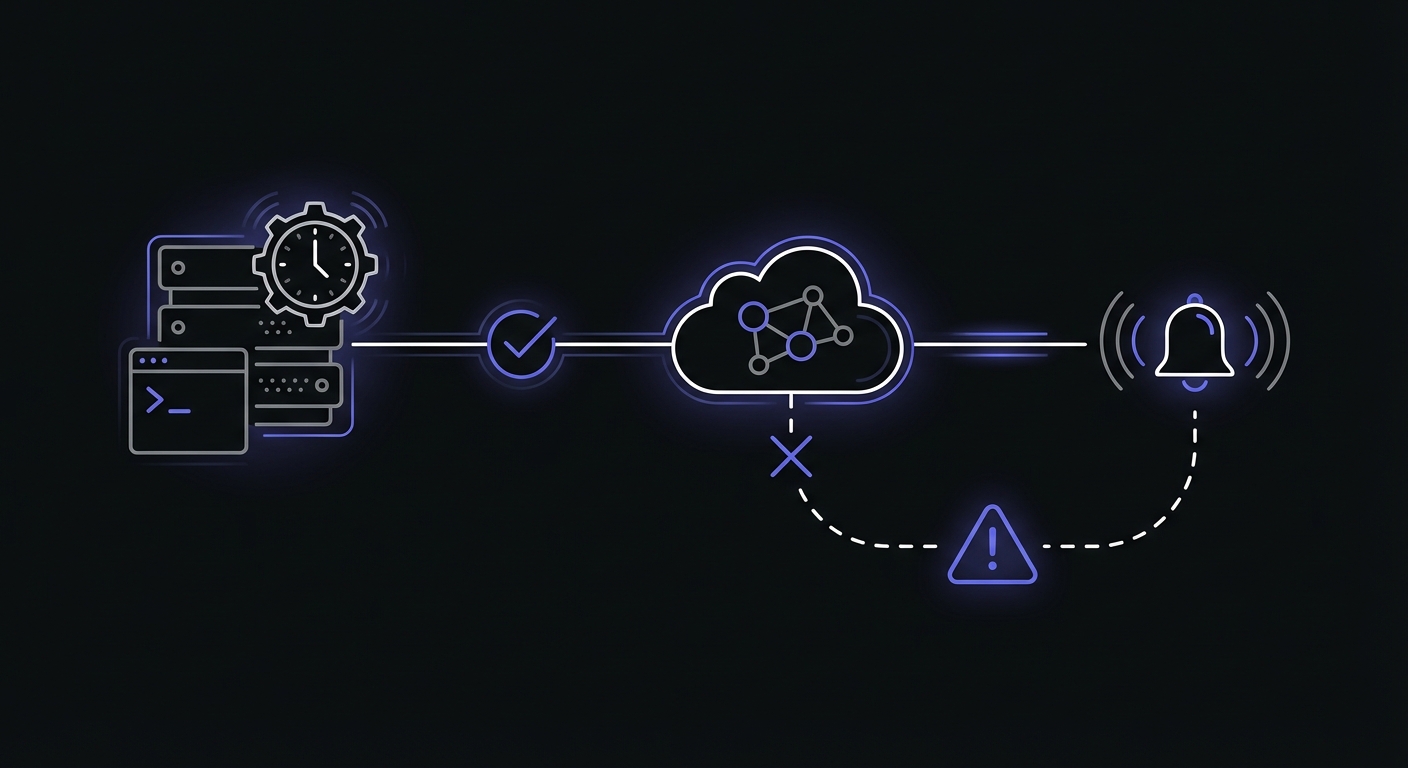
Three Types of Cron Monitoring
Not all monitoring approaches are equal. Choose the right type for your jobs:
Heartbeat monitoring: Your job pings a URL when it completes successfully. If the ping does not arrive within the expected window, you get an alert. This catches jobs that never run or fail to complete.
Exit code monitoring: The monitoring wrapper checks your script's exit code. Exit 0 means success; any other code triggers an alert. This catches jobs that run but encounter errors.
Output monitoring: The monitoring service analyzes your job's output for error patterns. This catches jobs that exit 0 but produce wrong results (like processing 0 records instead of 10,000).
For maximum protection, combine heartbeat monitoring with exit code validation:
0 2 * * * /scripts/backup.sh && curl -fsS --retry 3 https://ping.example.com/backupThe && ensures the curl only runs if the script exits 0. The -f flag makes curl fail on HTTP errors, and --retry 3 handles transient network issues.
Get Alerted When Jobs Miss Their Schedule
Monitoring services track when your jobs should run and alert you when they do not. If your midnight backup does not ping by 12:15 AM, you get a notification.
Know Immediately, Not Eventually
The value of monitoring is time. Instead of learning about a failure days later through a customer complaint, you learn about it minutes after it happens.
Stop the Manual Checking
Monitoring replaces manual log checking. Instead of spending 30 minutes every morning verifying jobs ran, you spend zero minutes, because the monitoring service does it for you.
Peace of Mind
With monitoring in place, you can trust your scheduled tasks. When your phone is quiet, you know things are working. When it buzzes, you know exactly what needs attention.
Configure Grace Periods
Jobs do not always run at exactly the scheduled time. Server load, network delays, and job queuing can cause variation. Configure your monitoring with appropriate grace periods to avoid false alarms.
A job scheduled for midnight might finish at 12:03 AM on a quiet night and 12:12 AM during high load. A 15-minute grace period prevents alerts for normal timing variation while still catching actual failures quickly.
Detection Strategies Checklist
Use this quick reference to evaluate your current monitoring coverage:
| Strategy | What It Detects | Implementation |
|---|---|---|
| Execution confirmation | Job never started | Heartbeat ping on completion |
| Completion confirmation | Job started but hung | Start ping + finish ping |
| Duration monitoring | Job running too long | Monitoring service tracks runtime |
| Exit code validation | Job failed with error | && curl pattern, wrapper scripts |
| Output validation | Job ran but produced wrong results | Check output before pinging |
| Schedule verification | Job removed or misconfigured | Expected schedule in monitoring service |
Multi-Language Wrapper Scripts
The heartbeat pattern works in any language. Here are production-ready examples.
Bash Wrapper
#!/bin/bash
set -e  # Exit on any error

# Your job logic here
/usr/bin/python3 /scripts/process_data.py

# Only ping on success
curl -fsS --retry 3 https://ping.example.com/abc123
PHP Wrapper
<?php
// process-orders.php

try {
    // Your job logic
    $orders = processAllPendingOrders();

    if ($orders === false) {
        throw new Exception('Order processing failed');
    }

    // Only ping on success
    file_get_contents('https://ping.example.com/orders123');

} catch (Exception $e) {
    error_log('Cron failed: ' . $e->getMessage());
    exit(1);  // Non-zero exit triggers no ping
}
Python Wrapper
#!/usr/bin/env python3
import requests
import sys

def main():
    try:
        # Your job logic
        result = sync_inventory_data()

        if not result.success:
            raise Exception(f"Sync failed: {result.error}")

        # Only ping on success
        requests.get('https://ping.example.com/inventory', timeout=10)

    except Exception as e:
        print(f"Cron failed: {e}", file=sys.stderr)
        sys.exit(1)

if __name__ == "__main__":
    main()
Getting Started
Ready to stop silent failures? Here is how to start.
Sign Up for Monitoring
Choose a monitoring service and create a free account. Most services offer free tiers that cover small setups:
- Cron Crew: 15 free monitors
- Healthchecks.io: 20 free monitors
- Cronitor: 5 free monitors
Add Monitoring to Your Most Suspicious Job
You probably already have a job in mind. The one you check on manually. The one that has caused problems before. The one that would be really bad if it failed. Start there.
# Before
0 2 * * * /scripts/backup.sh

# After
0 2 * * * /scripts/backup.sh && curl -s https://ping.example.com/abc123
Wait for the "Aha" Moment
Once monitoring is in place, two things happen. First, you gain confidence that your job is running because you can see it on the dashboard. Second, if it ever fails, you learn about it immediately.
That first alert, the one where monitoring catches a failure you would not have known about, is the moment when the value becomes undeniable.
Expand From There
After monitoring one job, you will want to monitor more. Add them incrementally based on criticality. Over time, you will build a safety net that catches failures across your entire scheduled task infrastructure.
Conclusion
Silent cron job failures are insidious. They do not announce themselves. They do not send alerts. They simply happen, and the consequences accumulate until someone notices.
The five signs we covered, discovery shock, stale data, manual recovery routines, customer complaints, and daily log checking, are all symptoms of the same underlying problem: cron jobs run without feedback.
Monitoring provides that feedback. It turns silent failures into immediate alerts. It replaces manual checking with automated verification. It gives you confidence that your scheduled tasks are actually running.
Ready to stop the silent failures? Sign up for Cron Crew's free tier and add monitoring to your most critical cron job today. Follow our 5-minute setup guide to get started, and review our cron job best practices to build reliability into your scheduled tasks from the ground up.